
79G5 DATA SHEET
Click here for the 79G5 Data Sheet
INTRODUCTION
NAI is a leading manufacturer of rugged embedded boards, including the PCIe Multifunction I/O Board. When combined with NAI’s smart function modules, these boards offer a variety of solutions for meeting complex and time-critical sense and response requirements for I/O-intensive, mission critical applications. The PCIe Multifunction I/O Board provides a wide range of input and output capabilities, including analog and digital I/O, signal generation and acquisition, and communication interfaces. The board’s single-slot, half-size design is engineered to excel in high channel density and multifunction I/O systems. Its modular I/O approach also makes it a highly flexible and integrable solution for demanding computing environments.
79G5 Overview
The 79G5 PCIe Multifunction I/O Board offers a variety of features designed to meet the needs of complex and time-critical sense and response requirements for I/O-intensive, mission-critical applications. Key features of the 79G5 include:
Rugged connectivity: Equipped with a front high-density rugged Micro-D I/O receptacle connector, the board ensures secure and durable connections, suitable for demanding industrial environments.
PCIe 2.0 compatibility: The 79G5 employs a PCIe 2.0 (x1) interface with speeds up to 5 GT/s, providing a robust and high-bandwidth connection to the host system.
Maintenance/Console interface: The board offers a comprehensive maintenance/console interface, which includes:
-
1x Gigbit Ethernet, 1x RS-232 serial port, and 1x USB (pending)
-
A dedicated mini-HDMI type-C receptacle for convenient connectivity
Support for three independent, smart function modules: The board can support up to three independent, smart function modules based on the COSA® architecture. With over one hundred modules to choose from, this allows for a wide range of input and output capabilities, including analog and digital I/O, signal generation and acquisition, and communication interfaces. Each function module slot also has an independent x1 SerDes interface.
Background Built-In-Test (BIT): The board’s BIT continually checks and reports on the health of each channel, allowing for preventative maintenance and reducing the likelihood of downtime.
Software Support Kits (SSKs) and drivers available: SSKs and drivers are available to make the board easier to integrate into a system and develop software.
Compact form factor: The 79G5 is designed to be space-efficient, fitting into a single slot and adopting a full-height, half-length form factor with dimensions of 4.2” (107 mm) in height and 6.6” (175 mm) in length.
Energy-efficient: The 79G5 boasts low power dissipation, typically consuming less than 3.5 watts, a crucial factor for applications where power efficiency is paramount.
Operating temperature: The board has a wide operating temperature range, operating from 0° C to 70° C. This makes it suitable for use in a diverse range of applications.
Overall, the 79G5 PCIe Multifunction I/O Board is a reliable and versatile solution for demanding computing environments that require high-performance and flexible I/O capabilities.
SOFTWARE SUPPORT
The ENAIBL Software Support Kit (SSK) is supplied with all system platform based board level products. This platform’s SSK contents include html format help documentation which defines board specific library functions and their respective parameter requirements. A board specific library and its source code is provided (module level ‘C’ and header files) to facilitate function implementation independent of user operating system (O/S). Portability files are provided to identify Board Support Package (BSP) dependent functions and help port code to other common system BSPs. With the use of the provided help documentation, these libraries are easily ported to any 32-bit O/S such as RTOS or Linux.
The latest version of a board specific SSK can be downloaded from our website www.naii.com in the software downloads section. Software setup is covered in Choosing the Right SSK and the SSK package guides (SSK 1.x, SSK 2.x); packages are on the Downloads page. For other operating system support, contact factory.
Link to original
SPECIFICATIONS
General for the Motherboard
| Signal Logic Level: | Supports LVDS PCIe bus (x1) |
|---|---|
| Power (Motherboard): | +12 VDC (PCIe) @ 120 mA (then add power for each individual module) Note: Function module(s) (+5 V) power is derived from the (PCIe) 12 VDC power rail - ensure proper power conversion when calculating power budget(s). External /- 12 VDC power source(s) must be supplied for modules that require an additional +/- 12 VDC for operation (see specific function module power requirements).+5 VDC @ 0.70 A (typical) |
| Temperature, Operating: | “C” =0° C to +70° C |
| Conformal Coating: | All card(s) are conformal coated (as applicable). |
| Storage Temperature: | -55° C to +105° C |
| General size | Single slot, full height, half-length, PCIe @ 4.2” (107 mm) height x 6.6” (175 mm) length (envelope) |
| Weight: | 12 oz. (340 g) unpopulated Add weight for each module (typically 2.5 oz. (71 g) each) |
Specifications are subject to change without notice.
Environmental
Unless otherwise specified, the following table outlines the general Environmental Specifications design guidelines for board level products of North Atlantic Industries. All our cPCI, VME and OpenVPX boards are designed for either air or conduction cooling. All boards also incorporate appropriate stiffening to ensure performance during shock and vibration but also to assure reliable operation (lower fatigue stresses) over the service life of the product.
| Parameters | Level | ||
| 1 / Commercial-AC (Air Cooled) | 2 / Rugged-AC (Air Cooled) | 3 / Rugged-CC (Conduction Cooled) | |
| Temperature - Operating | 0° C to 70° C, AmbientH | -40° C to 85° C, AmbientI | -40° C to 85° C, at wedge lock thermal interface |
| Temperature - Storage | -40° C to 85° C | -55° C to 105° C | -55° C to 105° C |
| Humidity - Operating | 0 to 95%, non-condensing | 0 to 95%, non-condensing | 0 to 95%, non-condensing |
| Humidity - Storage | 0 to 95%, non-condensing | 0 to 95%, non-condensing | 0 to 95%, non-condensing |
| Vibration - SineA | 2 g peak, 15 Hz - 2 kHzB | 6 g peak, 15 Hz - 2 kHzB | 10 g peak, 15 Hz - 2 kHzC |
| Vibration - RandomD | .002 g2 /Hz, 15 Hz - 2 kHz | 0.04 g2 /Hz, 15 Hz - 2 kHz | 0.1 g2 /Hz, 15 Hz - 2 kHzE |
| ShockF | 20 g peak, half-sine, 11 ms | 30 g peak, half-sine 11 ms | 40 g peak, half-sine, 11 ms |
| Low PressureG | Up to 15,000 ft. | Up to 50,000 ft. | Up to 50,000 ft. |
Notes:
A. Based on sweep duration of ten minutes per axis on each of the three mutually perpendicular axes. B. Displacement limited to 0.10 D.A. from 15 to 44 Hz. C. Displacement limited to 0.436 D.A. from 15 to 21 Hz. D. 60 minutes per axis on each of the three mutually perpendicular axes. E. Per MIL-STD-810G, Method 5.14.6 Procedure I, Fig.514.6C-6 Category 7 tailored (11.65 Grms): 15 Hz - 2 kHz; ASD (PSD) at 0.04 g2/Hz between 15 Hz - 150 Hz, increasing @ 4 dB/octave from 0.04 g2/Hz to 0.1 g /Hz between 150 Hz - 300 Hz, 0.1 g2/Hz between 300 Hz - 1000 Hz, decreasing @ 6 dB/octave from 0.1 g2/Hz to 0.025 g2/Hz between 1000 Hz - 2000 Hz. Three hits per direction per axis (total of 18 hits). F. Three hits per direction per axis (total of 18 hits). G. For altitudes higher than 50,000 ft., contact NAI. H. High temperature operation requires 350 lfm minimum air flow across cover/heatsink (module dependent). I. High temperature operation requires 600 lfm minimum air flow across cover/heatsink (module dependent).
Specifications subject to change without notice
REGISTER MEMORY MAP ADDRESSING
The register map address consists of the following:
• cPCI/PCIe BAR or Base Address for the Board • Module Slot Base Address • Function Offset Address
Board Base Address
The table below lists the BAR used for access to the motherboard and module registers. The second BAR is used internally for motherboard and module firmware updates. The other cPCI/PCIe BARs not listed are not used.
| NAI Boards | Device ID | Bus | Motherboard and Module Register Access | Motherboard and Module Firmware Updates |
| Slave Boards | ||||
| 79G5 | 0x7981 | PCIe | BAR 1 Size: Module Dependent (minimum 64K Bytes) | BAR 2 Size: 1M Bytes |
Module Slot and Function Addresses
The memory map for the modules are dependent on the types of modules on the board and the order in which the modules are installed on the board as well as the firmware installed on the motherboard. The function modules are enumerated allowing for dynamic memory space allocation and therefore the “start” address of the module function register area is factory pre-defined (and read from) the Module Address register. Refer to Figure 1 for an example.
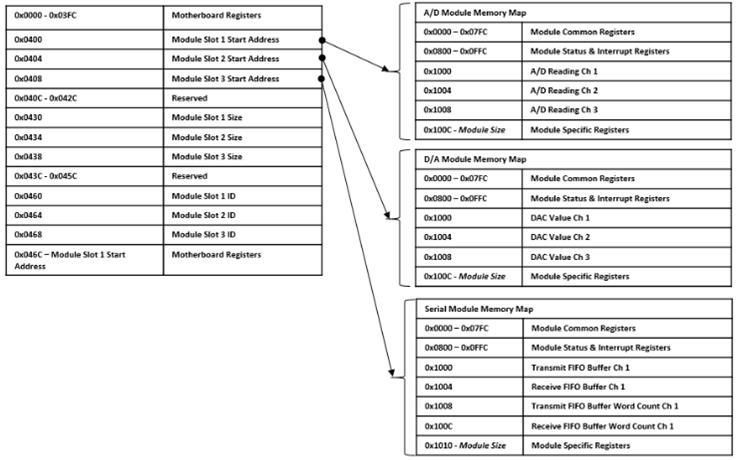
Figure 1. Register Memory Map Addressing for Motherboards with 3 Modules
Address Calculation
Motherboard Registers
Read/Write access to the motherboard registers starts with the base address for the board and then the motherboard base offset address.
For example, to address Module Slot 1 Start Address register (i.e. register address = 0x0400):
- Start with the base address for the board.
- Add the motherboard register address offset.
| Motherboard Address = | Base Address Motherboard Address Offset | = 0x0000 0400 |
| 0x0000 0000 + 0x0400 |
Module Registers:
Read/Write access to the Function module’s registers start with the base address of the board. Add the “content” for the Module Start Address and then, add the specific module function register offset.
For example, to address an appropriate/specific function module with a register offset:
- Start with the base address for the board.
- Add the value (contents) from the module base address offset register (contents/value of Motherboard Memory register for Module 1 (i.e., @ 0x0400) = 0x4000.
- Then add the specific module function Register Offset of interest (i.e., A/D Reading Ch 1 @ 0x1000)
| (Function Specific) Address = | Base Address + | Module Base Address Offset + | Function Register Offset | = 0x0000 5000 |
| 0x0000 0000 | 0x4000 | 0x1000 |
REGISTER DESCRIPTIONS
Module Information Registers
The Module Slot Address, Module Slot Size and Module Slot ID provide information about the modules detected on the board.
Link to original
Module Slot Addressing Ready Function: Indicates that the module slots are ready to be addressed. Type: unsigned binary word (32-bit) Data Range: 0x0000 0000 to 0xFFFF FFFF Read/Write: R Initialized Value: 0xA5A5A5A5 Operational Settings: This register will contain the value of 0xA5A5A5A5 when the module addresses have been determined.
Link to original
Module Slot Address Function: Specifies the Base Address for the module in the specific slot position. Type: unsigned binary word (32-bit) Data Range: 0x0000 0000 to 0xFFFF FFFF Read/Write: R Initialized Value: Based on board's module configuration. Operational Settings: 0x0000 0000 indicates no Module found.
Link to original
Module Slot Size Function: Specifies the Memory Size (in bytes) allocated for the module in the specific slot position. Type: unsigned binary word (32-bit) Range: 0x0000 0000 to 0xFFFF FFFF Read/Write: R Initialized Value: Assigned by factory for the module. Operational Settings: 0x0000 0000 indicates no Module found.
Module Slot ID Function: Specifies the Model ID for the module in the specified slot position. Type: 4-character ASCII string Data Range: 0x0000 0000 to 0xFFFF FFFF Read/Write: R Initialized Value: Assigned by factory for the module. Operational Settings: The Module ID is formatted as four ASCII bytes: three characters followed by a space. Module IDs are in little-endian order with a single space following the first three characters. For example, 'TL1' is '1LT', 'SC1' is '1CS' and so forth. Example below is for “TL1” (MSB justified). All value of 0000 0000 indicates no Module found. Link to original
D31 D30 D29 D28 D27 D26 D25 D24 D23 D22 D21 D20 D19 D18 D17 D16 ASCII Character (ex: 'T' - 0x54) ASCII Character (ex: 'L' - 0x4C) D15 D14 D13 D12 D11 D10 D9 D8 D7 D6 D5 D4 D3 D2 D1 D0 ASCII Character (ex: '1' - 0x31) ASCII Space (' ' - 0x20)
Hardware Information Registers
The registers identified in this section provide information about the board’s hardware.
Link to original
Product Serial Number Function: Specifies the Board Serial Number. Type: unsigned binary word (32-bit) Data Range: 0x0000 0000 to 0xFFFF FFFF Read/Write: R Initialized Value: Serial number assigned by factory for the board. Operational Settings: N/A
Platform
Function: Specifies the Board Platform Identifier. Values are for the ASCII characters for the NAI valid platforms (Identifiers).
Type: unsigned binary word (32-bit)
Data Range: See table below.
Read/Write: R
Initialized Value: ASCII code is for the Platform Identifier of the board
Operational Settings: Valid NAI platform and the associated value for the platform is shown below:
| NAI Platform | Platform Identifier | ASCII Binary Values (Note: little-endian order of ascii values) |
|---|---|---|
| PCIe | 79 | 0x0000 3937 |
Model
Function: Specifies the Board Model Identifier. Value is for the ASCII characters for the NAI valid model.
Type: unsigned binary word (32-bit)
Data Range: See table below.
Read/Write: R
Initialized Value: ASCII code is for the Model Identifier of the board
Operational Settings: Example of NAI model and the associated value for the model is shown below:
| NAI Model | ASCII Binary Values (Note: little-endian order of ascii values) |
|---|---|
| G | 0x0000 0047 |
Generation
Function: Specifies the Board Generation. Identifier values are for the ASCII characters for the NAI valid generation identifiers.
Type: unsigned binary word (32-bit)
Data Range: See table below.
Read/Write: R
Initialized Value: ASCII code is for the Generation Identifier of the board
Operational Settings: Example of NAI generation and the associated value for the generation is shown below:
| NAI Generation | ASCII Binary Values (Note: little-endian order of ascii values) |
|---|---|
| 5 | 0x0000 0035 |
Processor Count/Ethernet Count
Function: Specifies the Processor Count and Ethernet Count
Type: unsigned binary word (32-bit)
Data Range: See table below.
Read/Write: R
Operational Settings:
Processor Count - Integer: indicates the number of unique processor types on the motherboard.
| NAI Board | Processor Count | Description | |
| PCIe | 79G5 | 1 | Xilinx Zynq 7015 with Dual Core Cortex A9 |
Ethernet Interface Count - Indicates the number of Ethernet interfaces on the product motherboard. For example, Single Ethernet = 1; Dual
Ethernet = 2.
Processor/Ethernet Interface Count
| D31 | D30 | D29 | D28 | D27 | D26 | D25 | D24 | D23 | D22 | D21 | D20 | D19 | D18 | D17 | D16 |
| Processor Count (See Table) | |||||||||||||||
| D15 | D14 | D13 | D12 | D11 | D10 | D9 | D8 | D7 | D6 | D5 | D4 | D3 | D2 | D1 | D0 |
| Ethernet Count (Based on Part Number Ethernet Options) | |||||||||||||||
Maximum Module Slot Count/ARM Platform Type
Function: Specifies the Maximum Module Slot Count and ARM Platform Type.
Type: unsigned binary word (32-bit)
Data Range: See table below.
Read/Write: R
Operational Settings:
Maximum Module Slot Count - Indicates the number of modules that can be installed on the product.
ARM Platform - Altera = 1; Xilinx X1 = 2; Xilinx X2 = 3; UltraScale = 4
| NAI Board | Maximum Module Slot Count | ARM Platform Type | |
| PCIe | 79G5 | 3 | Xilinx X2 = 3 |
Maximum Module Slot Count / ARM Platform Type
| D31 | D30 | D29 | D28 | D27 | D26 | D25 | D24 | D23 | D22 | D21 | D20 | D19 | D18 | D17 | D16 |
| Maximum Module Slot Count (See Table) | |||||||||||||||
| D15 | D14 | D13 | D12 | D11 | D10 | D9 | D8 | D7 | D6 | D5 | D4 | D3 | D2 | D1 | D0 |
| ARM Platform Type (See Table) | |||||||||||||||
Motherboard Firmware Information Registers
The registers in this section provide information on the revision of the firmware installed on the motherboard.
Motherboard Core (MBCore) Firmware Version Function: Specifies the Version of the NAI factory provided Motherboard Core Application installed on the board. Type: Two (2) unsigned binary word (32-bit) Data Range: 0x0000 0000 to 0xFFFF FFFF Read/Write: R Operational Settings: The motherboard firmware version consists of four components: Major, Minor, Minor 2 and Minor 3. Link to original
Motherboard Core Firmware Version (Note: little-endian order in register) (ex. 4.7.0.0) Word 1 (Ex. 0007 0004 = 4.7 (Major.Minor) D31 D30 D29 D28 D27 D26 D25 D24 D23 D22 D21 D20 D19 D18 D17 D16 Minor (ex: 0x0007 = 7) D15 D14 D13 D12 D11 D10 D9 D8 D7 D6 D5 D4 D3 D2 D1 D0 Major (ex: 0x0004 = 4) Word 2 (Ex. 0x0000 0000 = 0000 = 0.0 (Minor2.Minor3)) D31 D30 D29 D28 D27 D26 D25 D24 D23 D22 D21 D20 D19 D18 D17 D16 Minor 3 (ex: 0x000 = 0) D15 D14 D13 D12 D11 D10 D9 D8 D7 D6 D5 D4 D3 D2 D1 D0 Minor 2 (ex: 0x000 = 0)
Motherboard Firmware Build Time/Date Function: Specifies the Build Date/Time of the NAI factory provided Motherboard Core Application installed on the board. Type: Two (2) unsigned binary word (32-bit) Data Range: N/A Read/Write: R Operational Settings: The motherboard firmware time consists of the Build Date and Build Time. NOTE: On some builds the the Date/Time fields are fixed to 0000 0000 to maintain binary consistency across builds. Link to original
Motherboard Firmware Build Time (Note: little-endian order in register) Word 1 - Build Date (ex. 0x030C 07E2 = 2018-12-03) D31 D30 D29 D28 D27 D26 D25 D24 D23 D22 D21 D20 D19 D18 D17 D16 Day (ex: 0x03 = 3) Month (ex: 0x0C = 12) D15 D14 D13 D12 D11 D10 D9 D8 D7 D6 D5 D4 D3 D2 D1 D0 Year (ex: 0x07E2 = 2018) Word 2 - Build Time (ex. 0x001B 3B0A = 10:59:27) D31 D30 D29 D28 D27 D26 D25 D24 D23 D22 D21 D20 D19 D18 D17 D16 null (0x00) Seconds (ex: 0x1B = 27) D15 D14 D13 D12 D11 D10 D9 D8 D7 D6 D5 D4 D3 D2 D1 D0 Minutes (ex: 0x3B = 59) Hours (ex: 0x0A = 10)
Motherboard FPGA Revision Function: Specifies the Version of the NAI factory provided Motherboard FPGA installed on the board. Type: unsigned binary word (32-bit) Data Range: 0x0000 0000 to 0xFFFF FFFF Read/Write: R Operational Settings: The motherboard FPGA firmware version consists of two components: Major, Minor. Link to original
Motherboard FPGA Firmware Version (ex. 0x0005 0008 = 5.8) D31 D30 D29 D28 D27 D26 D25 D24 D23 D22 D21 D20 D19 D18 D17 D16 Major (ex: 0x0005 = 5) D15 D14 D13 D12 D11 D10 D9 D8 D7 D6 D5 D4 D3 D2 D1 D0 Minor (ex: 0x0008 = 8)
Motherboard FPGA Compile Date/Time Function: Specifies the Compile Date/Time of the NAI factory provided Motherboard FPGA installed on the board. Type: unsigned binary word (32-bit) Data Range: N/A Read/Write: R Operational Settings: The motherboard firmware time consists of the Build Date and Time in the following format: Link to original
Motherboard FPGA Compile Time (ex. 0xD12A 01B8 = 02/26/21 00:06:56) D31 D30 D29 D28 D27 D26 D25 D24 D23 D22 D21 D20 D19 D18 D17 D16 Day (D31:D27) Month (D26:D23) Year (D22:D17) ex. 0xD ex. 0x1 0x2 0xA 1 1 0 1 0 0 1 0 0 0 1 0 1 0 1 1 Day = 0x1A = 26 Month = 0x2 = 2 Year = 0x15 = 21 D15 D14 D13 D12 D11 D10 D9 D8 D7 D6 D5 D4 D3 D2 D1 D0 Hour (D16:D12) Minutes (D11:D6) Seconds (D5:D0) ex. 0x0 ex. 0x1 ex. 0xB ex. 0x8 Hour = 0x00 = 0 Minutes = 0x06 = 06 Seconds = 0x38 = 56
Motherboard Monitoring Registers
The registers in this provide motherboard temperature measurement information.
Temperature Readings Register
The temperature registers provide the current, maximum (from power-up) and minimum (from power-up) for the processor and PCB for Zynq processor.
These registers are only available on Xilinx Generation 5 platforms, and are periodically populated by the motherboard core application, which only runs in Petalinux and BareMetal. For other operating systems, refer to the naibrd Software Support Kit (SSK) naibsp_system_Monitor_Temperature_Get() routine to manually retrieve the temperature (NOTE: this feature is typically utilized for development/factory use only; contact the factory for additional details on potential use, if required).
Temperature Readings Register Function: Specifies the Measured Temperatures on Motherboard. Type: signed byte (8-bits) for each temperature reading - Six (6) 32-bit words Data Range: 0x0000 0000 to 0xFFFF 0000 Read/Write: R Initialized Value: Value corresponding to the measured temperatures based on the table below. Operational Settings: The 8-bit temperature readings are signed bytes. For example, if the following register contains the value 0x6955 0000:
Word 3 (Max Zynq Temperatures) D31 D30 D29 D28 D27 D26 D25 D24 D23 D22 D21 D20 D19 D18 D17 D16 Max Zynq Core Temperature Max Zynq PCB Temperature D15 D14 D13 D12 D11 D10 D9 D8 D7 D6 D5 D4 D3 D2 D1 D0 0x00 0x00 The values would represent the following temperatures:
Temperature Measurements Data Bits Value Temperature (Celsius) Max Zynq Core Temperature D31:D24 0x69 +105° Max Zynq PCB Temperature D23:D16 0x55 +85° Link to original
Temperature Readings Word 1 (Current Zynq Temperatures) D31 D30 D29 D28 D27 D26 D25 D24 D23 D22 D21 D20 D19 D18 D17 D16 Zynq Core Temperature Zynq PCB Temperature D15 D14 D13 D12 D11 D10 D9 D8 D7 D6 D5 D4 D3 D2 D1 D0 0x00 0x00 Word 2 (Reserved) D31 D30 D29 D28 D27 D26 D25 D24 D23 D22 D21 D20 D19 D18 D17 D16 0x00 0x00 D15 D14 D13 D12 D11 D10 D9 D8 D7 D6 D5 D4 D3 D2 D1 D0 0x00 0x00 Word 3 (Max Zynq Temperatures) D31 D30 D29 D28 D27 D26 D25 D24 D23 D22 D21 D20 D19 D18 D17 D16 Max Zynq Core Temp Max Zynq PCB Temp D15 D14 D13 D12 D11 D10 D9 D8 D7 D6 D5 D4 D3 D2 D1 D0 0x00 0x00 Word 4 (Reserved) D31 D30 D29 D28 D27 D26 D25 D24 D23 D22 D21 D20 D19 D18 D17 D16 0x00 0x00 D15 D14 D13 D12 D11 D10 D9 D8 D7 D6 D5 D4 D3 D2 D1 D0 0 0 0 0 0 0 0 0 0 0 0 0 0 0 0 0 Word 5 (Min Zynq Temperatures) D31 D30 D29 D28 D27 D26 D25 D24 D23 D22 D21 D20 D19 D18 D17 D16 Min Zynq Core Temperature Min Zynq PCB Temperature D15 D14 D13 D12 D11 D10 D9 D8 D7 D6 D5 D4 D3 D2 D1 D0 0 0 0 0 0 0 0 0 0 0 0 0 0 0 0 0 Word 6 (Reserved) D31 D30 D29 D28 D27 D26 D25 D24 D23 D22 D21 D20 D19 D18 D17 D16 0x00 0x00 D15 D14 D13 D12 D11 D10 D9 D8 D7 D6 D5 D4 D3 D2 D1 D0 0 0 0 0 0 0 0 0 0 0 0 0 0 0 0 0
Higher Precision Temperature Readings Register
These registers provide higher precision readings of the current Zynq and PCB temperatures.
Higher Precision Zynq Core Temperature Function: Specifies the Higher Precision Measured Zynq Core temperature on Interface Board. Type: signed word (16-bits) for integer part and unsigned word (16-bits) for fractional part Data Range: 0x0000 0000 to 0xFFFF FFFF Read/Write: R Initialized Value: Measured Zynq Core temperature on Interface Board Operational Settings: The upper 16-bits represent the signed integer part of the temperature and the lower 16-bits represent the fractional part of the temperature with the resolution of 1/1000 of degree Celsius. For example, if the register contains the value 0x002B 0271, this represents Zynq Core Temperature = 43.625° Celsius, and value 0xFFF6 0177 represents -10.375° Celsius. Link to original
D31 D30 D29 D28 D27 D26 D25 D24 D23 D22 D21 D20 D19 D18 D17 D16 Signed Integer Part of Temperature D15 D14 D13 D12 D11 D10 D9 D8 D7 D6 D5 D4 D3 D2 D1 D0 Fractional Part of Temperature
Higher Precision Motherboard PCB Temperature Function: Specifies the Higher Precision Measured Motherboard PCB temperature. Type: signed word (16-bits) for integer part and unsigned word (16-bits) for fractional part Data Range: 0x0000 0000 to 0xFFFF FFFF Read/Write: R Initialized Value: Measured Motherboard PCB temperature Operational Settings: The upper 16-bits represent the signed integer part of the temperature and the lower 16-bits represent the fractional part of the temperature with the resolution of 1/1000 of degree Celsius. For example, if the register contains the value 0x0020 007D, this represents Interface PCB Temperature = 32.125° Celsius, and value 0xFFE8 036B represents -24.875° Celsius. Link to original
D31 D30 D29 D28 D27 D26 D25 D24 D23 D22 D21 D20 D19 D18 D17 D16 Signed Integer Part of Temperature D15 D14 D13 D12 D11 D10 D9 D8 D7 D6 D5 D4 D3 D2 D1 D0 Fractional Part of Temperature
Motherboard Health Monitoring Registers
The registers in this section provide a summary of motherboard temperature sensors and their corresponding bits. Additionally, this section provides an overview of the registers allocated to those sensors, which are used to monitor current/minimum/maximum temperature readings, upper & lower critical/warning temperature thresholds, and whether or not a programmed temperature threshold has been exceeded.
These registers are only available on Xilinx Generation 5 platforms, and are periodically populated by the motherboard core application, which only runs in Petalinux and BareMetal. For other operating systems, refer to the naibrd Software Support Kit (SSK) naibsp_system_Monitor_Temperature_Get() routine to manually retrieve the temperature (NOTE: this feature is typically utilized for development/factory use only; contact the factory for additional details on potential use, if required).
Motherboard Sensor Summary Alarm Function: The corresponding sensor bit is set if the sensor has crossed any of its thresholds. Type: unsigned binary word (32-bits) Data Range: See table below Read/Write: R Initialized Value: 0 Operational Settings: This register provides a summary for motherboard sensors. When the corresponding sensor bit is set, the Sensor Threshold Status register for that sensor will indicate the threshold condition that triggered the event. Link to original
Bit(s) Sensor D31:D5 Reserved D4 Motherboard PCB Temperature D3 Zynq Core Temperature D2:D0 Reserved
Motherboard Sensor Registers
The registers listed in this section apply to each module sensor listed for the Motherboard Sensor Summary Status register. Each individual sensor register provides a group of registers for monitoring motherboard temperatures readings. From these registers, a user can read the current temperature of the sensor in addition to the minimum and maximum temperature readings since power-up. Upper and lower critical/warning temperature thresholds can be set and monitored from these registers. When a programmed temperature threshold is crossed, the Sensor Threshold Status register will set the corresponding bit for that threshold. The figure below shows the functionality of this group of registers when accessing the Zynq Core Temperature sensor as an example.
Link to original

Sensor Threshold Status Function: Reflects which threshold has been crossed Type: unsigned binary word (32-bits) Data Range: See table below Read/Write: R Initialized Value: 0 Operational Settings: The associated bit is set when the sensor reading exceed the corresponding threshold settings. Link to original
Bit(s) Description D31:D4 Reserved D3 Exceeded Upper Critical Threshold D2 Exceeded Upper Warning Threshold D1 Exceeded Lower Critical Threshold D0 Exceeded Lower Warning Threshold
Link to original
Sensor Current Reading Function: Reflects current reading of temperature sensor Type: Single Precision Floating Point Value (IEEE-754) Data Range: Single Precision Floating Point Value (IEEE-754) Read/Write: R Initialized Value: N/A Operational Settings: The register represents current sensor reading as a single precision floating point value. For example, for a temperature sensor, register value 0x41C6 0000 represents temperature = 24.75° Celsius.
Link to original
Sensor Minimum Reading Function: Reflects minimum value of temperature sensor since power up Type: Single Precision Floating Point Value (IEEE-754) Data Range: Single Precision Floating Point Value (IEEE-754) Read/Write: R Initialized Value: N/A Operational Settings: The register represents minimum sensor value as a single precision floating point value. For example, for a temperature sensor, register value 0x41C6 0000 represents temperature = 24.75° Celsius.
Link to original
Sensor Maximum Reading Function: Reflects maximum value of temperature sensor since power up Type: Single Precision Floating Point Value (IEEE-754) Data Range: Single Precision Floating Point Value (IEEE-754) Read/Write: R Initialized Value: N/A Operational Settings: The register represents maximum sensor value as a single precision floating point value. For example, for a temperature sensor, register value 0x41C6 0000 represents temperature = 24.75° Celsius.
Link to original
Sensor Lower Warning Threshold Function: Reflects lower warning threshold of temperature sensor Type: Single Precision Floating Point Value (IEEE-754) Data Range: Single Precision Floating Point Value (IEEE-754) Read/Write: R/W Initialized Value: Default lower warning threshold (value dependent on specific sensor) Operational Settings: The register represents sensor lower warning threshold as a single precision floating point value. For example, for a temperature sensor, register value 0xC220 0000 represents temperature = -40.0° Celsius.
Link to original
Sensor Lower Critical Threshold Function: Reflects lower critical threshold of temperature sensor Type: Single Precision Floating Point Value (IEEE-754) Data Range: Single Precision Floating Point Value (IEEE-754) Read/Write: R/W Initialized Value: Default lower critical threshold (value dependent on specific sensor) Operational Settings: The register represents sensor lower critical threshold as a single precision floating point value. For example, for a temperature sensor, register value 0xC25C 0000 represents temperature = -55.0° Celsius.
Link to original
Sensor Upper Warning Threshold Function: Reflects upper warning threshold of temperature sensor Type: Single Precision Floating Point Value (IEEE-754) Data Range: Single Precision Floating Point Value (IEEE-754) Read/Write: R/W Initialized Value: Default upper warning threshold (value dependent on specific sensor) Operational Settings: The register represents sensor upper warning threshold as a single precision floating point value. For example, for a temperature sensor, register value 0x42AA 0000 represents temperature = 85.0° Celsius.
Link to original
Sensor Upper Critical Threshold Function: Reflects upper critical threshold of temperature sensor Type: Single Precision Floating Point Value (IEEE-754) Data Range: Single Precision Floating Point Value (IEEE-754) Read/Write: R/W Initialized Value: Default upper critical threshold (value dependent on specific sensor) Operational Settings: The register represents sensor upper critical threshold as a single precision floating point value. For example, for a temperature sensor, register value 0x42FA 0000 represents temperature = 125.0° Celsius.
Ethernet Configuration Registers
The registers in this section provide information about the Ethernet Configuration for the two ports on the board.
Important: Regardless if the board is configured for one or two Ethernet ports, the second IP address cannot be on the same Subnet as the First IP Address. The table below provides examples of valid and invalid IP Addresses and Subnet Mask Addresses.
Link to original
First Port (A) IP Address First Port (A) Subnet Mask Second Port (B) IP Address Second Port (B) Subnet Mask Result 192.168.1.5 255.255.255.0 192.168.2.5 255.255.255.0 Good 192.168.1.5 255.255.0.0 192.168.2.5 255.255.0.0 Conflict 192.168.1.5 255.255.0.0 192.168.2.5 255.255.255.0 Conflict 10.0.0.15 255.0.0.0 192.168.1.5 255.255.255.0 Good
Ethernet MAC Address and Ethernet Settings Function: Specifies the Ethernet MAC Address and Ethernet Settings for the Ethernet port. Type: Two (2) unsigned binary word (32-bit) Data Range: See table. Read/Write: R Operational Settings: The Ethernet MAC Address consists of six octets. The Ethernet Settings are defined in table.
Bits Description Values D31:D23 Reserved 0 D22:D21 Duplex 00 = Not Specified
01 = Half Duplex
10 = Full Duplex
11 = ReservedD20:D18 Speed 000 = Not Specified
001 = 10 Mbps
010 = 100 Mbps
011 = 1000 Mbps
100 = 2500 Mbps
101 = 10000 Mbps
110 = Reserved
111 = ReservedD17 Auto Negotiate 0 = Enabled
1 = DisabledD16 Static IP Address 0 = Enabled
1 = DisabledLink to original
Ethernet MAC Address and Ethernet Settings (Note: little-endian order in register) Word 1 (Ethernet MAC Address (Octets 1-4)) (ex: aa:bb:cc:dd:ee:ff) D31 D30 D29 D28 D27 D26 D25 D24 D23 D22 D21 D20 D19 D18 D17 D16 MAC Address Octet 4 (ex: 0xDD) MAC Address Octet 3 (ex: 0xCC) D15 D14 D13 D12 D11 D10 D9 D8 D7 D6 D5 D4 D3 D2 D1 D0 MAC Address Octet 2 (ex: 0xBB) MAC Address Octet 1 (ex: 0xAA) Word 2 (Ethernet MAC Address (Octets 5-6) and Ethernet Settings) D31 D30 D29 D28 D27 D26 D25 D24 D23 D22 D21 D20 D19 D18 D17 D16 Ethernet Settings (See table) D15 D14 D13 D12 D11 D10 D9 D8 D7 D6 D5 D4 D3 D2 D1 D0 MAC Address Octet 6 (ex: 0xFF) MAC Address Octet 5 (ex: 0xEE)
Ethernet Interface Name Function: Specifies the Ethernet Interface Name for the Ethernet port. Type: 8-character ASCII string Data Range: See table. Read/Write: R Operational Settings: The Ethernet Interface Name (eth0, eth1, etc) for the Ethernet port. Link to original
Ethernet Interface Name (Note: ascii string in register) (ex. “eth0”) Word 1 (Bit 0-31) (ex: 0x3068 7465 = “0hte”) D31 D30 D29 D28 D27 D26 D25 D24 D23 D22 D21 D20 D19 D18 D17 D16 ASCII Character (ex: '0' - 0x30) ASCII Character (ex: 'h' - 0x68) D15 D14 D13 D12 D11 D10 D9 D8 D7 D6 D5 D4 D3 D2 D1 D0 ASCII Character (ex: 't' - 0x74) ASCII Character (ex: 'e' - 0x65) Word 2 (Bit 32-63) (ex: 0x0000 0000) D31 D30 D29 D28 D27 D26 D25 D24 D23 D22 D21 D20 D19 D18 D17 D16 ASCII Character (ex: null - 0x00) ASCII Character (ex: null - 0x00) D15 D14 D13 D12 D11 D10 D9 D8 D7 D6 D5 D4 D3 D2 D1 D0 ASCII Character (ex: null - 0x00) ASCII Character (ex: null - 0x00)
Ethernet IPv4 Address Function: Specifies the Ethernet IPv4 Address for the Ethernet port. Type: Three (3) unsigned binary word (32-bit) Data Range: See table. Read/Write: R Operational Settings: The Ethernet IPv4 Address consists of three parts: IPv4 Address, IPv4 Subnet Mask and IPv4 Gateway. Link to original
Ethernet IPv4 Address (Note: little-endian order in register) Word 1 (Ethernet IPv4 Address) (ex: 0x1001 A8C0 = 192.168.1.16) D31 D30 D29 D28 D27 D26 D25 D24 D23 D22 D21 D20 D19 D18 D17 D16 IPv4 Address Octet 4 (ex: 0x10 = 16) IPv4 Address Octet 3 (ex: 0x01 = 1) D15 D14 D13 D12 D11 D10 D9 D8 D7 D6 D5 D4 D3 D2 D1 D0 IPv4 Address Octet 2 (ex: 0xA8 = 168) IPv4 Address Octet 1 (ex: 0xC0 = 192) Word 2 (Ethernet IPv4 Subnet) (ex: 0x00FF FFFF = 255.255.255.0) D31 D30 D29 D28 D27 D26 D25 D24 D23 D22 D21 D20 D19 D18 D17 D16 IPv4 Subnet Octet 4 (ex: 0x00 = 0) IPv4 Subnet Octet 3 (ex: 0xFF = 255) D15 D14 D13 D12 D11 D10 D9 D8 D7 D6 D5 D4 D3 D2 D1 D0 IPv4 Subnet Octet 2 (ex: 0xFF = 255) IPv4 Subnet Octet 1 (ex: 0xFF = 255) Word 3 (Ethernet IPv4 Gateway) (ex: 0x0101 A8C0 = 192.168.1.1) D31 D30 D29 D28 D27 D26 D25 D24 D23 D22 D21 D20 D19 D18 D17 D16 IPv4 Gateway Octet 4 (ex: 0x01 = 1) IPv4 Gateway Octet 3 (ex: 0x01 = 1) D15 D14 D13 D12 D11 D10 D9 D8 D7 D6 D5 D4 D3 D2 D1 D0 IPv4 Gateway Octet 2 (ex: 0xA8 = 168) IPv4 Gateway Octet 1 (ex: 0xC0 = 192)
Ethernet IPv6 Address Function: Specifies the Ethernet IPv6 Address for the Ethernet port. Type: Five (5) unsigned binary word (32-bit) Data Range: See table. Read/Write: R Operational Settings: The IPv6 Prefix length indicates the network portion of an IPv6 address using the following format: IPv6 address/prefix length ` Prefix length can range from 0 to 128 ` * Typical prefix length is 64 The following is an illustration of IPv6 addressing with IPv6 Prefix length of 64.
64 bits 64 bits Prefix Interface ID Prefix 1 Prefix 2 Prefix 3 Subnet ID Interface ID 1 Interface ID 2 Interface ID 3 Interface ID 4 Example: 2002:c0a8:101:0:7c99:d118:9058:1235/64 2002 C0A8 0101 0000 7C99 D118 9058 1235 Link to original
Ethernet IPv6 Address (Note: little-endian order within 32-bit and 16-bit words in register) (ex. IPv6 Address: 2002:c0a8:201:0:7c99:d118:9058:1235 IPv6 Prefix: 64) Word 1 (Ethernet IPv6 Address (Prefix 1-2)) (ex:0xA8C0 0220 = 2002 C0A8) D31 D30 D29 D28 D27 D26 D25 D24 D23 D22 D21 D20 D19 D18 D17 D16 Prefix 2 (ex: 0xA8C0 = C0A8) D15 D14 D13 D12 D11 D10 D9 D8 D7 D6 D5 D4 D3 D2 D1 D0 Prefix 1 (ex: 0x0220 = 2002) Word 2 (Ethernet IPv6 Address (Prefix 3/Subnet ID)) + (ex:0x000 0101 = 0101 0000) D31 D30 D29 D28 D27 D26 D25 D24 D23 D22 D21 D20 D19 D18 D17 D16 Subnet ID (ex: 0x0000 = 0000) D15 D14 D13 D12 D11 D10 D9 D8 D7 D6 D5 D4 D3 D2 D1 D0 Prefix 3 (ex: 0x0101 = 0101) Word 3 (Ethernet IPv6 Address (Interface ID 1-2)) + (ex: 0x18D1 997C = 7C99 D118) D31 D30 D29 D28 D27 D26 D25 D24 D23 D22 D21 D20 D19 D18 D17 D16 Interface ID 2 (ex: 0x18D1 = D118) D15 D14 D13 D12 D11 D10 D9 D8 D7 D6 D5 D4 D3 D2 D1 D0 Interface ID 1 (ex: 0x997C = 7C99) Word 4 (Ethernet IPv6 Address (Interface ID 3-4)) + (ex: 0x3512 5890 = 9058 1235) D31 D30 D29 D28 D27 D26 D25 D24 D23 D22 D21 D20 D19 D18 D17 D16 Interface ID 4 (ex: 0x3512 = 1235) D15 D14 D13 D12 D11 D10 D9 D8 D7 D6 D5 D4 D3 D2 D1 D0 Interface ID 3 (ex: 0x5890 = 9058) Word 5 (Ethernet IPv6 Prefix Length) + (ex:0x0000 0040) D31 D30 D29 D28 D27 D26 D25 D24 D23 D22 D21 D20 D19 D18 D17 D16 0 0 0 0 0 0 0 0 0 0 0 0 0 0 0 0 D15 D14 D13 D12 D11 D10 D9 D8 D7 D6 D5 D4 D3 D2 D1 D0 Prefix Length (ex: 0x0040 = 64)
Interrupt Vector and Steering
When interrupts are enabled, the interrupt vector associated with the specific interrupt can be programmed (typically with a unique number/identifier) such that it can be utilized in the Interrupt Service Routine (ISR) to identify the type of interrupt. When an interrupt occurs, the contents of the Interrupt Vector registers is reported as part of the interrupt mechanism. In addition to specifying the interrupt vector, the interrupt can be directed (“steered”) to the native bus or to the application running on the onboard ARM processor.
Note
The Interrupt Vector and Interrupt Steering registers are mapped to the Motherboard Common Memory and these registers are associated with the Module Slot position (refer to Function Register Map).
Interrupt Vector Function: Set an identifier for the interrupt. Type: unsigned binary word (32-bit) Data Range: 0x0000 0000 to 0xFFFF FFFF Read/Write: R/W Initialized Value: 0 Operational Settings: When an interrupt occurs, this value is reported as part of the interrupt mechanism.
Interrupt Steering Function: Sets where to direct the interrupt. Type: unsigned binary word (32-bit) Data Range: See table Read/Write: R/W Initialized Value: 0 Operational Settings: When an interrupt occurs, the interrupt is sent as specified: Link to original
Direct Interrupt to VME 1 Direct Interrupt to ARM Processor (via SerDes)
(Custom App on ARM or NAI Ethernet Listener App)2 Direct Interrupt to PCIe Bus 5 Direct Interrupt to cPCI Bus 6
Module Control Command Registers
Modules Control Command Requests Function: Provides the ability to command individual Modules to Reset, Power-down, or Power-up. Type: unsigned binary word (32-bit) Data Range: 0x0000 0000 to 0xFFFF FFFF Read/Write: R/W Operational Settings: The Module Control Commands registers provide the ability to request individual Modules to perform one of the following functions - Reset, Power-down, Power-up. Only one command can be requested at a time per Module. For example, one can't request a Reset and a Power-down at the same time for the same Module. Once the command is recognized and handled, the bit will be cleared. Note
Clearing of the command request bit only indicates the command has been recognized and initiated, it does not indicate that the command action has been completed.
There is one Control Command Request register per Module. Each register is Bit-mapped as shown in the table below:
Link to original
Bit(s) Description D31:D3 Reserved D2 Module Power-up D1 Module Power-down D0 Module Reset
Modules Health Monitoring Registers
Module Communications Status Function: Provides the ability to monitor factors may effect communication status of a Module. Type: unsigned binary word (32-bit) Data Range: 0x0000 0000 to 0xFFFF FFFF Read/Write: R Operational Settings: The Module Communications registers provide the ability to monitor factors that may effect the Communications Status of individual Modules. There is one register per Module. Each communication factor is bit mapped to the register as shown in the table below:
Bit(s) Description D31:D5 Reserved D4 Module Communications Error Detected D3 Module Firmware Not Ready D2 Module LinkInit Not Done D1 Module Not Detected D0 Module Powered-down Module Powered-down: The user can request an individual Module be powered-down (see Module Control Command Requests). Once the request is detected and acted upon, this bit will be set. Once powered-down, you will not be able to communicate with the Module.
Module Not Detected: If a Module in this slot has not been detected, you will not be able to communicate with the Module.
Module LinkInit Not Done: Module communications is accomplished via SERDES. LinkInit is required to establish a connection to the Module. If the LinkInit has not been successfully completed, you will not be able to communicate with the Module.
Module Firmware Not Ready: Each Module has Firmware that is ready from Module QSPI and loaded for execution. If this Firmware was not loaded and started successfully, you may not be able to communicate with the Module.
Module Communications Error Detected: If at some point during run-time, communications with the Module has failed, this bit will be set.
Link to original
Module BIT Status Function: Provides the ability to monitor the individual Module BIT Status. Type: unsigned binary word (32-bit) Data Range: 0x0000 0000 to 0xFFFF FFFF Read/Write: R Operational Settings: The Module BIT Status registers provide the ability to monitor individual Module BIT results as Latched and current value. A 1 is any bit field indicates BIT failure for the Module in that slot. Link to original
Bit(s) Description D31:D20 Reserved D19 Module Slot 3 BIT Failure (current value) D18 Module Slot 2 BIT Failure (current value) D17 Module Slot 1 BIT Failure (current value) D16 Reserved D15:D4 Reserved D3 Module Slot 3 BIT Failure - Latched D2 Module Slot 2 BIT Failure - Latched D1 Module Slot 1 BIT Failure - Latched D0 Reserved
Scratchpad Area
Link to original
Scratchpad Area Function: Registers reserved as scratch pad for customer use. Type: unsigned binary word (32-bit) Data Range: 0x0000 0000 to 0xFFFF FFFF Read/Write: R/W Operational Settings: This area in memory is reserved for customer use.
MOTHERBOARD FUNCTION REGISTER MAP
Key:
Bold Underline = Measurement/Status/Board Information
Bold Italic = Configuration/Control
Module Information Registers
| 0x03FC | Module Slot Addressing Ready | R |
|---|
| 0x0400 | Module Slot 1 Address | R |
|---|---|---|
| 0x0404 | Module Slot 2 Address | R |
| 0x0408 | Module Slot 3 Address | R |
| 0x0430 | Module Slot 1 Size | R |
|---|---|---|
| 0x0434 | Module Slot 2 Size | R |
| 0x0438 | Module Slot 3 Size | R |
| 0x0460 | Module Slot 1 ID | R |
|---|---|---|
| 0x0464 | Module Slot 2 ID | R |
| 0x0468 | Module Slot 3 ID | R |
Hardware Information Registers
| 0x0020 | Product Serial Number | R |
|---|
| 0x0024 | Platform | R |
|---|---|---|
| 0x0028 | Model | R |
| 0x002C | Generation | R |
| 0x0030 | Processor Count/Ethernet Count | R |
|---|---|---|
| 0x0034 | Maximum Module Slot Count/ARM Platform Type | R |
Motherboard Firmware Information Registers
Motherboard Core Information
| 0x0100 | MBCore Major/Minor Version | R |
|---|---|---|
| 0x0104 | MBCore Minor 2/3 Version | R |
| 0x0108 | MBCore Build Date | R |
Motherboard FPGA Information
| 0x0270 | MB FPGA Revision | R |
|---|---|---|
| 0x0274 | MB FPGA Compile Date/Time | R |
Motherboard Monitoring Registers
Temperature Readings
| 0x0200 | Current Zynq Temperatures | R |
|---|---|---|
| 0x0204 | Reserved | R |
| 0x0208 | Max Zynq Temperatures | R |
| 0x020C | Reserved | R |
| 0x0210 | Min Zynq Temperatures | R |
| 0x0214 | Reserved | R |
Higher Precision Temperature Readings
| 0x0230 | Current Zynq Core Temperature | R |
|---|---|---|
| 0x0234 | Current Motherboard PCB Temperature | R |
Motherboard Health Monitoring Registers
| 0x20F8 | Motherboard Sensor Summary Status | R |
|---|

Ethernet Configuration Registers
| 0x0070 | Ethernet A MAC (Octets 1-4) | R |
|---|---|---|
| 0x0074 | Ethernet A MAC (Octets 5-6)/Misc Settings | R |
| 0x0078 | Ethernet A Interface Name (Bit 0-31) | R |
|---|---|---|
| 0x007C | Ethernet A Interface Name (Bit 32-63) | R |
| 0x0080 | Ethernet A IPv4 Address | R |
|---|---|---|
| 0x0084 | Ethernet A IPv4 Subnet Mask | R |
| 0x0088 | Ethernet A IPv4 Gateway | R |
| 0x008C | Ethernet A IPv6 Address (Prefix 1-2) | R |
|---|---|---|
| 0x0090 | Ethernet A IPv6 Address (Prefix 3/Subnet ID) | R |
| 0x0094 | Ethernet A IPv6 Address (Interface ID 1-2) | R |
| 0x0098 | Ethernet A IPv6 Address (Interface ID 3-4) | R |
| 0x009C | Ethernet A IPv6 Prefix Length | R |
| 0x00A0 | Ethernet B MAC (Octets 1-4) | R |
|---|---|---|
| 0x00A4 | Ethernet B MAC (Octets 5-6)/Misc Settings | R |
| 0x00A8 | Ethernet B Interface Name (Bit 0-31) | R |
|---|---|---|
| 0x00AC | Ethernet B Interface Name (Bit 32-63) | R |
| 0x00B0 | Ethernet B IPv4 Address | R |
|---|---|---|
| 0x00B4 | Ethernet B IPv4 Subnet Mask | R |
| 0x00B8 | Ethernet B IPv4 Gateway | R |
| 0x00BC | Ethernet B IPv6 Address (Prefix 1-2) | R |
|---|---|---|
| 0x00C0 | Ethernet B IPv6 Address (Prefix 3/Subnet ID) | R |
| 0x00C4 | Ethernet B IPv6 Address (Interface ID 1-2) | R |
| 0x00C8 | Ethernet B IPv6 Address (Interface ID 3-4) | R |
| 0x00CC | Ethernet B IPv6 Prefix Length | R |
Interrupt Vector and Steering
| 0x0500 - 0x057C | Module 1 Interrupt Vector 1 - 32 | R/W | 0x0600 - 0x067C | Module 1 Interrupt Steering 1 - 32 | R/W |
|---|---|---|---|---|---|
| 0x0700 - 0x077C | Module 2 Interrupt Vector 1 - 32 | R/W | 0x0800 - 0x087C | Module 2 Interrupt Steering 1 - 32 | R/W |
| 0x0900 - 0x097C | Module 3 Interrupt Vector 1 - 32 | R/W | 0x0A00 - 0x0A7C | Module 3 Interrupt Steering 1 - 32 | R/W |
Module Control Command Requests
| 0x01D8 | Module Slot 1 Command Request | R/W |
|---|---|---|
| 0x01DC | Module Slot 2 Command Request | R/W |
| 0x01E0 | Module Slot 3 Command Request | R/W |
Modules Health Monitoring Registers
Module Communications Status
| 0x01B8 | Module Slot 1 Communications Status | R |
|---|---|---|
| 0x01BC | Module Slot 2 Communications Status | R |
| 0x01C0 | Module Slot 3 Communications Status | R |
Module BIT Status
| 0x0128 | Module BIT Status (current and latched) | R |
|---|
Scratchpad Area
| 0x3800 - 0x3BFF | Scratchpad Registers | R/W |
|---|
ETHERNET
(For detailed supplement, please visit the NAI web-site specific product page and refer to: Ethernet Interface for Generation 5 SBC and Embedded IO Boards Specification)
Note
For products capable of 10/100/1000Base-KX functionality - the product Ethernet PHY supports 1000BASE-X. Product interoperability with 10/100/1000BASE-KX is supported with 1000BASE-X (provided that auto-negotiation is disabled).
The Ethernet Interface Option allows communications and control access to all function modules either via the system BUS or Ethernet ports 1 or 2.
Ethernet 1 Ethernet 2 Ethernet 3* Ethernet 4* (REF PORT A) (REF PORT B) (REF PORT C) (REF PORT D) The default IP address: 192.168.1.16 192.168.2.16 192.168.3.16 192.168.4.16 The default subnet: 255.255.255.0 255.255.255.0 255.255.255.0 255.255.255.0 The default gateway: 192.168.1.1 192.168.2.1 192.168.3.1 192.168.4.1 *see Part Number Designation for applicability.
Note
Actual “as shipped” card Ethernet default IP addresses may vary based upon final ATP configuration(s).
The NAI interface supports IPv4 and IPv6 and both the TCP and UDP protocols. The Ethernet Operation Mode Command Listener application running on the motherboard host processor implements the operation interface. The listener is operational on startup through the nai_MBStartup process and listen on specific ports for commands to process. The default ports are listed below:
- TCP1 - Port 52801
- TCP2 - Port 52802
- UDP1 - Port 52801
- UDP2 - Port 52802
While the listener is active, note that interrupts from the motherboard do not trigger. The listener can be disabled by turning off the nai_MBStartup process through the Motherboard EEPROM. To turn off nai_MBStartup use the command mbeeprom_util set MBStartupInitOnlyFlag 1 in the console, either by serial port or telnet to the motherboard, and then reboot the system. To turn on the nai_MBStartup use the command mbeeprom_util set MBStartupInitOnlyFlag 0 in the console, either by serial port or telnet to the motherboard, and then reboot the system.
Ethernet Message Framework
The interface uses a specific message framework for all commands and responses. All messages begin with a Preamble code and end with a Postamble code. The message framework is shown below.
Preamble
2 bytes
Always
0xD30FSequenceNo
2 bytesType Code
2 byteMessage Length
(2 bytes)Payload
(0..1414 bytes)Postamble
2 bytes
Always
0xF03DMessage Elements
Preamble The Preamble is used to delineate the beginning of a message frame.
The Preamble is always 0xD30F.SequenceNo The SequenceNo is used to associate Commands with Responses. Type Code Type Codes are used to define the type of Command or Response the message contains. Message Length The Message Length is the number of bytes in the complete message frame starting with and including the
Preamble and ending with and including the Postamble.Payload The Payload contains the unique data that makes up the command or response.
Payloads vary based on command type.Postamble The Postamble is use to delineate the end of a message frame.
The Postamble is always 0xF03D.Notes
- The messaging protocol applies only to card products.
- Messaging is managed by the connected (client) computer. The client computer will send a single message and wait for a reply from the card. Multiple cards may be managed from a single computer, subject to channel and computer capacity.
Board Addressing
The interface provides two main addressing areas: Onboard and Off-board.
Onboard addressing refers to accessing resources located on the board that is implementing the operation interface (including its modules).
Off-board addressing refers to accessing resources located on another board reachable via VME, PCI, or other bus. Off-board addressing requires a Master/Slave configuration.
The user must always specify if a particular address is Onboard or Off-board. See the command descriptions for the onboard and off-board flags.
Within a particular board (Onboard or Off-board), the address space is broken up into two areas: Motherboard Common Address Space and Module Address Space. All addresses are 32-bit.
Motherboard Common Address Space starts at 0x00000000 and ends at 0x00004000. This is a 4Kx32-bit address space (16 kbytes).
Module Address Space starts at 0x00004000. Module addressing is dynamically configured at startup. NAI boards support between 1 and 6 modules. The minimum module address space size is 4Kx32 (16 kbytes) and module sizes are always a multiple of 4Kx32.
Module addressing is dynamic and cumulative. The first detected module (starting with Slot 1) is given an address of 0x00004000. The 2nd detected Module is given an address of:
First_Detected_Module_Address + First_Detected_Module_Size
Note
Slots do not define addresses.
If no module is detected in a module slot, that slot is not given an address. Therefore, if the first detected Module is in Slot 2, then that module address will be 0x00004000. If the next detected module is in Slot 4, then the address of that Module will be:
Second_Detected_Module_Address = First_Detected_Module_Address + First_Detected_Module_Size
If a 3rd Module is detected in Slot 6, then the address of that Module will be:
Third_Detected_Module_Address = Second_Detected_Module_Address + Second_Detected_Module_Size
Note
Module addresses are calculated at each board startup when the modules are detected. Therefore, if a module should fail to be detected due to malfunction or because it was removed from the motherboard, the addresses of the modules that follow it in the slot sequence will be altered. This is important to note when programming to this interface.
Users can always retrieve the Module Addresses, Module Sizes and Module IDs from the fixed Motherboard Common address area. This data is set upon each board startup. While the Module Addressing is dynamic, the address where these addresses are stored is fixed. For example, to find the startup address of the module location in Slot 3, refer to the MB Common Address 0x00000408 from the Motherboard Common Addresses table that follows.
Ethernet Wiring Convention
Link to original
RJ-45 Pin T568A Color T568B Color 10/100Base-T 1000BASE-T NAI wiring convention 1 white/green stripe white/orange stripe TX+ DA+ ETH-TP0+ 2 green orange TX- DA- ETH-TP0- 3 white/orange stripe white/green stripe RX+ DB+ ETH-TP1+ 4 blue blue DC+ ETH-TP2+ 5 white/blue stripe white/blue stripe DC- ETH-TP2- 6 orange green RX- DB- ETH-TP1- 7 white/brown stripe white/brown stripe DD+ ETH-TP3+ 8 brown brown DD- ETH-TP3-
79G5 CONNECTOR/PIN-OUT INFORMATION

J1 I/O Panel Connector
Connector, receptacle 100-pin SKT (FEM), Micro-D,
Aluminum, Electroless Nickel plated/finish
100RN100SBRP1, Amphenol
or
M83513/21-H01NP, Glenair
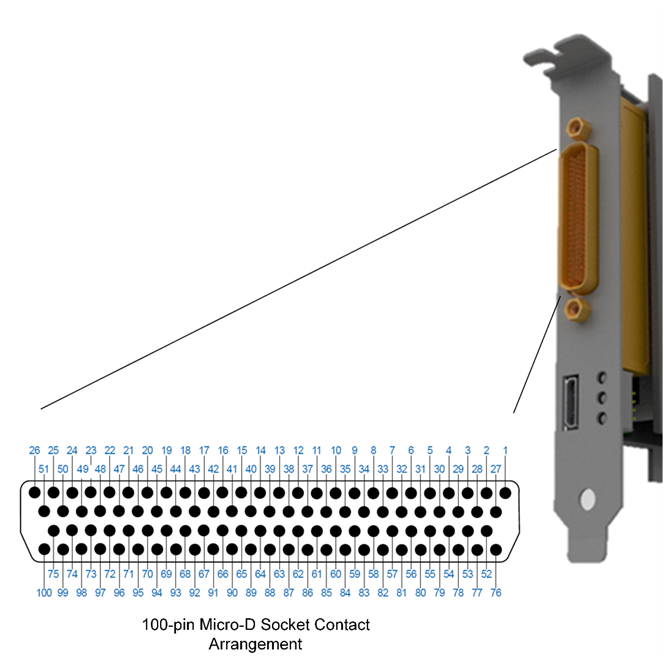
J1, Mating Accessories
(Suggested only)
Mating Connector
NAI Accessory Option P/N: 05-0348
Connector, mate, plug, 100-pin PIN (MALE), Micro-D
100RN100P-B, Amphenol
Solder-cup discrete wire termination
Aluminum, Electroless Nickel plated/finish
Note: Connector ONLY;
NO wiring strain relief or backshell is provided
Mating Connector/Backshell Kit
NAI Accessory Option P/N: 79G5-CONN-KIT
Includes the following:
05-0348; see Mating Connector for details (Qty. 1)
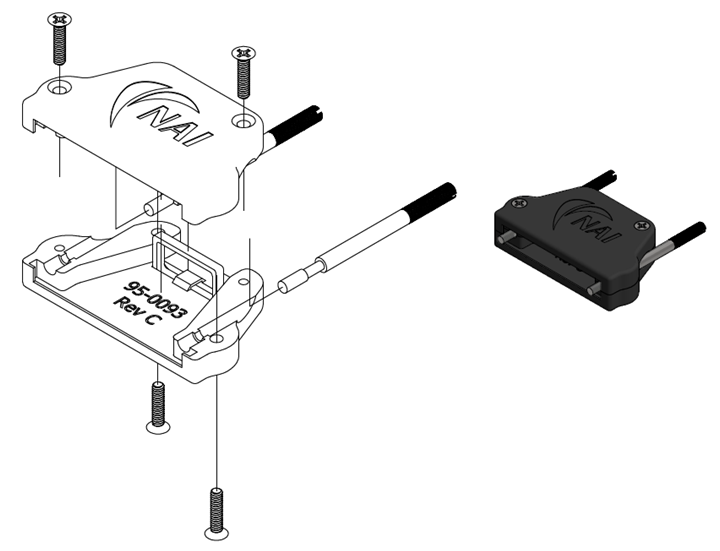
95-0158; 79G5 Backshell Connector Kit (Qty. 1)
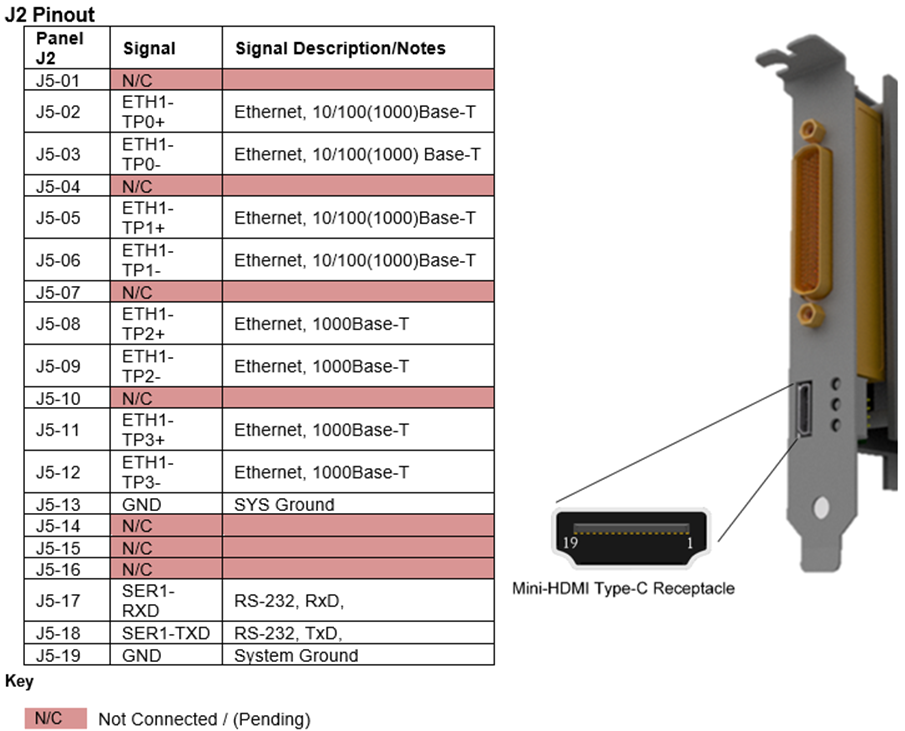
J2, Utility Connector/Pinout
Industry standard mini-HDMI type (type-C receptacle).
The 79G5 provides console/maintenance function via a Mini-HDMI card edge connector J2 which provides the following signals:
- Serial (port 1) (RS-232 console port; Async, default: 115,200, 8-bit, no-parity/flow)
- Ethernet port 1 (factory configuration)
J2, Mating Accessory, Optional
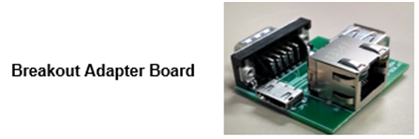
NAI also provides an optional 79G5 J2 accessory mating kit (NAI P/N 75SBC4-BB) which includes: 1.) A “breakout” adapter board and 2.) HDMI cable (@ 1 m length), w/ mini-Type-C plug to mini-Type C plug. The “breakout” adapter board and a Micro-HDMI cable allow for standard I/O connections to Ethernet (RJ-45 receptacle) and asynchronous serial (DB9-male). Consult the factory for availability.
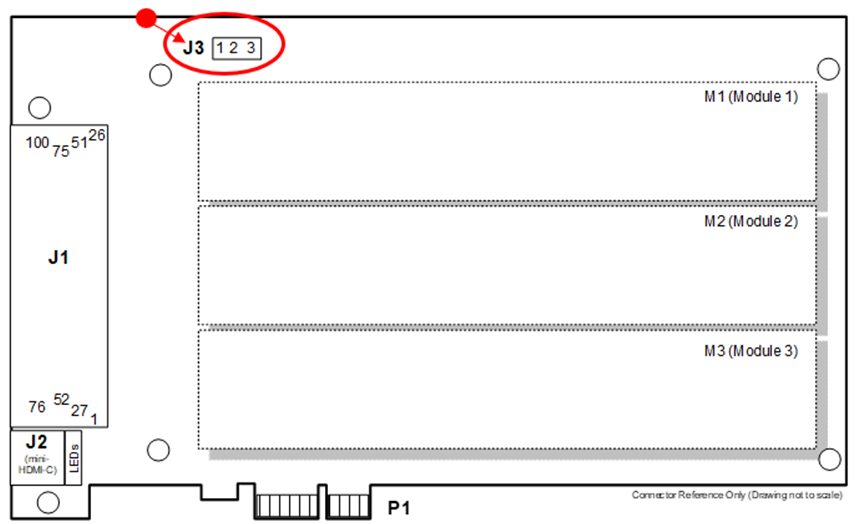
J3, External ±12V Module Power Input Connector/Pinout (Inboard)
This card may be configured and shipped with modules requiring ±12 VDC power (see configuration part number). The PCIe bus power is not specified to handle higher power ±12 VDC operation. To facilitate certain module operation, external ±12 VDC power supplies must be applied to the appropriate input power supply pins.
The external supplementary module ±12 VDC power can be provided from an external source and connected to this inboard source ‘J3’ connector or alternatively provided through the ‘J1’ panel connector.
Note
Both the J1 and J3 connector ±12 V Module Power Input Power Supply external input pins are configured in parallel):
| Inboard J3 | Signal | Signal Description/Notes | (For Reference) J1 - Panel |
|---|---|---|---|
| J3-1 | (+)12 V | +12 V Module Power Supply Input | J1-9 |
| J3-2 | GND | System Ground / ±12 V return | J1-26, 43 |
| J3-3 | (-)12 V | -12 V Module Power Supply Input | J1-84 |
| ± 12 V Power (Inboard) Connector | Date of Manufacture (DOM) | |
| J3 | Prior to 5/21/2018 | As of 5/21/2018 |
| PCB | Molex 530140310 (NAI 05-0212) | Molex 532530370 (NAI 05-0377) |
| Cable Mate | Molex 510040300 (NAI 05-0213) | Molex 510650300 (NAI 05-0378) |
| Cable Mate Contact | Molex 500118100 (NAI 08-0009) | (Molex 502128100) (NAI 08-0031) |
J3: Molex MicroBlade™, 2 mm spacing, 3-pin
J3, Mating Connector
Molex MicroBlade™ Wire-to-Board Housing, Friction Lock, 5.80 mm Height, 2 mm Pitch, 3-pin; Molex (recommended, or equivalent)
Front Panel System (Power/Signal/System) Ground Reference
Front Panel: J1 pins 26, 43
Front Panel Chassis Ground
Front Panel: No dedicated pins - connector/jackscrews/connector shell only (when panel secured to chassis).
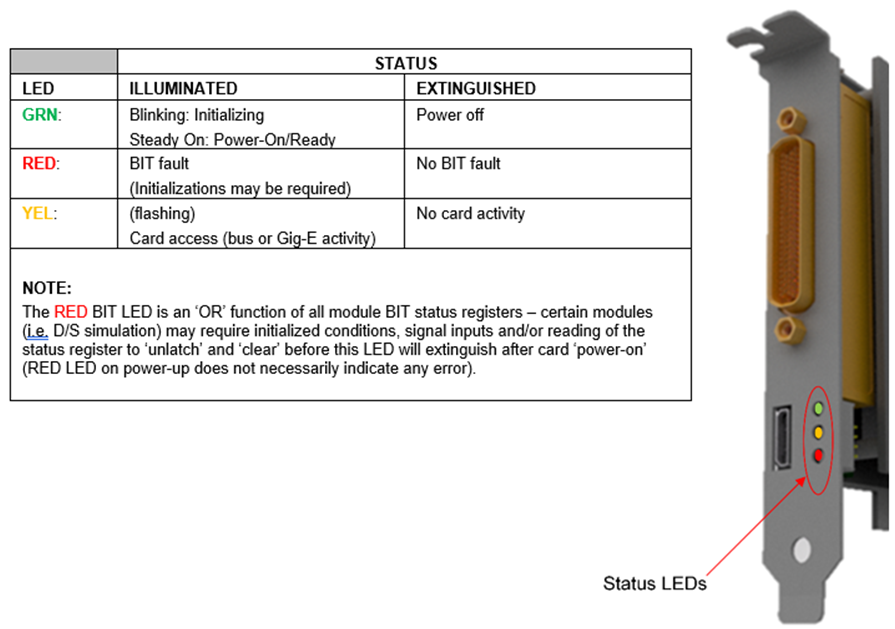
Panel Status LEDs
Front Panel LEDs indications (only available on air-cooled units).
PCIe Interface
The 79G5 implements a high-speed serial PCIe Revision 2.0 (GEN-2), x1 end node (endpoint) interface. The 79G5 card supports industry standard PCIe LVDS signal interfaces.
Note
This card does not support hot-plug/hot-swap or extended SMBus, JTAG or Standby functions.
P1, PCB Edge Connector, PCIe Interface Pinouts
| PIN | SIDE B | SIDE A |
| 1 | +12 V PCIe | PRSNTn |
| 2 | +12 V PCIe | +12 V PCIe |
| 3 | +12 V PCIe | +12 V PCIe |
| 4 | GND | GND |
| 5 | N/C | N/C |
| 6 | N/C | N/C |
| 7 | GND | N/C |
| 8 | N/C | N/C |
| 9 | N/C | N/C |
| 10 | N/C | N/C |
| 11 | N/C | PERSTn |
| Key Notch | ||
| 12 | N/C | GND |
| 13 | GND | REFCLK_PCIE_P |
| 14 | PCIE-RXP | REFCLK_PCIE_N |
| 15 | PCIE-RXN | GND |
| 16 | GND | PCIE-TXP |
| 17 | PRSNTn | PCIE-TXN |
| 18 | GND | GND |
Key
| Key Notch | PCIe physical keyway |
|---|---|
| N/C | Not Connected |
Signal Descriptions, P1
| Signal Name | Description |
|---|---|
| PCIE-RXP | Transmitter Lane 0, Differential pair (+); (bus perspective) |
| PCIE-RXN | Transmitter Lane 0, Differential Pair (-); (bus perspective) |
| PCIE-TXP | Receiver Lane 0, Differential pair (+); (bus perspective) |
| PCIE-TXN | Receiver Lane 0, Differential Pair (-); (bus perspective) |
| PRSNTn | Hot-plug detect (functionality not supported) |
| PERSTn | Power Good |
| REFCLK_PCIE_P | Reference Clock, Differential Pair (+) |
| REFCLK_PCIE_N | Reference Clock, Differential Pair (-) |
| +12V PCIe | +12 V Power |
| GND | Digital Ground and Power Supply return for (5, +12, -12) (SYS GND) |
J1, Front Panel I/O Pinout
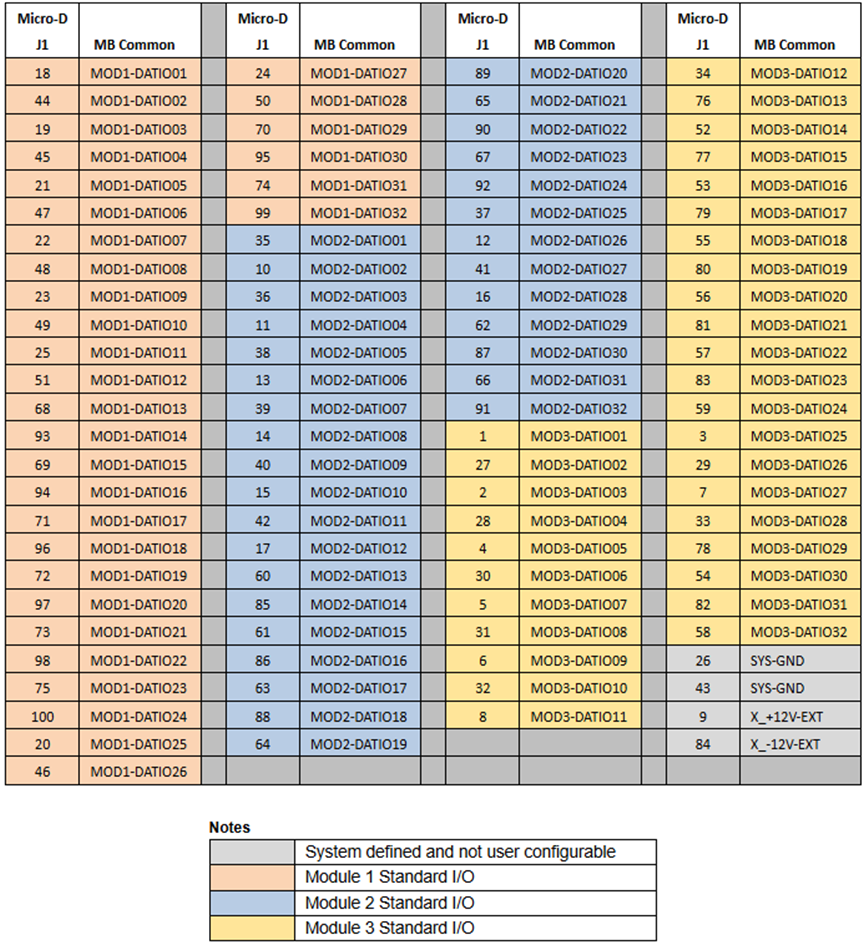
J1, Front Panel Generic Module I/O Signal Layout
The following provides the generic connector pin-out layout for the J1 front panel.
Front User I/O Mapping
Front User I/O Mapping (for reference) are shown below, with respect to DATAIO. Additional information on pin-outs can be found in the Module Operational Manuals.
| Slot 1 | Slot 2 | Slot 3 | ||||
| Module Signal (Ref Only) | Micro-D J1 | Global (MB) | Micro-D J1 | Global (MB) | Micro-D J1 | Global (MB) |
| DATIO1 | 18 | 35 | 1 | |||
| DATIO2 | 44 | 10 | 27 | |||
| DATIO3 | 19 | 36 | 2 | |||
| DATIO4 | 45 | 11 | 28 | |||
| DATIO5 | 21 | 38 | 4 | |||
| DATIO6 | 47 | 13 | 30 | |||
| DATIO7 | 22 | 39 | 5 | |||
| DATIO8 | 48 | 14 | 31 | |||
| DATIO9 | 23 | 40 | 6 | |||
| DATIO10 | 49 | 15 | 32 | |||
| DATIO11 | 25 | 42 | 8 | |||
| DATIO12 | 51 | 17 | 34 | |||
| DATIO13 | 68 | 60 | 76 | |||
| DATIO14 | 93 | 85 | 52 | |||
| DATIO15 | 69 | 61 | 77 | |||
| DATIO16 | 94 | 86 | 53 | |||
| DATIO17 | 71 | 63 | 79 | |||
| DATIO18 | 96 | 88 | 55 | |||
| DATIO19 | 72 | 64 | 80 | |||
| DATIO20 | 97 | 89 | 56 | |||
| DATIO21 | 73 | 65 | 81 | |||
| DATIO22 | 98 | 90 | 57 | |||
| DATIO23 | 75 | 67 | 83 | |||
| DATIO24 | 100 | 92 | 59 | |||
| DATIO25 | 20 | 37 | 3 | |||
| DATIO26 | 46 | 12 | 29 | |||
| DATIO27 | 24 | 41 | 7 | |||
| DATIO28 | 50 | 16 | 33 | |||
| DATIO29 | 70 | 62 | 78 | |||
| DATIO30 | 95 | 87 | 54 | |||
| DATIO31 | 74 | 66 | 82 | |||
| DATIO32 | 99 | 91 | 58 | |||
| DATIO33 | N/C | N/C | N/C | |||
| DATIO34 | N/C | N/C | N/C | |||
| DATIO35 | N/C | N/C | N/C | |||
| DATIO36 | N/C | N/C | N/C | |||
| DATIO37 | N/C | N/C | N/C | |||
| DATIO38 | N/C | N/C | N/C | |||
| DATIO39 | N/C | N/C | N/C | |||
| DATIO40 | N/C | N/C | N/C | |||
| 26, 43 | SYS GND | 26, 43 | SYS GND | 26, 43 | SYS GND | |
| 9 | +12 V IN | 9 | +12 V IN | 9 | +12 V IN | |
| 84 | -12 V IN | 84 | -12 V IN | 84 | -12 V IN | |
Connector Signal/Pin-Out Notes
NAI Synchro/Resolver Naming Convention
| Signal | Resolver | Synchro |
|---|---|---|
| S1 | SIN(-) | X |
| S2 | COS(+) | Z |
| S3 | SIN(+) | Y |
| S4 | COS(-) | No connect |
Additional Pin-Out Details
| 1. Isolated Discrete Module (DT2) | For ‘differential’ A/D; “P” designation considered ‘positive’ input pin, “N” pin designation considered ‘negative’ input pin. |
|---|---|
| 2. Discrete I/O Module (DT1) | All GND pins are common within the module, but, isolated from system/power GND. Each pin should be individually wired for optimal power current distribution. |
| 3. TTL I/O Module (TL1) | I/O referenced to system power GND. |
| 4. CMRP - A/D Module(s) (ADx) | The Common Mode Reference Point (CMRP) is an isolated reference connection for all the A/D channels. For expected high common mode voltage applications, it is recommended that the pin designated as CMRP be referenced (direct or resistor coupled) to the signal source GND reference (must have current path between CMRP and signal source generator) to minimize common mode voltage within the acceptable specification range. All channels within the module are independent but share a CMRP, which is isolated from system/power GND. |
MECHANICAL DETAILS
General - Outline
Note
The following mechanical outline detail examples are provided for reference only. Dimensions are in inches unless otherwise specified.
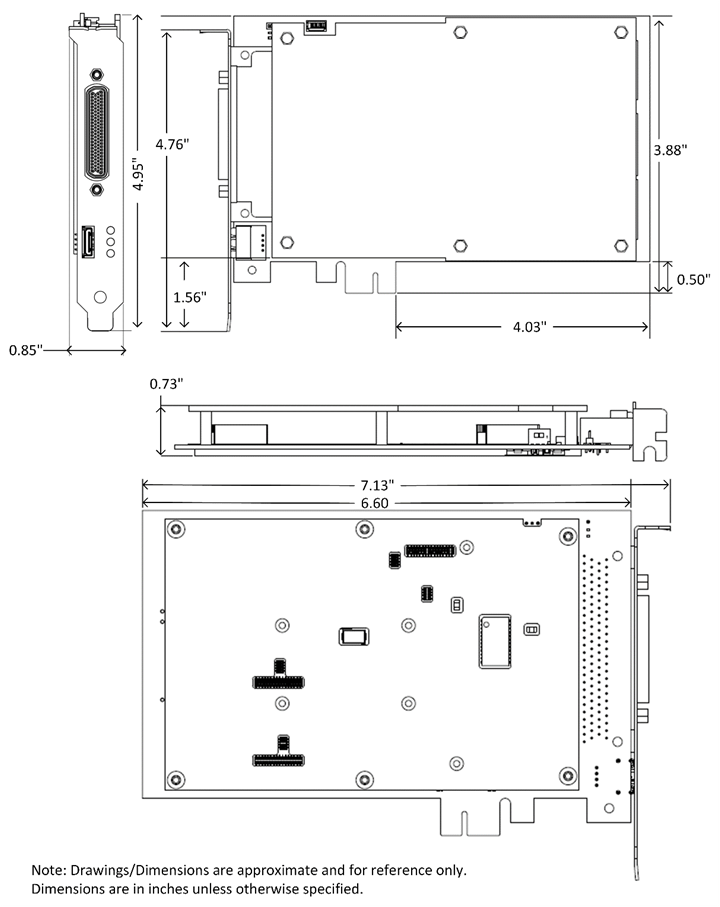
79G5 PART NUMBER DESIGNATION
Click here for the 79G5 part number designation
SYNCHRO/RESOLVER AND LVDT/RVDT SIMULATION MODULE CODE TABLES
Select the Digital-to-Synchro (DSx), Digital-to-Resolver (DRx) or Digital-to-LVDT/RVDT (DLx) module ID corresponding to the application operating parameters required from the following code table (where x = the specific module ID designator). Customer should indicate the actual frequency applicable the design to assure that the correct default band width is set at the factory. All Input and Reference voltages are auto ranging. Frequency/voltage band tolerances +/- 10%. For availability and ranges other than those listed contact the factory. Specifications may be subject to change.
- Single Channel module pending availability (contact factory)
Module ID Format Channel(s) Output Voltage VL-L (Vrms) Reference Voltage (Vrms) Frequency Range (Hz) Power / CH maximum (VA) Notes DS1 SYN 1* 2 - 28 2 - 115 47 - 1 K 3 DR1 RSL DL1 LVDT/RVDT DS2 SYN 1* 2 - 28 2 - 115 1 K - 5 K 3 DR2 RSL DL2 LVDT/RVDT DS3 SYN 1* 2 - 28 2 - 115 5 K - 10 K 3 DR3 RSL DL3 LVDT/RVDT DS4 SYN 1* 2 - 28 2 - 115 10 K - 20 K 3 DR4 RSL DL4 LVDT/RVDT DS5 SYN 1* 28 - 90 2 - 115 47 - 1 K 3 DR5 RSL DL5 LVDT/RVDT DSX SYN 1* X X X X X = TBD; special configuration, requires special part number code designation, contact factory DRX RSL DLX LVDT/RVDT DSA SYN 2 2 - 28 2 - 115 47 - 1 K 1.5 DRA RSL DLA LVDT/RVDT DSB SYN 2 2 - 28 2 - 115 1 K - 5 K 1.5 DRB RSL DLB LVDT/RVDT DSC SYN 2 2 - 28 2 - 115 5 K - 10 K 1.5 DRC RSL DLC LVDT/RVDT DSD SYN 2 2 - 28 2 - 115 10 K - 20 K 1.5 DRD RSL DLD LVDT/RVDT DSE SYN 2 28 - 90 2 - 115 47 - 1 K 2.2 DRE RSL DLE LVDT/RVDT DSY SYN 2 Y Y Y Y Y = TBD; special configuration, requires special part number code designation, contact factory DRY RSL DLY LVDT/RVDT DSJ SYN 3 2 - 28 2 - 115 47 - 1 K 0.5 DRJ RSL DLJ LVDT/RVDT DSK SYN 3 2 - 28 2 - 115 1 K - 5 K 0.5 DRK RSL DLK LVDT/RVDT DSL SYN 3 2 - 28 2 - 115 5 K - 10 K 0.5 DRL RSL DLL LVDT/RVDT DSM SYN 3 2 - 28 2 - 115 10 K - 20 K 0.5 DRM RSL DLM LVDT/RVDT DSN SYN 3 28 - 90 2 - 115 47 - 1 K 0.5 DRN RSL DLN LVDT/RVDT DSZ SYN 3 Z Z Z Z Z = TBD; special configuration, requires special part number code designation, contact factory DRZ RSL DLZ LVDT/RVDT SYNCHRO/RESOLVER AND LVDT/RVDT MEASUREMENT MODULE CODE TABLES
SYN/RSL Four-Channel Measurement (Field Programmable SYN/RSL)
Select the Synchro/Resolver-to-Digital (SDx) module ID corresponding to the application operating parameters required from the following code table (where x = the specific module ID designator). Customer should indicate the actual frequency applicable to the design to assure that the correct default band width is set at the factory. All Input and Reference voltages are auto ranging. For availability and ranges other than those listed contact the factory. Specifications may be subject to change.
Frequency/voltage band tolerances +/- 10%.
Module ID Input Voltage V (Vrms) Reference Voltage + (Vrms) Frequency Range + (Hz) Notes SD1 2 - 28 2 - 115 47 - 1 K SD2 2 - 28 2 - 115 1K - 5 K SD3 2 - 28 2 - 115 5K - 10 K SD4* 2 - 28 2 - 115 10K - 20 K SD5 28 - 90 2 - 115 47 - 1 K SDX* X X X X = TBD; special configuration, requires special part number code designation, contact factory *Consult factory for availability
LVDT/RVDT Four-Channel Measurement (Field Programmable 2, 3 or 4-Wire)
Select the LVDT/RVDT-to-Digital (LDx) module ID corresponding to the application operating parameters required from the following code table (where x = the specific module ID designator). Customer should indicate the actual frequency applicable to the design to assure that the correct default band width is set at the factory. All Input and Excitation voltages are auto ranging. For availability and ranges other than those listed contact the factory. Specifications may be subject to change.
Frequency/voltage band tolerances +/- 10%.
Module ID Input Signal Voltage V + (Vrms) Excitation Voltage + (Vrms) Frequency Range + (Hz) Notes LD1 2 - 28 2 - 115 47 - 1 K LD2 2 - 28 2 - 115 1K - 5 K LD3 2 - 28 2 - 115 5K - 10 K LD4* 2 - 28 2 - 115 10K - 20 K LD5 28 - 90 2 - 115 47 - 1 K LDX* X X X X = TBD; special configuration, requires special part number code designation, contact factory *Consult factory for availability
Link to original
NAI Cares
North Atlantic Industries (NAI) is a leading independent supplier of Embedded I/O Boards, Single Board Computers, Rugged Power Supplies, Embedded Systems and Motion Simulation and Measurement Instruments for the Military, Aerospace and Industrial Industries. We accelerate our clients’ time-to-mission with a unique approach based on a Configurable Open Systems Architecture™ (COSA®) that delivers the best of both worlds: custom solutions from standard COTS components.
We have built a reputation by listening to our customers, understanding their needs, and designing, testing and delivering board and system-level products for their most demanding air, land and sea requirements. If you have any applications or questions regarding the use of our products, please contact us for an expedient solution.
Please visit us at: www.naii.com or select one of the following for immediate assistance:
Documentation
FAQ
Application Notes
http://www.naii.com/applicationnotes
Calibration and Repairs
http://www.naii.com/calibrationrepairs
Call Us
(631) 567-1100
Link to original