
Encoder (EC1) Family Guide
Overview
An encoder module turns the output of a position or motion sensor into precise feedback a control system can act on — where a shaft is pointed, how far it has turned, which way it is moving, and how fast. That feedback is the input a servo loop, gimbal, actuator, or motor controller needs to close the loop and hold a commanded position.
The EC1 is NAI’s encoder smart function module: four independently isolated, multi-mode channels in a Gen5 6U or 3U VPX package. Each channel is electrically isolated and independently programmable, so one module can read four different sensors — running four different protocols — at the same time, without ground-loop concerns between them.
The mental model used throughout this page is simple: every channel runs in one of two control modes — SSI or Counter. SSI reads an absolute position word from a serial encoder (driving the clock as the controller, or passively listening). Counter accumulates relative pulse counts, and a counter input mode picks the behavior — incremental up/down, direction-count, quadrature (direction-aware A-QUAD-B at 1×/2×/4×), or a timer / general-purpose counter driven by an internal clock or external trigger. EC1 is currently the only encoder module in the catalog, and it is SSK 2.x-native — the Software section explains what that means for the API you call.
EC1 at a glance
Each channel is set to SSI or Counter mode. The rows below show how the A, B, and Index lines are used in each configuration — the two SSI sub-modes, then the Counter input modes (Timer, Direction count, Up/down, Quadrature):
| Channel mode | Channel A | Channel B | Index |
|---|---|---|---|
| SSI (standard / controller) | Clock (out) | Data (in) | — |
| SSI (listen-only) | Clock (in) | Data (in) | — |
| Timer | — | — | Control (in) |
| Direction count | Counter (in) | Count direction (in) | Control (in) |
| Up/down count | Count up | Count down | Control (in) |
| Quadrature | Input A | Input B | Control (in) |
All four channels are electrically isolated and can run different modes at the same time. The last four rows are all Counter mode with different input modes; the first two are SSI mode.
Choosing a channel mode
The two control modes differ in what they read and how a position is represented:
- SSI — read an absolute position word from a serial encoder over a clock/data pair. The channel either drives the clock as the controller, or passively listens to a clock and data it does not generate.
- Counter — accumulate relative counts from input pulses; position is built up from movement rather than read out whole. A counter input mode selects the counting behavior:
- Incremental / up-down / direction — count pulses up, down, or as steered by a direction line.
- Quadrature (A-QUAD-B) — direction-aware decoding of the paired A/B inputs, with selectable 1× / 2× / 4× resolution: 1× counts once per A/B cycle, 4× counts on every A/B edge for finer resolution.
- Timer / general-purpose — a pre-loadable counter driven by an internal clock or an external trigger, rather than by an encoder’s motion pulses.
Physical setup
Every EC1 channel presents the same three signal lines — A, B, and Index — and the physical layer they ride on is software-configured per channel, not strapped in hardware. Three settings define that physical layer:
- Input electrical level. Each channel’s inputs are software-selectable between differential (RS422 levels) and single-ended (TTL levels) —
NAIBRD_ENC_INPUT_RS422andNAIBRD_ENC_INPUT_TTLin the API (the header also exposes the equivalentNAIBRD_ENC_INPUT_DIFFERENTIAL/NAIBRD_ENC_INPUT_SINGLE_ENDEDnames). Match the level to what your encoder drives: RS422 for the differential pairs of a long-cable industrial encoder, TTL for a single-ended local source. - Input termination. Termination is likewise software-selectable per channel (
NAIBRD_ENC_DIFF_TERMINATED). Terminate when the channel sits at the end of a differential line that needs it; match the choice to your cabling and the encoder, not to a fixed rule. - Debounce / digital input filter. Each port — A, B, and Index — has an independent, software-set debounce filter (
naibrd_ENC_SetDebounceTime/naibrd_ENC_SetDebounceEnable). It ignores spurious transitions shorter than the configured window, so it earns its keep on noisy or contact-type inputs; a value of 0 disables it. Leave it off for clean high-speed signals where it would only blunt edges.
What those three lines actually carry depends on the channel’s mode — in SSI controller mode A is clock-out and B is data-in; in quadrature A and B are the quadrature pair and Index is control. The full mapping is the “EC1 at a glance” table above; set the mode first, then wire to match.
The exact connector pins are per-module, so get them from the manual; the wiring pattern is the same:
- Identify the EC1’s slot number on your NAI motherboard or system.
- Bring the channel’s signals out through the breakout board, where the slot’s pins appear as generic IO# numbers.
- Map IO# pins to the channel’s A, B, and Index lines using the pinout in the EC1 Manual (Appendix B, pin-out details).
- Wire to the encoder with the channel set to the correct input level (RS422 or TTL) and termination for your cabling.
A couple of things hold for the family:
- Channels are independently isolated. All four channels are electrically isolated from one another, so the module can interface directly to four independent encoders without ground-loop concerns — different sensors, different grounds, different modes, at the same time.
- Level and termination travel with the channel, not the module. Because each channel is configured on its own, mixing — say, a terminated RS422 SSI encoder on channel 1 and a single-ended TTL counter input on channel 2 — is just two different software setups on one module, no jumpers.
Software
There’s nothing about which software you run that’s specific to the encoder. The NAI SSK (naibrd library) is identical across every OS and architecture — PetaLinux, VxWorks, Deos, Windows. What OS you’re on is determined by your motherboard/SBC, not by the EC1. The only module-specific part is which API functions you call: for the EC1 that’s the naibrd_ENC_* family.
The lifecycle is the standard board-access flow — connect, get a card and module, then call naibrd_ENC_* directly per channel. There is no Open/Free device handle (unlike 1553): you pass (cardIndex, module, channel) to every call. Each channel is set to one mode, configured for that mode, and then read:
/* SSK 2.x — connect, then configure a channel, then read */
naiapp_RunBoardMenu(CONFIG_FILE);                       /* discover boards */
naiapp_query_CardIndex(naiapp_GetBoardCnt(), 0, &cardIndex);
naibrd_GetModuleCount(cardIndex, &moduleCnt);
naiapp_query_ModuleNumber(moduleCnt, 1, &module);
naibrd_GetModuleName(cardIndex, module, &moduleID);     /* moduleID identifies the ENC module */

int32_t maxChannel = naibrd_ENC_GetChannelCount(moduleID);
/* For a channel: set its mode, configure it, then read. No Open/Free. */
naibrd_ENC_SetControlMode(cardIndex, module, channel, NAIBRD_ENC_MODE_SSI); /* or _MODE_COUNTER */
/* ... mode-specific config ... */
/* ... read: naibrd_ENC_GetSSI_Data(...) or naibrd_ENC_GetCNTR_Count(...) ... */
Note
EC1 is supported by SSK 2.x (the
naibrd_ENC_*API shown here). SSK 1.x’s encoder library predates EC1 — it targets the legacy E7/E8 encoder parts only and has no counter/quadrature API — so this guide is SSK 2.x throughout.
Where to find what you need:
- Which functions/registers to call — the EC1 Manual documents the registers and the full
naibrd_ENC_*API (SSI controller/listener, counter/quadrature, debounce, status, BIT). - Building and deploying on your platform — Connecting to Boards covers the toolchain, deployment, and terminal access for PetaLinux/ARM Linux, VxWorks, Deos, and Windows.
- The connection your calls run against — Opening a Software Handle to Your Board walks through the board-access flow the snippet above runs.
- Launching the app on the board itself — Running Applications from the Target covers loading and launching your executable on the target.
Confirm communication
Unlike a controlled bus, the EC1 needs no external encoder and no loopback to prove the link — it runs a continuous, always-on Built-In Test. BIT is enabled at all times (except while a channel is being configured) and verifies each channel’s A, B, and Index signal inputs in real time: for RS422 it detects open-wire, short-circuit, low differential signal, and out-of-range input voltage; for TTL it detects out-of-range input voltage. So the zero-hardware first-success check is simply to read the BIT status: a successful read confirms the board link, the SSK, and the module are talking, and a clear fault status confirms the channel’s signal inputs are healthy too.
/* Zero-hardware confirmation: read the always-on BIT status */
nai_status_bit_t bitRealtime, bitLatched;
naibrd_ENC_GetChannelMappedStatus(cardIndex, module, channel, NAIBRD_ENC_STATUS_BIT_REALTIME, &bitRealtime);
naibrd_ENC_GetChannelMappedStatus(cardIndex, module, channel, NAIBRD_ENC_STATUS_BIT_LATCHED, &bitLatched);
/* Read succeeds => link/SSK/module OK; no fault asserted => signal inputs healthy too. */
naibrd_ENC_ClearChannelMappedStatus(cardIndex, module, channel, NAIBRD_ENC_STATUS_BIT_LATCHED);
The enc_basic_ops sample’s “Display Chan Status” command does exactly this read, and reading real encoder data is the next step (covered in Features / Try it below).
Features
Everything you do with an EC1 module happens per channel, and each of the four channels is a complete, independent encoder interface running its own mode at the same time — one module can have channel 1 reading an absolute SSI word, channel 2 accumulating incremental counts, and channel 3 decoding a quadrature pair, all concurrently and all electrically isolated. The mode you set with naibrd_ENC_SetControlMode (NAIBRD_ENC_MODE_SSI or NAIBRD_ENC_MODE_COUNTER) decides which of the calls below apply to that channel; the SSI sub-mode (controller vs. listener) and the counter input mode (up/down/direction vs. quadrature) refine it from there. Common per-channel setup applies to either mode first — input level (naibrd_ENC_SetInputMode), termination (naibrd_ENC_SetInputTermination), and debounce (see Physical setup). Each feature below lists a sampling of the relevant naibrd_ENC_* calls — full signatures and parameters are in the EC1 Manual.
SSI Controller — drive the clock, read an absolute position word
What it does / when: the channel drives the SSI clock and reads an absolute position word back from a serial encoder over a clock/data pair. Use it when the encoder reports its whole position on demand rather than as a stream of motion pulses.
Applies to: any channel set to NAIBRD_ENC_MODE_SSI with SSI mode NAIBRD_ENC_SSI_CONTROLLER.
Also: programmable clock rate, data-bit count, binary or gray data, parity, zero-bit, and dwell.
Relevant APIs:
nai_status_t naibrd_ENC_SetSSI_Mode(int32_t cardIndex, int32_t module, int32_t channel, naibrd_enc_ssi_mode_t mode);            /* NAIBRD_ENC_SSI_CONTROLLER */
nai_status_t naibrd_ENC_SetSSI_ClockRate_uS(int32_t cardIndex, int32_t module, int32_t channel, uint32_t clockRate_uS);
nai_status_t naibrd_ENC_SetSSI_NumDataBits(int32_t cardIndex, int32_t module, int32_t channel, uint32_t numDataBits);
nai_status_t naibrd_ENC_SetSSI_DataType(int32_t cardIndex, int32_t module, int32_t channel, naibrd_enc_ssi_data_type_t type); /* BINARY / GRAY */
nai_status_t naibrd_ENC_SetSSI_ParityEnable(int32_t cardIndex, int32_t module, int32_t channel, bool_t enable);
nai_status_t naibrd_ENC_SetSSI_Parity(int32_t cardIndex, int32_t module, int32_t channel, naibrd_enc_ssi_parity_t parity);     /* EVEN / ODD */
nai_status_t naibrd_ENC_SetSSI_ZeroBitEnable(int32_t cardIndex, int32_t module, int32_t channel, bool_t enable);
nai_status_t naibrd_ENC_SSI_TriggerData(int32_t cardIndex, int32_t module, int32_t channel);
nai_status_t naibrd_ENC_GetSSI_Data(int32_t cardIndex, int32_t module, int32_t channel, uint32_t* p_outdata);
Exercise it: enc_basic_ops → “SSI” menu.
SSI Listen-Only — passively receive clock and data
What it does / when: the channel passively receives both clock and data from an external SSI master rather than generating the clock itself. Use it to read the same SSI encoder another controller is already polling, without contending for the bus.
Applies to: any channel set to NAIBRD_ENC_MODE_SSI with SSI mode NAIBRD_ENC_SSI_LISTENER. It uses the same read API as the controller (naibrd_ENC_SSI_TriggerData / naibrd_ENC_GetSSI_Data).
Also: watchdog and error-break detection for the externally-driven stream.
Relevant APIs:
nai_status_t naibrd_ENC_SetSSI_WatchDogEnable(int32_t cardIndex, int32_t module, int32_t channel, bool_t enable);
nai_status_t naibrd_ENC_SetSSI_ErrorBreakEnable(int32_t cardIndex, int32_t module, int32_t channel, bool_t enable);
Exercise it: enc_basic_ops → “SSI” menu (set mode to listener).
Counter — incremental, up/down, direction, and general-purpose counting
What it does / when: accumulate relative counts from input pulses. Supports up, down, direction, and up/down modes, with pre-load, compare/match, latched-vs-realtime read, and speed/period — so position is built up from movement rather than read out whole.
Applies to: any channel set to NAIBRD_ENC_MODE_COUNTER.
Also: index control, special count modes, clock divide, and per-port polarity.
Relevant APIs:
nai_status_t naibrd_ENC_SetCNTR_InputMode(int32_t cardIndex, int32_t module, int32_t channel, naibrd_enc_cntr_cim_t input);   /* UP / DOWN / DIR_CNT / UP_DOWN_CNT */
nai_status_t naibrd_ENC_SetCNTR_PreLoad(int32_t cardIndex, int32_t module, int32_t channel, uint32_t preLoad);
nai_status_t naibrd_ENC_SetCNTR_ControlCommand(int32_t cardIndex, int32_t module, int32_t channel, naibrd_enc_cntr_ctrl_t cmd); /* RESET / LOAD / LATCH */
nai_status_t naibrd_ENC_SetCNTR_IndexControl(int32_t cardIndex, int32_t module, int32_t channel, naibrd_enc_cntr_icm_t indexCtrl);
nai_status_t naibrd_ENC_SetCNTR_SpecialControl(int32_t cardIndex, int32_t module, int32_t channel, naibrd_enc_cntr_scm_t spclCtrl);
nai_status_t naibrd_ENC_SetCNTR_ClkDivide(int32_t cardIndex, int32_t module, int32_t channel, naibrd_enc_cntr_clk_div_t clkDiv);
nai_status_t naibrd_ENC_SetCNTR_CompareEnable(int32_t cardIndex, int32_t module, int32_t channel, bool_t enable);
nai_status_t naibrd_ENC_SetCNTR_CompareCount(int32_t cardIndex, int32_t module, int32_t channel, uint32_t compareValue);
nai_status_t naibrd_ENC_GetCNTR_Count(int32_t cardIndex, int32_t module, int32_t channel, naibrd_enc_count_type_t countType, uint32_t* count); /* FINE/COARSE x REALTIME/LATCHED */
nai_status_t naibrd_ENC_GetCNTR_Speed(int32_t cardIndex, int32_t module, int32_t channel, naibrd_enc_cntr_direction_type_t* p_outdirection, uint32_t* p_outperiod_uS);
Exercise it: enc_basic_ops → “Cntr” menu.
Quadrature — direction-aware A-QUAD-B decoding
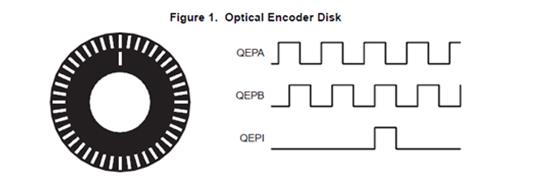
What it does / when: direction-aware decoding of the A/B pair at 1×, 2×, or 4× resolution. Use it for incremental encoders whose two channels are 90° out of phase, where the lead/lag relationship gives direction and edge density gives resolution.
Applies to: quadrature is a counter input mode — set naibrd_ENC_SetCNTR_InputMode to one of NAIBRD_ENC_CNTR_CIM_QUAD1X / QUAD2X / QUAD4X. See the manual’s quadrature discussion (EC1 Manual, Appendix A).
Also: Index control (latch/reset on the index pulse) and per-port input polarity, plus all the counter facilities above — pre-load, compare/match, and latched-vs-realtime reads.
Relevant APIs:
/* Quadrature is a counter input mode — select it via SetCNTR_InputMode: */
/*   NAIBRD_ENC_CNTR_CIM_QUAD1X | NAIBRD_ENC_CNTR_CIM_QUAD2X | NAIBRD_ENC_CNTR_CIM_QUAD4X */
nai_status_t naibrd_ENC_SetCNTR_Polarity(int32_t cardIndex, int32_t module, int32_t channel, naibrd_enc_port_type_t port, naibrd_enc_cntr_polarity_t polarity);
Exercise it: enc_basic_ops → “Cntr” menu → input mode QUAD1X/2X/4X.
Supporting — synchronized multi-channel read, status, and interrupts
What it does / when: take a synchronized snapshot of all channels driven by the module’s interval timer, and monitor channel/event status with optional interrupts. Use it when you need the four channels sampled together at a fixed cadence, or want the module to flag an event rather than polling for it.
Applies to: module-wide (interval timer + multi-channel read) and per-channel (mapped status / interrupts).
Relevant APIs:
nai_status_t naibrd_ENC_SetIntervalTimerEnable(int32_t cardIndex, int32_t module, bool_t enable);
nai_status_t naibrd_ENC_SetIntervalTimerPreload(int32_t cardIndex, int32_t module, uint16_t preLoad);
nai_status_t naibrd_ENC_SetIntervalTimerClkDivide(int32_t cardIndex, int32_t module, naibrd_enc_intvl_clk_t clkDiv);
nai_status_t naibrd_ENC_SetMultiChanRdEnable(int32_t cardIndex, int32_t module, int32_t channel, bool_t enable);
nai_status_t naibrd_ENC_TriggerMultiChanRd(int32_t cardIndex, int32_t module);
nai_status_t naibrd_ENC_GetMultiChanRdStatus(int32_t cardIndex, int32_t module, nai_status_bit_t* p_outmcrStatusBit);
Exercise it: enc_basic_ops → “IT” (interval timer) and “Glo” (global register) menus; per-channel status via “STAT”.
Try it
The snippets below show the order of naibrd_ENC_* calls you’d make for each mode — drop them into the body of an NAI sample app (after the standard connection flow described in Software above) and you have a working read. Each snippet is the conceptual sequence — not a fully-buildable program — and the enc_basic_ops sample app is the full reference.
Try it — SSI read
Configure a channel as an SSI controller and read one absolute position word.
/* SSK 2.x — SSI controller: configure and read one absolute position word */
naibrd_ENC_SetInputMode(cardIndex, module, chan, NAIBRD_ENC_INPUT_RS422);
naibrd_ENC_SetControlMode(cardIndex, module, chan, NAIBRD_ENC_MODE_SSI);
naibrd_ENC_SetSSI_Mode(cardIndex, module, chan, NAIBRD_ENC_SSI_CONTROLLER);
naibrd_ENC_SetSSI_NumDataBits(cardIndex, module, chan, 24);
naibrd_ENC_SetSSI_ClockRate_uS(cardIndex, module, chan, 1);
naibrd_ENC_SetSSI_DataType(cardIndex, module, chan, NAIBRD_ENC_SSI_DATA_GRAY);
uint32_t position;
naibrd_ENC_SSI_TriggerData(cardIndex, module, chan);
naibrd_ENC_GetSSI_Data(cardIndex, module, chan, &position);
Try it — Counter read
An incremental up/down counter, pre-loaded then latched and read.
/* SSK 2.x — incremental up/down counter */
naibrd_ENC_SetInputMode(cardIndex, module, chan, NAIBRD_ENC_INPUT_RS422);
naibrd_ENC_SetControlMode(cardIndex, module, chan, NAIBRD_ENC_MODE_COUNTER);
naibrd_ENC_SetCNTR_InputMode(cardIndex, module, chan, NAIBRD_ENC_CNTR_CIM_UP_DOWN_CNT);
naibrd_ENC_SetCNTR_PreLoad(cardIndex, module, chan, 0);
naibrd_ENC_SetCNTR_ControlCommand(cardIndex, module, chan, NAIBRD_ENC_CNTR_CTRL_LOAD);
uint32_t count;
naibrd_ENC_SetCNTR_ControlCommand(cardIndex, module, chan, NAIBRD_ENC_CNTR_CTRL_LATCH);
naibrd_ENC_GetCNTR_Count(cardIndex, module, chan, NAIBRD_ENC_COUNT_FINE_LATCHED, &count);
Try it — Quadrature read
A-QUAD-B 4× decode, reading the live count. The index pulse resets the count to zero each revolution (homing), so the value read is the position relative to the last index mark.
/* SSK 2.x — A-QUAD-B 4x decode, index resets the count each revolution */
naibrd_ENC_SetInputMode(cardIndex, module, chan, NAIBRD_ENC_INPUT_RS422);
naibrd_ENC_SetControlMode(cardIndex, module, chan, NAIBRD_ENC_MODE_COUNTER);
naibrd_ENC_SetCNTR_InputMode(cardIndex, module, chan, NAIBRD_ENC_CNTR_CIM_QUAD4X);
naibrd_ENC_SetCNTR_IndexControl(cardIndex, module, chan, NAIBRD_ENC_CNTR_ICM_RESET_I);
uint32_t count;
naibrd_ENC_GetCNTR_Count(cardIndex, module, chan, NAIBRD_ENC_COUNT_FINE_REALTIME, &count);
Try it — multi-channel synchronized read
Snapshot all channels together on the interval timer.
/* SSK 2.x — snapshot all channels on the interval timer */
naibrd_ENC_SetIntervalTimerClkDivide(cardIndex, module, NAIBRD_ENC_INTVL_CLK_25_MHz);
naibrd_ENC_SetIntervalTimerPreload(cardIndex, module, 1000);
for (int ch = 1; ch <= maxChannel; ch++)
    naibrd_ENC_SetMultiChanRdEnable(cardIndex, module, ch, NAI_TRUE);
naibrd_ENC_SetIntervalTimerEnable(cardIndex, module, NAI_TRUE);
naibrd_ENC_TriggerMultiChanRd(cardIndex, module);
/* then read each channel's latched count/data */
Building and running. The snippets above are condensed for orientation. The full, buildable program is enc_basic_ops; for build/run instructions across platforms see Using NAI SSK 2.x Sample Applications.
Hardware capabilities and status monitoring
This section covers what the hardware provides and what you can monitor — for how to drive each mode (SSI, counter, quadrature, multi-channel read), see Features and Try it above.
Always-on BIT. The EC1 runs a continuous Built-In Test that is enabled at all times except while a channel is being configured. It verifies each channel’s signal inputs in real time: for RS422 it detects open-wire, short-circuit, low differential signal, and out-of-range input voltage; for TTL it detects out-of-range input voltage. Because BIT never has to be armed, reading its status is the zero-hardware first-success check described in Confirm communication.
Isolation. All four channels are independently isolated from one another, so the module can interface four encoders on different grounds at the same time without ground-loop concerns.
COSA™ SerDes + multi-event interrupts. The EC1 rides NAI’s COSA™ architecture over a high-speed SerDes link to the host, with multi-event interrupt capability so the module can flag prioritized encoder events rather than forcing the host to poll for them.
Mapped status model. EC1 exposes status in two complementary forms, both with realtime and latched variants:
- Channel-mapped status (
naibrd_enc_chan_mapped_status_type_t) — the per-channel BIT result, read withnaibrd_ENC_GetChannelMappedStatus. - Event-mapped status (
naibrd_enc_event_mapped_status_type_t, ~30 event types) — counter events (borrow, carry, compare-match, sign, direction, counter-active) and SSI events (new data, overflow, zero-bit error, busy, parity error, watchdog, ext-clock error), read withnaibrd_ENC_GetEventMappedStatus.
Both kinds can raise interrupts via naibrd_ENC_SetChannelMappedInterruptEnable and naibrd_ENC_SetEventMappedInterruptEnable.
| Status | What it tells you | How to read it |
|---|---|---|
| Channel BIT status | Per-channel signal-input health (open / short / voltage) | naibrd_ENC_GetChannelMappedStatus(..., NAIBRD_ENC_STATUS_BIT_REALTIME / _LATCHED, ...) |
| Counter events | Borrow, carry, compare-match, sign, direction, counter-active | naibrd_ENC_GetEventMappedStatus(..., NAIBRD_ENC_STATUS_CNTR_*_REALTIME / _LATCHED, ...) |
| SSI events | New data, overflow, zero-bit error, busy, parity error, watchdog, ext-clock error | naibrd_ENC_GetEventMappedStatus(..., NAIBRD_ENC_STATUS_SSI_*_REALTIME / _LATCHED, ...) |
| Multi-channel read complete | Synchronized snapshot finished | naibrd_ENC_GetMultiChanRdStatus(...) |
Any of these statuses can raise an interrupt through the channel- or event-mapped interrupt-enable calls, so the module can signal a fault, a compare-match, or a fresh reading instead of being polled.
Common pitfalls
- Configure the channel’s mode before mode-specific programming. The manual is explicit: set the channel up first, then program it for SSI or Counter. Writing SSI/counter registers before the mode is set won’t take.
- Match the input level to the encoder (RS422 vs TTL) and terminate correctly. The wrong electrical level or termination gives you no signal or a garbled one.
- SSI parity / zero-bit / data-type must match the encoder. A mismatch shows up as parity errors or wrong position values — binary-vs-gray especially will read as plausible-but-wrong numbers.
- Debounce set too high blunts real edges. Use the debounce filter for noisy or contact-type inputs; leave it off (0) for clean high-speed signals where it would only swallow real transitions.
- Pick the right quadrature decode factor (1× / 2× / 4×). The factor scales counts-per-revolution; a wrong factor makes position off by 2× or 4×.
- Reading latched vs realtime counts. A latched read returns the value captured by a LATCH command or an index event — issue the latch (or configure index latch) before reading latched, or read realtime for the live value.
- Expecting SSK 1.x to drive EC1. SSK 1.x’s encoder library supports only the legacy E7/E8 encoder parts; use SSK 2.x for the EC1.
Related resources
- EC1 Manual — registers and the full
naibrd_ENC_*API - EC1 Register Map — the EC1 register map
- Download the SSK — get the library and sample apps
- Connecting to Boards — power, network, terminal, and file transfer to your board
- Opening a Software Handle to Your Board — establish the connection your
naibrd_ENC_*calls run against - Running Applications from the Target — load and launch a built sample on the board
- ESP2 Quick Start — exercise channels with no code via the Embedded Soft Panel