
INTRODUCTION
This module manual provides information about the North Atlantic Industries, Inc. (NAI) TTL/CMOS SF Function Module: TL1 and the variants TL3, TL5 and TL7, which provide different TTL strapping options. This module is compatible with all NAI Generation 5 motherboards.
The TL1 family provides 24 individually programmable digital I/O channels that may be configured as either inputs or outputs and supports standard TTL/CMOS single-ended digital interface levels (System GND referenced, non-isolated). The module is optimized for 3.3 V logic operation and supports output drive from either an internally generated VCC source or an externally applied VCC supply (up to 5.5 V maximum) to support interfacing with both 3.3 V and 5 V logic environments.
Input functionality includes per-channel status monitoring and programmable interrupt generation on rising- or falling-edge transitions, with programmable debounce filtering and selectable delay to suppress false transitions caused by relay and switch contact bounce. All input channels are continuously scanned during operation. Output channels provide buffered TTL/CMOS drive capability with programmable logic state control and integrated readback verification. Continuous Background Built-In-Test (BIT) executes transparently during normal operation and provides real-time channel health monitoring by validating input channel integrity and comparing actual output states against commanded logic states to support reliable operation in mission-critical embedded systems.
The differences between TL1 and each variant, are listed in the table that follows. Otherwise, the modules are identical.
TTL Strapping Configurations by Module
| Designation | Type | Default Power-On / Description |
| TL1 | TTL I/O | 1. Internal VCC 2. Input with 100k pull-downs |
| TL3 | TTL with: * EXT-VCC strapped to Internal +5 V | 1. Internal VCC 2. Input with 100k pull-downs |
| TL5 | TTL with: * Input pull-ups | 1. Internal VCC 2. Input with 100k pull-ups |
| TL7 | TTL with: * Input pull-ups * EXT-VCC strapped to Internal +5 V | 1. Internal VCC 2. Input with 100k pull-ups |
FEATURES
- 24 channels available as inputs or outputs
- Programmable debounce circuitry with selectable time delay eliminates false signals resulting from relay contact bounce
- Built-in test runs in background constantly monitoring system health for each channel
SPECIFICATIONS
Digital I/O - 24-Channels TTL/CMOS SF Module TL1 and TL3, TL5 and TL7 Variants
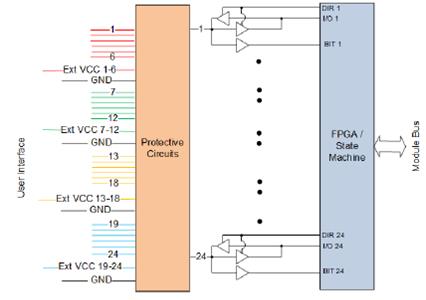
TTL Input
| Input levels | TTL and CMOS compatible, single ended inputs. Each channel incorporates a 100 kΩ pull-down resistor (contact factory regarding special configurations requiring inputs with 100 kΩ pull-up resistor(s)). |
| V in L | ≤ 0.8 V = “0” |
| V in H | ≥ 2.0 V = “1” |
| V in Max. | 5.5 V |
| I in | ± 50µA |
| Read Delay | 300 ns (pending characterization) |
| Debounce | Programmable from 0 to 34.36 sec.; LSB=8 ns. |
TTL Output
| Output Levels | TTL/CMOS, single ended outputs (internal or external Vcc selectable) |
| Drive Capability | V out L: 0.55 V max. Low level output current: 24 mA (sink) V out H: 2.4 V min. High level output current 24 mA (source) |
| Rise/Fall Time | 10 ns into a 50pf load |
| Write Delay | 300 ns (pending characterization) |
| Power | 5 VDC @ 75 mA unloaded (max. 650 mA, with all channels at full source) (pending characterization) |
| Ground | All grounds are common and connected/referenced to system ground |
| Weight | 1.5 oz. (42 g) |
Specifications are subject to change without notice.
PRINCIPLE OF OPERATION
TL1 and its variants, provide up to 24 individual digital TTL/CMOS I/O channels, depending on platform and I/O connector pin availability. TL1 channels 1 through 24 may be set as inputs or outputs. Status and/or interrupts are enabled for each channel to indicate transition on rising edge or transition on falling edge as well as current state. Each TTL/CMOS channel has an internal 100 K-ohm pull-down resistor, which is hardware configurable for 100K pull-up. All inputs are continually hardware scanned as a background operation. Debounce circuits for each channel offer a selectable time delay to eliminate false signals resulting from contact bounce commonly experienced with mechanical relays and switches.
When programmed as outputs, the channels can be set to output the commanded state from either an internally generated 3.3V power supply, or from an externally provided VCC supply (up to 5.5 V max). If an overcurrent condition is detected, the channel will be reset to input mode. All outputs are continually scanned “real-time”, for present status.
The input thresholds are fixed and ratiometric with the VCC supply. If the external VCC supply is configured, the effective input threshold will be dependent on the supplied VCC.
Note
See TTL Strapping Configurations by Module for strapping options.
Automatic Background Built-In Test (BIT)/Diagnostic Capability
The module contains automatic background BIT testing that verifies channel processing (data read or write logic), tests for overcurrent conditions and provides status for threshold signal transitioning. Any failure triggers an Interrupt (if enabled) with the results available in status registers. The testing is totally transparent to the user, requires no external programming and has no effect on the operation of this card. It continually checks that each channel is functional. This capability is accomplished by an additional test comparator that is incorporated into each module. The test comparator checks each channel and is compared against the operational channel. Depending upon the configuration, the Input data read or Output logic written of the operational channel and test comparator must agree or a fault is indicated with the results available in the associated status register. Low-to-High and High-to-Low logic transitions are indicated. There is no independent overcurrent detection. Instead, the BIT detection circuitry is used to infer an overcurrent condition if the output state setting doesn’t match the readback value seen by the input circuitry. For example, a shorted output, causing the read state to be opposite from the expected value would trigger this. If the fault persists beyond the BIT interval stabilization time, the overcurrent protection will kick in and reset the drive output by returning the transceiver to input mode. To reset this condition, a reset command needs to be issued to the Overcurrent Clear register, which will restore drive output and allow the latched status to be reset. This is separate from the reset for the Interrupt Enable Overcurrent register on this module. It is recommended that a reset command is done whenever status is cleared to avoid a non-apparent output reset condition.
Status and Interrupts
The TTL/CMOS Function Module provide registers that indicate faults or events. Refer to “Status and Interrupts Module Manual” for the Principle of Operation description.
User Watchdog Timer Capability
The TTL/CMOS Function Module provide registers that support User Watchdog Timer capability. Refer to “User Watchdog Timer Module Manual” for the Principle of Operation description.
Module Common Registers
The TTL/CMOS Function Module provide module common registers that provide access to module-level bare metal/FPGA revisions & compile times, unique serial number information, and temperature/voltage/current monitoring. Refer to “Module Common Registers Module Manual” for the detailed information.
REGISTER DESCRIPTIONS
The register descriptions provide the register name, Register Offset, Type, Data Range, Read or Write information, Initialized Value, a description of the function and, in most cases, a data table.
Input/Output Registers
| I/O Format | |
| Function: | Sets channels as inputs or outputs. |
| Type: | unsigned binary word (32-bit) |
| Read/Write: | R/W |
| Initialized Value: | 0 |
| Operational Settings: | Write 0 for input (default), 1 for output. |
Note
Power-on default or reset is configured for input. Bit-mapped per channel.
| D31 | D30 | D29 | D28 | D27 | D26 | D25 | D24 | D23 | D22 | D21 | D20 | D19 | D18 | D17 | D16 |
| 0 | 0 | 0 | 0 | 0 | 0 | 0 | 0 | Ch24 | Ch23 | Ch22 | Ch21 | Ch20 | Ch19 | Ch18 | Ch17 |
| D15 | D14 | D13 | D12 | D11 | D10 | D9 | D8 | D7 | D6 | D5 | D4 | D3 | D2 | D1 | D0 |
| Ch16 | Ch15 | Ch14 | Ch13 | Ch12 | Ch11 | Ch10 | Ch9 | Ch8 | Ch7 | Ch6 | Ch5 | Ch4 | Ch3 | Ch2 | Ch1 |
| Read I/O | |
| Function: | Reads High (1) or Low (0) inputs or outputs as defined by internal channel threshold values. |
| Type: | unsigned binary word (32-bit) |
| Read/Write: | R |
| Initialized Value: | N/A |
| Operational Settings: | N/A |
| D31 | D30 | D29 | D28 | D27 | D26 | D25 | D24 | D23 | D22 | D21 | D20 | D19 | D18 | D17 | D16 |
| 0 | 0 | 0 | 0 | 0 | 0 | 0 | 0 | Ch24 | Ch23 | Ch22 | Ch21 | Ch20 | Ch19 | Ch18 | Ch17 |
| D15 | D14 | D13 | D12 | D11 | D10 | D9 | D8 | D7 | D6 | D5 | D4 | D3 | D2 | D1 | D0 |
| Ch16 | Ch15 | Ch14 | Ch13 | Ch12 | Ch11 | Ch10 | Ch9 | Ch8 | Ch7 | Ch6 | Ch5 | Ch4 | Ch3 | Ch2 | Ch1 |
| Write Outputs | |
| Function: | Sets data outputs High (1) or Low (0). |
| Type: | unsigned binary word (32-bit) |
| Read/Write: | R/W |
| Initialized Value: | 0 |
| Operational Settings: | Write 1 for High output; write 0 for Low. |
| D31 | D30 | D29 | D28 | D27 | D26 | D25 | D24 | D23 | D22 | D21 | D20 | D19 | D18 | D17 | D16 |
| 0 | 0 | 0 | 0 | 0 | 0 | 0 | 0 | Ch24 | Ch23 | Ch22 | Ch21 | Ch20 | Ch19 | Ch18 | Ch17 |
| D15 | D14 | D13 | D12 | D11 | D10 | D9 | D8 | D7 | D6 | D5 | D4 | D3 | D2 | D1 | D0 |
| Ch16 | Ch15 | Ch14 | Ch13 | Ch12 | Ch11 | Ch10 | Ch9 | Ch8 | Ch7 | Ch6 | Ch5 | Ch4 | Ch3 | Ch2 | Ch1 |
VCC Bank Registers
| VCC Select | |
| Function: | Enables user selection of external VCC source or internal 3.3 V source for each Channel Bank (6 channels per bank), for applications requiring output voltages other than the internal voltage. |
| Type: | unsigned binary word (32-bit) |
| Data Range: | 0 to 0x0000 000F |
| Read/Write: | R/W |
| Initialized Value: | 0 |
| Operational Settings: | Write 0 for external VCC source or 1 for internal (3.3 V) for each bank. |
Note
Normal operating range for external VCC must be within the range between 1.2 V and 5.5 V (-0.35 V to 6.0 V absolute max. short-term tolerance) with a maximum current source of 30 mA.
Note
For special strapping option; whereby the external VCC is tied to the internal +5 V supply or special internal voltage configurations, contact factory.
| Bit(s) | Name | Description |
| D31:D4 | Reserved | Set Reserved bits to 0. |
| D3 | Configure Bank 4 (Ch 19-24) | 1=Internal (3.3V), 0=External |
| D2 | Configure Bank 3 (Ch 13-18) | 1=Internal (3.3V), 0=External |
| D1 | Configure Bank 2 (Ch 07-12) | 1=Internal (3.3V), 0=External |
| D0 | Configure Bank 1 (Ch 01-06) | 1=Internal (3.3V), 0=External |
| Read VCC Bank | |
| Function: | Read the VCC bank voltage |
| Type: | unsigned binary word (32-bit) |
| Data Range: | 0x0000 0000 to 0x0000 0FFF |
| Read/Write: | R |
| Initialized Value: | N/A |
| Operational Settings: | The Read VCC Bank register reflects the VCC voltage of a bank. The voltage can be calculated using the equation VCC = (0.001221 * register_value) / 0.91. |
Input/Output Control Registers
| Debounce | |
| Function: | When the I/O Format register is set for Input mode, the input signal will have the debounce filtering applied based on this programmed value. This is selectable for each channel. |
| Type: | binary word (32-bit) |
| Data Range: | 0x 0000 0000 to 0x FFFF FFFF |
| Read/Write: | R/W |
| Initialized Value: | 0x10 |
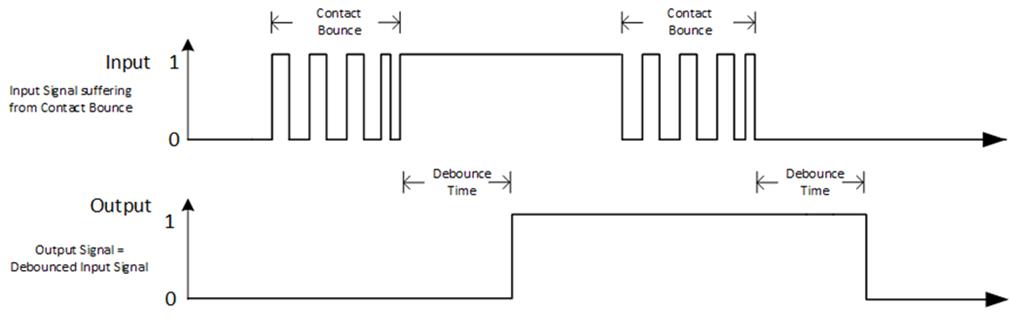
| Operational Settings: | The Debounce register, when programmed for a non-zero value, is used with channels programmed as input to “filter” or “ignore” expected application spurious initial transitions. Enter required debounce time into appropriate channel registers. LSB weight is 8 ns/bit (register may be programmed from 0 (debounce filter inactive) through a maximum of 34.36s (full scale w/ 8 ns resolution). Once a signal level is a logic voltage level period longer than the debounce time (Logic High and Logic Low ), a logic transition is validated. Signal pulse widths less than programmed debounce time are filtered. Once valid, the transition status register flag is set for the channel and the output logic changes state. Enter a value of 0 to disable debounce filtering. Debounce defaults to 0080h upon reset. |
| Overcurrent Reset | |
| Function: | Resets disabled channels in Overcurrent Latched Status register following an overcurrent condition. |
| Type: | unsigned binary word (32-bit) |
| Read/Write: | R/W |
| Initialized Value: | 0 |
| Operational Settings: | 1 is written to reset disabled channels. Processor will write a 0 back to the Overcurrent Reset register when reset process is complete. |
| D31 | D30 | D29 | D28 | D27 | D26 | D25 | D24 | D23 | D22 | D21 | D20 | D19 | D18 | D17 | D16 |
| 0 | 0 | 0 | 0 | 0 | 0 | 0 | 0 | Ch24 | Ch23 | Ch22 | Ch21 | Ch20 | Ch19 | Ch18 | Ch17 |
| D15 | D14 | D13 | D12 | D11 | D10 | D9 | D8 | D7 | D6 | D5 | D4 | D3 | D2 | D1 | D0 |
| Ch16 | Ch15 | Ch14 | Ch13 | Ch12 | Ch11 | Ch10 | Ch9 | Ch8 | Ch7 | Ch6 | Ch5 | Ch4 | Ch3 | Ch2 | Ch1 |
User Watchdog Timer Programming Registers
Refer to “User Watchdog Timer Module Manual” for the register descriptions.
Module Common Registers
Refer to “Module Common Registers Module Manual” for the register descriptions.
General Purpose Status Functions
| BIT Error Interrupt Interval | |
| Function: | Sets up a threshold requirement of “successive” events to accumulate before a BIT Error is generated. Accumulated successive fault detections add +2 to the count and no-fault detections subtract 1 from the count to filter BIT errors prior to an actual interrupt generation. Once the count exceeds this register's value, a BIT error is generated. |
| Type: | unsigned binary word (32-bit) |
| Data Range: | 0x0000 0000 to 0xFFFF FFFF |
| Read/Write: | R/W |
| Initialized Value: | 0x3 |
| Operational Settings: | Write a threshold to filter BIT errors prior to generating a BIT Error. |
Note
Advantageous in “noisy”/unstable application environments or for general filtering purposes.
| D31 | D30 | D29 | D28 | D27 | D26 | D25 | D24 | D23 | D22 | D21 | D20 | D19 | D18 | D17 | D16 |
| 0 | 0 | 0 | 0 | 0 | 0 | 0 | 0 | 0 | 0 | 0 | 0 | 0 | 0 | 0 | 0 |
| D15 | D14 | D13 | D12 | D11 | D10 | D9 | D8 | D7 | D6 | D5 | D4 | D3 | D2 | D1 | D0 |
| D | D | D | D | D | D | D | D | D | D | D | D | D | D | D | D |
| BIT Count Error Clear | |
| Function: | Clears the BIT error. |
| Type: | unsigned binary word (32-bit) |
| Read/Write: | R/W |
| Initialized Value: | 0 |
| Operational Settings: | Write a 1 to clear BIT errors. |
| D31 | D30 | D29 | D28 | D27 | D26 | D25 | D24 | D23 | D22 | D21 | D20 | D19 | D18 | D17 | D16 |
| 0 | 0 | 0 | 0 | 0 | 0 | 0 | 0 | Ch24 | Ch23 | Ch22 | Ch21 | Ch20 | Ch19 | Ch18 | Ch17 |
| D15 | D14 | D13 | D12 | D11 | D10 | D9 | D8 | D7 | D6 | D5 | D4 | D3 | D2 | D1 | D0 |
| Ch16 | Ch15 | Ch14 | Ch13 | Ch12 | Ch11 | Ch10 | Ch9 | Ch8 | Ch7 | Ch6 | Ch5 | Ch4 | Ch3 | Ch2 | Ch1 |
Status and Interrupt Registers
The TTL/CMOS I/O Module provides status registers for BIT, Low-to-High Transition, High-to-Low Transition, and Overcurrent.
BIT Status
There are four registers associated with the BIT Status: Dynamic Status, Latched Status, Interrupt Enable, and Set Edge/Level Interrupt.
| BIT Status | |
| Function: | Sets the corresponding bit associated with the channel's BIT error. |
| Type: | unsigned binary word (32-bits) |
| Data Range: | 0x0000 0000 to 0x00FF FFFF |
| Read/Write: | R (Dynamic), R/W (Latched, Interrupt Enable, Edge/Level Interrupt) |
| Initialized Value: | 0 |
Note
Faults are detected (associated channel(s) bit set to 1) within 10 ms.
| BIT Dynamic Status Register | |||||||||||||||
| BIT Latched Status Register | |||||||||||||||
| BIT Interrupt Enable Register | |||||||||||||||
| BIT Set Edge/Level Interrupt Register | |||||||||||||||
| D31 | D30 | D29 | D28 | D27 | D26 | D25 | D24 | D23 | D22 | D21 | D20 | D19 | D18 | D17 | D16 |
| 0 | 0 | 0 | 0 | 0 | 0 | 0 | 0 | Ch24 | Ch23 | Ch22 | Ch21 | Ch20 | Ch19 | Ch18 | Ch17 |
| D15 | D14 | D13 | D12 | D11 | D10 | D9 | D8 | D7 | D6 | D5 | D4 | D3 | D2 | D1 | D0 |
| Ch16 | Ch15 | Ch14 | Ch13 | Ch12 | Ch11 | Ch10 | Ch9 | Ch8 | Ch7 | Ch6 | Ch5 | Ch4 | Ch3 | Ch2 | Ch1 |
Low-to-High Transition Status
There are four registers associated with the Low-to-High Transition Status: Dynamic Status, Latched Status, Interrupt Enable, and Set Edge/Level Interrupt.
| Low-to-High Transition Status | |
| Function: | Sets the corresponding bit associated with the channel's Low-to-High Transition event. |
| Type: | unsigned binary word (32-bits) |
| Data Range: | 0x0000 0000 to 0x00FF FFFF |
| Read/Write: | R (Dynamic), R/W (Latched, Interrupt Enable, Edge/Level Interrupt) |
| Initialized Value: | 0 |
Note
Considered “momentary” during the actual event when detected. Programmable for level or edge sensing, status is indicated (associated channel(s) bit set to 1) within 40 ns.
Note
Programmable for level or edge sensing, status is indicated (associated channel(s) bit set to 1) within 100 ns.
Note
Transition status follows the value read by the I/O Format register.
| Low-to-High Dynamic Status Register | |||||||||||||||
| Low-to-High Latched Status Register | |||||||||||||||
| Low-to-High Interrupt Enable Register | |||||||||||||||
| Low-to-High Set Edge/Level Interrupt Register | |||||||||||||||
| D31 | D30 | D29 | D28 | D27 | D26 | D25 | D24 | D23 | D22 | D21 | D20 | D19 | D18 | D17 | D16 |
| 0 | 0 | 0 | 0 | 0 | 0 | 0 | 0 | Ch24 | Ch23 | Ch22 | Ch21 | Ch20 | Ch19 | Ch18 | Ch17 |
| D15 | D14 | D13 | D12 | D11 | D10 | D9 | D8 | D7 | D6 | D5 | D4 | D3 | D2 | D1 | D0 |
| Ch16 | Ch15 | Ch14 | Ch13 | Ch12 | Ch11 | Ch10 | Ch9 | Ch8 | Ch7 | Ch6 | Ch5 | Ch4 | Ch3 | Ch2 | Ch1 |
High-to-Low Transition Status
There are four registers associated with the High-to-Low Transition Status: Dynamic Status, Latched Status, Interrupt Enable, and Set Edge/Level Interrupt.
| High-to-Low Transition Status | |
| Function: | Sets the corresponding bit associated with the channel's High-to-Low Transition event. |
| Type: | unsigned binary word (32-bits) |
| Data Range: | 0x0000 0000 to 0x00FF FFFF |
| Read/Write: | R (Dynamic), R/W (Latched, Interrupt Enable, Edge/Level Interrupt) |
| Initialized Value: | 0 |
Note
Considered “momentary” during the actual event when detected. Programmable for level or edge sensing, status is indicated (associated channel(s) bit set to 1) within 40 ns.
Note
Programmable for level or edge sensing, status is indicated (associated channel(s) bit set to 1) within 40 ns.
Note
Transition status follows the value read by the I/O Format register.
| High-to-Low Dynamic Status Register | |||||||||||||||
| High-to-Low Latched Status Register | |||||||||||||||
| High-to-Low Interrupt Enable Register | |||||||||||||||
| High-to-Low Set Edge/Level Interrupt Register | |||||||||||||||
| D31 | D30 | D29 | D28 | D27 | D26 | D25 | D24 | D23 | D22 | D21 | D20 | D19 | D18 | D17 | D16 |
| 0 | 0 | 0 | 0 | 0 | 0 | 0 | 0 | Ch24 | Ch23 | Ch22 | Ch21 | Ch20 | Ch19 | Ch18 | Ch17 |
| D15 | D14 | D13 | D12 | D11 | D10 | D9 | D8 | D7 | D6 | D5 | D4 | D3 | D2 | D1 | D0 |
| Ch16 | Ch15 | Ch14 | Ch13 | Ch12 | Ch11 | Ch10 | Ch9 | Ch8 | Ch7 | Ch6 | Ch5 | Ch4 | Ch3 | Ch2 | Ch1 |
Overcurrent Status
There are four registers associated with the Overcurrent Transition Status: Dynamic Status, Latched Status, Interrupt Enable, and Set Edge/Level Interrupt.
| Overcurrent Status | |
| Function: | Sets the corresponding bit associated with the channel's Overcurrent Error. |
| Type: | unsigned binary word (32-bits) |
| Data Range: | 0x0000 0000 to 0x00FF FFFF |
| Read/Write: | R (Dynamic), R/W (Latched, Interrupt Enable, Edge/Level Interrupt) |
| Initialized Value: | 0 |
Note
Status is indicated (associated channel(s) bit set to 1) within 80 ms.
Note
Channel(s) shut down by overcurrent sensed can be reset by writing to the Overcurrent Reset register.
| Overcurrent Dynamic Status Register | |||||||||||||||
| Overcurrent Latched Status Register | |||||||||||||||
| Overcurrent Interrupt Enable Register | |||||||||||||||
| Overcurrent Set Edge/Level Interrupt Register | |||||||||||||||
| D31 | D30 | D29 | D28 | D27 | D26 | D25 | D24 | D23 | D22 | D21 | D20 | D19 | D18 | D17 | D16 |
| 0 | 0 | 0 | 0 | 0 | 0 | 0 | 0 | Ch24 | Ch23 | Ch22 | Ch21 | Ch20 | Ch19 | Ch18 | Ch17 |
| D15 | D14 | D13 | D12 | D11 | D10 | D9 | D8 | D7 | D6 | D5 | D4 | D3 | D2 | D1 | D0 |
| Ch16 | Ch15 | Ch14 | Ch13 | Ch12 | Ch11 | Ch10 | Ch9 | Ch8 | Ch7 | Ch6 | Ch5 | Ch4 | Ch3 | Ch2 | Ch1 |
User Watchdog Timer Fault Status
The TTL/CMOS Function Module provides registers that support User Watchdog Timer capability. Refer to “User Watchdog Timer Module Manual” for the User Watchdog Timer Fault Status register descriptions.
Interrupt Vector and Steering
When interrupts are enabled, the interrupt vector associated with the specific interrupt can be programmed (typically with a unique number/identifier) such that it can be utilized in the Interrupt Service Routine (ISR) to identify the type of interrupt. When an interrupt occurs, the contents of the Interrupt Vector registers is reported as part of the interrupt mechanism. In addition to specifying the interrupt vector, the interrupt can be directed (“steered”) to the native bus or to the application running on the onboard ARM processor.
Note
The Interrupt Vector and Interrupt Steering registers are mapped to the Motherboard Common Memory and these registers are associated with the Module Slot position (refer to Function Register Map).
| Interrupt Vector | |
| Function: | Set an identifier for the interrupt. |
| Type: | unsigned binary word (32-bit) |
| Data Range: | 0x0000 0000 to 0xFFFF FFFF |
| Read/Write: | R/W |
| Initialized Value: | 0 |
| Operational Settings: | When an interrupt occurs, this value is reported as part of the interrupt mechanism. |
| Interrupt Steering | |
| Function: | Sets where to direct the interrupt. |
| Type: | unsigned binary word (32-bit) |
| Data Range: | See table |
| Read/Write: | R/W |
| Initialized Value: | 0 |
| Operational Settings: | When an interrupt occurs, the interrupt is sent as specified: |
| Direct Interrupt to VME | 1 |
| Direct Interrupt to ARM Processor (via SerDes) (Custom App on ARM or NAI Ethernet Listener App) | 2 |
| Direct Interrupt to PCIe Bus | 5 |
| Direct Interrupt to cPCI Bus | 6 |
FUNCTION REGISTER MAP
KEY
| Configuration/Control |
| Measurement/Status |
| INPUT/OUTPUT REGISTERS | |||||
| NOTE: Base Address - 0x4000 0000 | |||||
| OFFSET | REGISTER NAME | ACCESS | OFFSET | REGISTER NAME | ACCESS |
| 0x1038 | I/O Format | R/W | |||
| 0x1000 | Read I/O | R | 0x1024 | Write Outputs | R/W |
| VCC BANK REGISTERS | |||||
| NOTE: Base Address - 0x4000 0000 | |||||
| OFFSET | REGISTER NAME | ACCESS | OFFSET | REGISTER NAME | ACCESS |
| 0x1020 | Vcc Select | R/W | |||
| 0x1200 | Read Vcc Bank 1 | R | 0x1208 | Read Vcc Bank 3 | R |
| 0x1204 | Read Vcc Bank 2 | R | 0x120C | Read Vcc Bank 4 | R |
| INPUT/OUTPUT CONTROL REGISTERS | |||||
| NOTE: Base Address - 0x4000 0000 | |||||
| OFFSET | REGISTER NAME | ACCESS | OFFSET | REGISTER NAME | ACCESS |
| 0x208C | Debounce Time Ch.1 | R/W | 0x268C | Debounce Time Ch.13 | R/W |
| 0x210C | Debounce Time Ch.2 | R/W | 0x270C | Debounce Time Ch.14 | R/W |
| 0x218C | Debounce Time Ch.3 | R/W | 0x278C | Debounce Time Ch.15 | R/W |
| 0x220C | Debounce Time Ch.4 | R/W | 0x280C | Debounce Time Ch.16 | R/W |
| 0x228C | Debounce Time Ch.5 | R/W | 0x288C | Debounce Time Ch.17 | R/W |
| 0x230C | Debounce Time Ch.6 | R/W | 0x290C | Debounce Time Ch.18 | R/W |
| 0x238C | Debounce Time Ch.7 | R/W | 0x298C | Debounce Time Ch.19 | R/W |
| 0x240C | Debounce Time Ch.8 | R/W | 0x2A0C | Debounce Time Ch.20 | R/W |
| 0x248C | Debounce Time Ch.9 | R/W | 0x2A8C | Debounce Time Ch.21 | R/W |
| 0x250C | Debounce Time Ch.10 | R/W | 0x2B0C | Debounce Time Ch.22 | R/W |
| 0x258C | Debounce Time Ch.11 | R/W | 0x2B8C | Debounce Time Ch.23 | R/W |
| 0x260C | Debounce Time Ch.12 | R/W | 0x2C0C | Debounce Time Ch.24 | R/W |
| 0x1100 | Overcurrent Clear | R/W | |||
| USER WATCHDOG TIMER PROGRAMMING REGISTERS | |||||
| Refer to “User Watchdog Timer Module Manual” for the User Watchdog Timer Status Function Register Map. |
| MODULE COMMON REGISTERS | |||||
| Refer to “Module Common Registers Module Manual” for the Module Common Registers Function Register Map. |
| GENERAL PURPOSE STATUS REGISTERS | |||||
| NOTE: Base Address - 0x4000 0000 | |||||
| OFFSET | REGISTER NAME | ACCESS | OFFSET | REGISTER NAME | ACCESS |
| 0x101C | BIT Error Interrupt Interval | R/W | 0x1014 | BIT Count Error Clear | R/W |
| STATUS REGISTERS | |||||
| *When an event is detected, the bit associated with the event is set in this register and will remain set until the user clears the event bit. Clearing the bit requires writing a 1 back to the specific bit that was set when read (i.e. write-1-to-clear, writing a “1” to a bit set to “1” will set the bit to “0”). | |||||
| NOTE: Base Address - 0x4000 0000 | |||||
| OFFSET | REGISTER NAME | ACCESS | OFFSET | REGISTER NAME | ACCESS |
| BIT | Low-to-High Transition | ||||
| 0x0800 | BIT Dynamic Status | R | 0x0810 | Low-High Transition Dynamic Status | R |
| 0x0804 | BIT Latched Status* | R/W | 0x0814 | Low-High Transition Latched Status* | R/W |
| 0x0808 | BIT Interrupt Enable | R/W | 0x0818 | Lo-Hi Transition Interrupt Enable | R/W |
| 0x080C | BIT Set Edge/Level Interrupt | R/W | 0x081C | Lo-Hi Transition Set Edge/Level Interrupt | R/W |
| High-to-Low Transition | Overcurrent | ||||
| 0x0820 | High-Low Transition Dynamic Status | R | 0x0830 | Overcurrent Dynamic Status | R |
| 0x0824 | High-Low Transition Latched Status* | R/W | 0x0834 | Overcurrent Latched Status* | R/W |
| 0x0828 | Hi-Lo Transition Interrupt Enable | R/W | 0x0838 | Overcurrent Interrupt Enable | R/W |
| 0x082C | Hi-Lo Transition Set Edge/Level Interrupt | R/W | 0x083C | Overcurrent Set Edge/Level Interrupt | R/W |
| INTERRUPT REGISTERS | |||||
| The Interrupt Vector and Interrupt Steering registers are mapped to the Motherboard Memory Space and these addresses are absolute based on the module slot position. In other words, do not apply the Module Address offset to these addresses. | |||||
| OFFSET | REGISTER NAME | ACCESS | OFFSET | REGISTER NAME | ACCESS |
| 0x0500 | Module 1 Interrupt Vector 1 - BIT | R/W | 0x0600 | Module 1 Interrupt Steering 1 - BIT | R/W |
| 0x0504 | Module 1 Interrupt Vector 2 - Low-High | R/W | 0x0604 | Module 1 Interrupt Steering 2 - Low-High | R/W |
| 0x0508 | Module 1 Interrupt Vector 3 - High-Low | R/W | 0x0608 | Module 1 Interrupt Steering 3 - High-Low | R/W |
| 0x050C | Module 1 Interrupt Vector 4 - Overcurrent | R/W | 0x060C | Module 1 Interrupt Steering 4 - Overcurrent | R/W |
| 0x0510 to 0x0568 | Module 1 Interrupt Vector 5-27 - Reserved | R/W | 0x0610 to 0x0668 | Module 1 Interrupt Steering 5-27 - Reserved | R/W |
| 0x056C | Module 1 Interrupt Vector 28 - User Watchdog Timer Fault/Inter-FPGA Failure | R/W | 0x066C | Module 1 Interrupt Steering 28 - User Watchdog Timer Fault/Inter-FPGA Failure | R/W |
| 0x0570 to 0x057C | Module 1 Interrupt Vector 29-32 - Reserved | R/W | 0x0670 to 0x067C | Module 1 Interrupt Steering 29-32 - Reserved | R/W |
| 0x0700 | Module 2 Interrupt Vector 1 - BIT | R/W | 0x0800 | Module 2 Interrupt Steering 1 - BIT | R/W |
| 0x0704 | Module 2 Interrupt Vector 2 - Low-High | R/W | 0x0804 | Module 2 Interrupt Steering 2 - Low-High | R/W |
| 0x0708 | Module 2 Interrupt Vector 3 - High-Low | R/W | 0x0808 | Module 2 Interrupt Steering 3 - High-Low | R/W |
| 0x070C | Module 2 Interrupt Vector 4 - Overcurrent | R/W | 0x080C | Module 2 Interrupt Steering 4 - Overcurrent | R/W |
| 0x0710 to 0x0768 | Module 2 Interrupt Vector 5-27 - Reserved | R/W | 0x0810 to 0x0868 | Module 2 Interrupt Steering 5-27 - Reserved | R/W |
| 0x076C | Module 2 Interrupt Vector 28 - User Watchdog Timer Fault/Inter-FPGA Failure | R/W | 0x086C | Module 2 Interrupt Steering 28 - User Watchdog Timer Fault/Inter-FPGA Failure | R/W |
| 0x0770 to 0x077C | Module 2 Interrupt Vector 29-32 - Reserved | R/W | 0x0870 to 0x087C | Module 2 Interrupt Steering 29-32 - Reserved | R/W |
| 0x0900 | Module 3 Interrupt Vector 1 - BIT | R/W | 0x0A00 | Module 3 Interrupt Steering 1 - BIT | R/W |
| 0x0904 | Module 3 Interrupt Vector 2 - Low-High | R/W | 0x0A04 | Module 3 Interrupt Steering 2 - Low-High | R/W |
| 0x0908 | Module 3 Interrupt Vector 3 - High-Low | R/W | 0x0A08 | Module 3 Interrupt Steering 3 - High-Low | R/W |
| 0x090C | Module 3 Interrupt Vector 4 - Overcurrent | R/W | 0x0A0C | Module 3 Interrupt Steering 4 - Overcurrent | R/W |
| 0x0910 to 0x0968 | Module 3 Interrupt Vector 5-27 - Reserved | R/W | 0x0A10 to 0x0A68 | Module 3 Interrupt Steering 5-27 - Reserved | R/W |
| 0x096C | Module 3 Interrupt Vector 28 - User Watchdog Timer Fault/Inter-FPGA Failure | R/W | 0x0A6C | Module 3 Interrupt Steering 28 - User Watchdog Timer Fault/Inter-FPGA Failure | R/W |
| 0x0970 to 0x097C | Module 3 Interrupt Vector 29-32 - Reserved | R/W | 0x0A70 to 0x0A7C | Module 3 Interrupt Steering 29-32 - Reserved | R/W |
| 0x0B00 | Module 4 Interrupt Vector 1 - BIT | R/W | 0x0C00 | Module 4 Interrupt Steering 1 - BIT | R/W |
| 0x0B04 | Module 4 Interrupt Vector 2 - Low-High | R/W | 0x0C04 | Module 4 Interrupt Steering 2 - Low-High | R/W |
| 0x0B08 | Module 4 Interrupt Vector 3 - High-Low | R/W | 0x0C08 | Module 4 Interrupt Steering 3 - High-Low | R/W |
| 0x0B0C | Module 4 Interrupt Vector 4 - Overcurrent | R/W | 0x0C0C | Module 4 Interrupt Steering 4 - Overcurrent | R/W |
| 0x0B10 to 0x0B68 | Module 4 Interrupt Vector 5-27 - Reserved | R/W | 0x0C10 to 0x0C68 | Module 4 Interrupt Steering 5-27 - Reserved | R/W |
| 0x0B6C | Module 4 Interrupt Vector 28 - User Watchdog Timer Fault/Inter-FPGA Failure | R/W | 0x0C6C | Module 4 Interrupt Steering 28 - User Watchdog Timer Fault/Inter-FPGA Failure | R/W |
| 0x0B70 to 0x0B7C | Module 4 Interrupt Vector 29-32 - Reserved | R/W | 0x0C70 to 0x0C7C | Module 4 Interrupt Steering 29-32 - Reserved | R/W |
| 0x0D00 | Module 5 Interrupt Vector 1 - BIT | R/W | 0x0E00 | Module 5 Interrupt Steering 1 - BIT | R/W |
| 0x0D04 | Module 5 Interrupt Vector 2 - Low-High | R/W | 0x0E04 | Module 5 Interrupt Steering 2 - Low-High | R/W |
| 0x0D08 | Module 5 Interrupt Vector 3 - High-Low | R/W | 0x0E08 | Module 5 Interrupt Steering 3 - High-Low | R/W |
| 0x0D0C | Module 5 Interrupt Vector 4 - Overcurrent | R/W | 0x0E0C | Module 5 Interrupt Steering 4 - Overcurrent | R/W |
| 0x0D10 to 0x0D68 | Module 5 Interrupt Vector 5-27 - Reserved | R/W | 0x0E10 to 0x0E68 | Module 5 Interrupt Steering 5-27 - Reserved | R/W |
| 0x0D6C | Module 5 Interrupt Vector 28 - User Watchdog Timer Fault/Inter-FPGA Failure | R/W | 0x0E6C | Module 5 Interrupt Steering 28 - User Watchdog Timer Fault/Inter-FPGA Failure | R/W |
| 0x0D70 to 0x0D7C | Module 5 Interrupt Vector 29-32 - Reserved | R/W | 0x0E70 to 0x0E7C | Module 5 Interrupt Steering 29-32 - Reserved | R/W |
| 0x0F00 | Module 6 Interrupt Vector 1 - BIT | R/W | 0x1000 | Module 6 Interrupt Steering 1 - BIT | R/W |
| 0x0F04 | Module 6 Interrupt Vector 2 - Low-High | R/W | 0x1004 | Module 6 Interrupt Steering 2 - Low-High | R/W |
| 0x0F08 | Module 6 Interrupt Vector 3 - High-Low | R/W | 0x1008 | Module 6 Interrupt Steering 3 - High-Low | R/W |
| 0x0F0C | Module 6 Interrupt Vector 4 - Overcurrent | R/W | 0x100C | Module 6 Interrupt Steering 4 - Overcurrent | R/W |
| 0x0F10 to 0x0F68 | Module 6 Interrupt Vector 5-27 - Reserved | R/W | 0x1010 to 0x1068 | Module 6 Interrupt Steering 5-27 - Reserved | R/W |
| 0x0F6C | Module 6 Interrupt Vector 28 - User Watchdog Timer Fault/Inter-FPGA Failure | R/W | 0x106C | Module 6 Interrupt Steering 28 - User Watchdog Timer Fault/Inter-FPGA Failure | R/W |
| 0x0F70 to 0x0F7C | Module 6 Interrupt Vector 29-32 - Reserved | R/W | 0x1070 to 0x107C | Module 6 Interrupt Steering 29-32 - Reserved | R/W |
APPENDIX: PIN-OUT DETAILS
Pin-out details (for reference) are shown below, with respect to DATAIO. Additional information on pin-outs can be found in the Motherboard Operational Manuals.
| Module Signal (Ref Only) | 44-Pin I/O | 50-Pin I/O (Mod Slot 1-J3) | 50-Pin I/O (Mod Slot 2-J4) | 50-Pin I/O (Mod Slot 3-J3) | 50-Pin I/O (Mod Slot 3-J4) | TTL/CMOS (TLx) |
| DATIO1 | 2 | 10 | 1 | 2 | IO-CH01 | |
| DATIO2 | 24 | 35 | 26 | 27 | IO-CH02 | |
| DATIO3 | 3 | 11 | 2 | 3 | IO-CH03 | |
| DATIO4 | 25 | 36 | 27 | 28 | IO-CH04 | |
| DATIO5 | 5 | 13 | 4 | 5 | VCC1 (1-6) | |
| DATIO6 | 27 | 38 | 29 | 30 | GND | |
| DATIO7 | 7 | 14 | 5 | 6 | IO-CH07 | |
| DATIO8 | 29 | 39 | 30 | 31 | IO-CH08 | |
| DATIO9 | 8 | 15 | 6 | 7 | IO-CH09 | |
| DATIO10 | 30 | 40 | 31 | 32 | IO-CH10 | |
| DATIO11 | 10 | 17 | 8 | 9 | VCC2 (7-12) | |
| DATIO12 | 32 | 42 | 33 | 34 | GND | |
| DATIO13 | 12 | 18 | 9 | 17 | IO-CH13 | |
| DATIO14 | 34 | 43 | 34 | 42 | IO-CH14 | |
| DATIO15 | 13 | 19 | 10 | 18 | IO-CH15 | |
| DATIO16 | 35 | 44 | 35 | 43 | IO-CH16 | |
| DATIO17 | 15 | 21 | 12 | 20 | VCC3 (13-18) | |
| DATIO18 | 37 | 46 | 37 | 45 | GND | |
| DATIO19 | 17 | 22 | 13 | 21 | IO-CH19 | |
| DATIO20 | 39 | 47 | 38 | 46 | IO-CH20 | |
| DATIO21 | 18 | 23 | 14 | 22 | IO-CH21 | |
| DATIO22 | 40 | 48 | 39 | 47 | IO-CH2 | |
| DATIO23 | 20 | 25 | 16 | 24 | VCC4 (19-24) | |
| DATIO24 | 42 | 50 | 41 | 49 | GND | |
| DATIO25 | 4 | 12 | 3 | 4 | IO-CH05 | |
| DATIO26 | 26 | 37 | 28 | 29 | IO-CH06 | |
| DATIO27 | 9 | 16 | 7 | 8 | IO-CH11 | |
| DATIO28 | 31 | 41 | 32 | 33 | IO-CH12 | |
| DATIO29 | 14 | 20 | 11 | 19 | IO-CH17 | |
| DATIO30 | 36 | 45 | 36 | 44 | IO-CH18 | |
| DATIO31 | 19 | 24 | 15 | 23 | IO-CH23 | |
| DATIO32 | 41 | 49 | 40 | 48 | IO-CH24 | |
| DATIO33 | 6 | VCC1 (1-6) | ||||
| DATIO34 | 28 | GND | ||||
| DATIO35 | 11 | VCC2 (7-12) | ||||
| DATIO36 | 33 | GND | ||||
| DATIO37 | 16 | VCC3 (13-18) | ||||
| DATIO38 | 38 | GND | ||||
| DATIO39 | 21 | VCC4 (19-24) | ||||
| DATIO40 | 43 | GND | ||||
| N/A | - |
DOCS.NAII REVISIONS
| Revision Date | Description |
| 2025-03-13 | Updated module pinout table to add module I/O pinouts for 44- & 50-pin connectors. |
| 2025-04-21 | Updated Debounce high-end spec (from 32.36 sec to 34.36) in both module specifications & Debounce register description. |
| 2025-06-08 | Updated second Introduction paragraph; added third introduction paragraph; formatting updates throughout manual (non-technical changes). |
STATUS AND INTERRUPTS
Status registers indicate the detection of faults or events. The status registers can be channel bit-mapped or event bit-mapped. An example of a channel bit-mapped register is the BIT status register, and an example of an event bit-mapped register is the FIFO status register.
For those status registers that allow interrupts to be generated upon the detection of the fault or the event, there are four registers associated with each status: Dynamic, Latched, Interrupt Enabled, and Set Edge/Level Interrupt.
Dynamic Status: The Dynamic Status register indicates the current condition of the fault or the event. If the fault or the event is momentary, the contents in this register will be clear when the fault or the event goes away. The Dynamic Status register can be polled, however, if the fault or the event is sporadic, it is possible for the indication of the fault or the event to be missed.
Latched Status: The Latched Status register indicates whether the fault or the event has occurred and keeps the state until it is cleared by the user. Reading the Latched Status register is a better alternative to polling the Dynamic Status register because the contents of this register will not clear until the user commands to clear the specific bit(s) associated with the fault or the event in the Latched Status register. Once the status register has been read, the act of writing a 1 back to the applicable status register to any specific bit (channel/event) location will “clear” the bit (set the bit to 0). When clearing the channel/event bits, it is strongly recommended to write back the same bit pattern as read from the Latched Status register. For example, if the channel bit-mapped Latched Status register contains the value 0x0000 0005, which indicates fault/event detection on channel 1 and 3, write the value 0x0000 0005 to the Latched Status register to clear the fault/event status for channel 1 and 3. Writing a “1” to other channels that are not set (example 0x0000 000F) may result in incorrectly “clearing” incoming faults/events for those channels (example, channel 2 and 4).
Interrupt Enable: If interrupts are preferred upon the detection of a fault or an event, enable the specific channel/event interrupt in the Interrupt Enable register. The bits in Interrupt Enable register map to the same bits in the Latched Status register. When a fault or event occurs, an interrupt will be fired. Subsequent interrupts will not trigger until the application acknowledges the fired interrupt by clearing the associated channel/event bit in the Latched Status register. If the interruptible condition is still persistent after clearing the bit, this may retrigger the interrupt depending on the Edge/Level setting.
Set Edge/Level Interrupt: When interrupts are enabled, the condition on retriggering the interrupt after the Latch Register is “cleared” can be specified as “edge” triggered or “level” triggered. Note, the Edge/Level Trigger also affects how the Latched Register value is adjusted after it is “cleared” (see below).
Edge triggered: An interrupt will be retriggered when the Latched Status register change from low (0) to high (1) state. Uses for edge-triggered interrupts would include transition detections (Low-to-High transitions, High-to-Low transitions) or fault detections. After “clearing” an interrupt, another interrupt will not occur until the next transition or the re-occurrence of the fault again.
Level triggered: An interrupt will be generated when the Latched Status register remains at the high (1) state. Level-triggered interrupts are used to indicate that something needs attention.
Interrupt Vector and Steering
When interrupts are enabled, the interrupt vector associated with the specific interrupt can be programmed with a unique number/identifier defined by the user such that it can be utilized in the Interrupt Service Routine (ISR) to identify the type of interrupt. When an interrupt occurs, the contents of the Interrupt Vector registers is reported as part of the interrupt mechanism. In addition to specifying the interrupt vector, the interrupt can be directed (“steered”) to the native bus or to the application running on the onboard ARM processor.
Interrupt Trigger Types
In most applications, limiting the number of interrupts generated is preferred as interrupts are costly, thus choosing the correct Edge/Level interrupt trigger to use is important.
Example 1: Fault detection
This example illustrates interrupt considerations when detecting a fault like an “open” on a line. When an “open” is detected, the system will receive an interrupt. If the “open” on the line is persistent and the trigger is set to “edge”, upon “clearing” the interrupt, the system will not regenerate another interrupt. If, instead, the trigger is set to “level”, upon “clearing” the interrupt, the system will re-generate another interrupt. Thus, in this case, it will be better to set the trigger type to “edge”.
Example 2: Threshold detection
This example illustrates interrupt considerations when detecting an event like reaching or exceeding the “high watermark” threshold value. In a communication device, when the number of elements received in the FIFO reaches the high-watermark threshold, an interrupt will be generated. Normally, the application would read the count of the number of elements in the FIFO and read this number of elements from the FIFO. After reading the FIFO data, the application would “clear” the interrupt. If the trigger type is set to “edge”, another interrupt will be generated only if the number of elements in FIFO goes below the “high watermark” after the “clearing” the interrupt and then fills up to reach the “high watermark” threshold value. Since receiving communication data is inherently asynchronous, it is possible that data can continue to fill the FIFO as the application is pulling data off the FIFO. If, at the time the interrupt is “cleared”, the number of elements in the FIFO is at or above the “high watermark”, no interrupts will be generated. In this case, it will be better to set the trigger type to “level”, as the purpose here is to make sure that the FIFO is serviced when the number of elements exceeds the high watermark threshold value. Thus, upon “clearing” the interrupt, if the number of elements in the FIFO is at or above the “high watermark” threshold value, another interrupt will be generated indicating that the FIFO needs to be serviced.
Dynamic and Latched Status Registers Examples
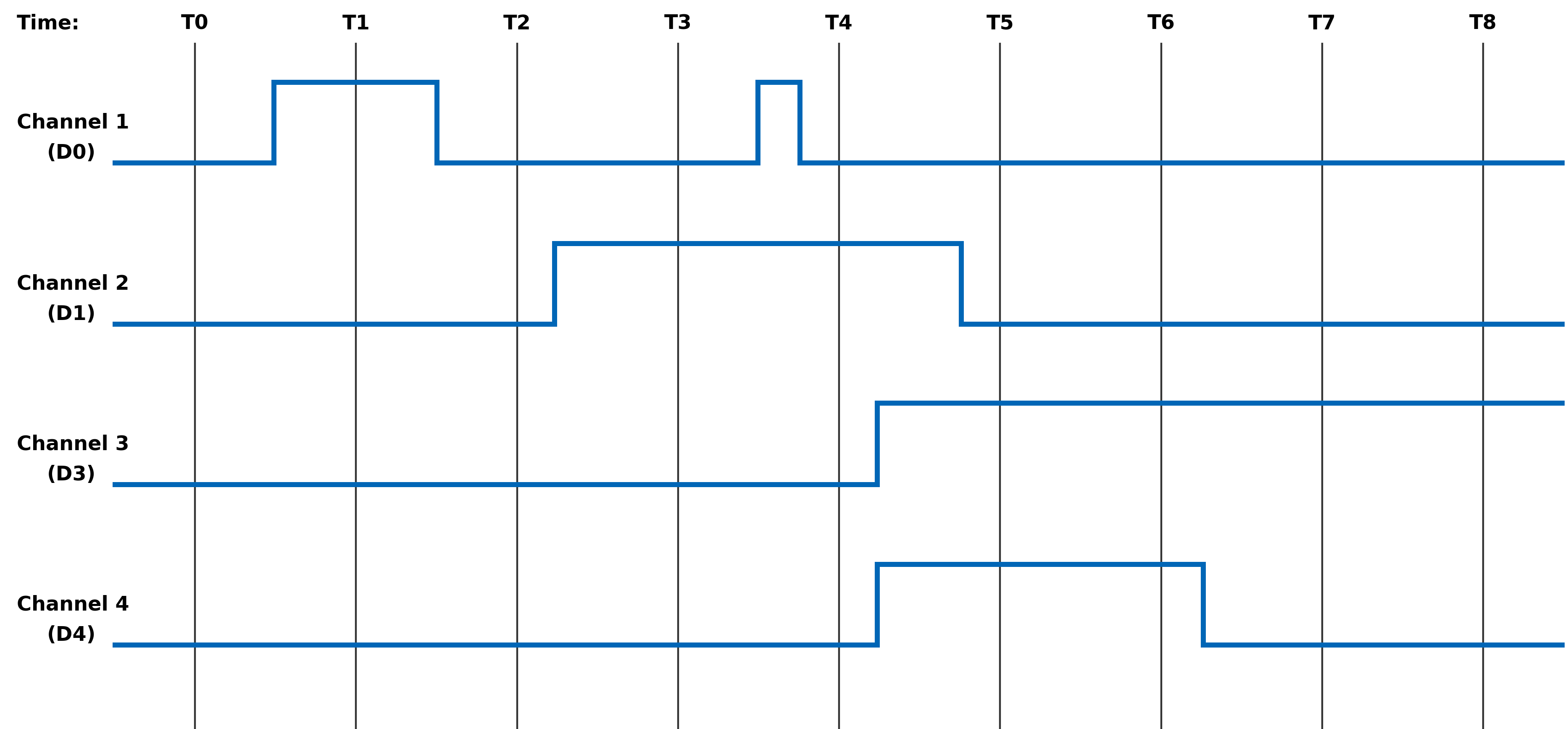
The examples in this section illustrate the differences in behavior of the Dynamic Status and Latched Status registers as well as the differences in behavior of Edge/Level Trigger when the Latched Status register is cleared.
Figure 1. Example of Module's Channel-Mapped Dynamic and Latched Status States
No Clearing of
Latched StatusClearing of Latched Status
(Edge-Triggered)Clearing of Latched Status
(Level-Triggered)Time Dynamic Status Latched Status Action Latched Status Action Latched T0 0x0 0x0 Read Latched Register 0x0 Read Latched Register 0x0 T1 0x1 0x1 Read Latched Register 0x1 0x1 T1 0x1 0x1 Write 0x1 to Latched Register Write 0x1 to Latched Register T1 0x1 0x1 0x0 0x1 T2 0x0 0x1 Read Latched Register 0x0 Read Latched Register 0x1 T2 0x0 0x1 Read Latched Register 0x0 Write 0x1 to Latched Register T2 0x0 0x1 Read Latched Register 0x0 0x0 T3 0x2 0x3 Read Latched Register 0x2 Read Latched Register 0x2 T3 0x2 0x3 Write 0x2 to Latched Register Write 0x2 to Latched Register T3 0x2 0x3 0x0 0x2 T4 0x2 0x3 Read Latched Register 0x1 Read Latched Register 0x3 T4 0x2 0x3 Write 0x1 to Latched Register Write 0x3 to Latched Register T4 0x2 0x3 0x0 0x2 T5 0xC 0xF Read Latched Register 0xC Read Latched Register 0xE T5 0xC 0xF Write 0xC to Latched Register Write 0xE to Latched Register T5 0xC 0xF 0x0 0xC T6 0xC 0xF Read Latched Register 0x0 Read Latched 0xC T6 0xC 0xF Read Latched Register 0x0 Write 0xC to Latched Register T6 0xC 0xF Read Latched Register 0x0 0xC T7 0x4 0xF Read Latched Register 0x0 Read Latched Register 0xC T7 0x4 0xF Read Latched Register 0x0 Write 0xC to Latched Register T7 0x4 0xF Read Latched Register 0x0 0x4 T8 0x4 0xF Read Latched Register 0x0 Read Latched Register 0x4 Interrupt Examples
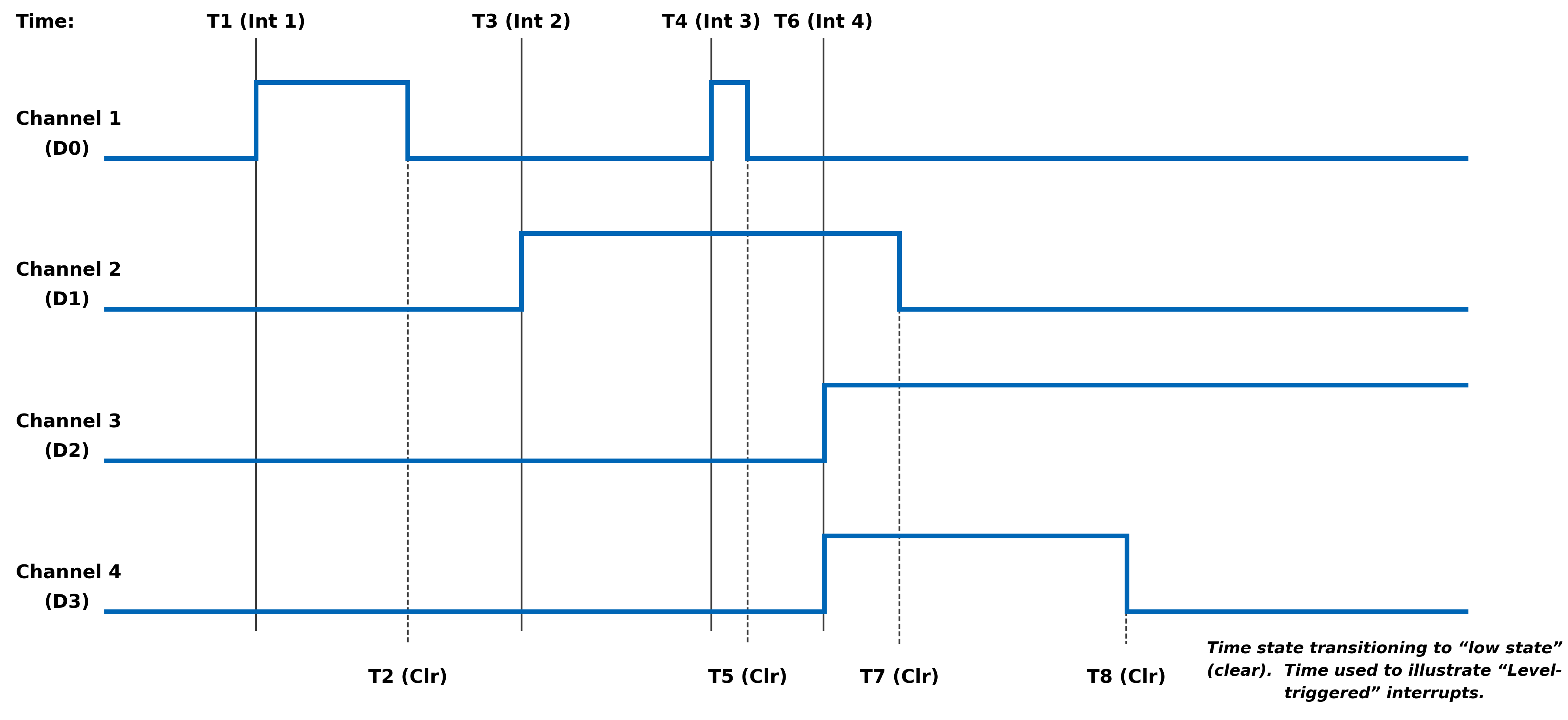
The examples in this section illustrate the interrupt behavior with Edge/Level Trigger.
Figure 2. Illustration of Latched Status State for Module with 4-Channels with Interrupt Enabled
Time Latched Status
(Edge-Triggered -
Clear Multi-Channel)Latched Status
(Edge-Triggered -
Clear Single Channel)Latched Status
(Level-Triggered -
Clear Multi-Channel)Action Latched Action Latched Action Latched T1
(Int 1)Interrupt Generated
Read Latched Registers0x1 Interrupt Generated
Read Latched Registers0x1 Interrupt Generated
Read Latched Registers0x1 T1
(Int 1)Write 0x1 to Latched Register Write 0x1 to Latched Register Write 0x1 to Latched Register T1
(Int 1)0x0 0x0 Interrupt re-triggers
Note, interrupt re-triggers after
each clear until T2.0x1 T3
(Int 2)Interrupt Generated
Read Latched Registers0x2 Interrupt Generated
Read Latched Registers0x2 Interrupt Generated
Read Latched Registers0x2 T3
(Int 2)Write 0x2 to Latched Register Write 0x2 to Latched Register Write 0x2 to Latched Register T3
(Int 2)0x0 0x0 Interrupt re-triggers
Note, interrupt re-triggers after
each clear until T7.0x2 T4
(Int 3)Interrupt Generated
Read Latched Registers0x1 Interrupt Generated
Read Latched Registers0x1 Interrupt Generated
Read Latched Registers0x3 T4
(Int 3)Write 0x1 to Latched Register Write 0x1 to Latched Register Write 0x3 to Latched Register T4
(Int 3)0x0 0x0 Interrupt re-triggers
Note, interrupt re-triggers after
each clear and 0x3 is reported
in Latched Register until T5.0x3 T4
(Int 3)0x0 0x0 Interrupt re-triggers
Note, interrupt re-triggers after
each clear until T7.0x2 T6
(Int 4)Interrupt Generated
Read Latched Registers0xC Interrupt Generated
Read Latched Registers0xC Interrupt Generated
Read Latched Registers0xE T6
(Int 4)Write 0xC to Latched Register Write 0x4 to Latched Register Write 0xE to Latched Register T6
(Int 4)0x0 Interrupt re-triggers
Write 0x8 to Latched Register0x8 Interrupt re-triggers
Note, interrupt re-triggers after
each clear and 0xE is
reported in Latched Register until T7.0xE T6
(Int 4)0x0 0x0 Interrupt re-triggers
Note, interrupt re-triggers after
each clear and 0xC is
reported in Latched Register until T8.0xC T6
(Int 4)0x0 0x0 Interrupt re-triggers
Note, interrupt re-triggers after
each clear and 0x4 is
reported in Latched Register always.0x4 REVISION HISTORY
Motherboard Manual - Status and Interrupts Revision History Revision Revision Date Description C 2021-11-30 C08896; Transition manual to docbuilder format - no technical info change. Link to original
DOCS.NAII REVISIONS Revision Date Description 2026-03-02 Formatting updates to document; no technical changes. 2026-05-18 Fixed formatting issues from conversion to new doc site format. 2026-05-19 Fixed minor formatting issue with Interrupt Examples table structure (removed extraneous cell). 2026-07-15 Revised image files for image quality.
USER WATCHDOG TIMER MODULE MANUAL
User Watchdog Timer Capability
The User Watchdog Timer (UWDT) Capability is available on the following modules:
AC Reference Source Modules
- AC1 - 1 Channel, 2-115 Vrms, 47 Hz - 20kHz
- AC2 - 2 Channels, 2-28 Vrms, 47 Hz - 20kHz
- AC3 - 1 Channel, 28-115 Vrms, 47 Hz - 2.5 kHz
Differential Transceiver Modules
- DF1/DF2 - 16 Channels Differential I/O
Digital-to-Analog (D/A) Modules
- DA1 - 12 Channels, ±10 VDC @ 25 mA, Voltage or Current Control Modes
- DA2 - 16 Channels, ±10 VDC @ 10 mA
- DA3 - 4 Channels, ±40 VDC @ ±100 mA, Voltage or Current Control Modes
- DA4 - 4 Channels, ±80 VDC @ 10 mA
- DA5 - 4 Channels, ±65 VDC or ±2 A, Voltage or Current Control Modes
Digital-to-Synchro/Resolver (D/S) or Digital-to-L( R )VDT (D/LV) Modules
- (Not supported)
Discrete I/O Modules
DT1/DT4 - 24 Channels, Programmable for either input or output, output up to 500 mA per channel from an applied external 3 - 60 VCC source.
DT2/DT5 - 16 Channels, Programmable for either input voltage measurements (±80 V) or as a bi-directional current switch (up to 500 mA per channel).
DT3/DT6 - 4 Channels, Programmable for either input voltage measurements (±100 V) or as a bi-directional current switch (up to 3 A per channel).
TTL/CMOS Modules
- TL1-TL8 - 24 Channels, Programmable for either input or output.
Principle of Operation
The User Watchdog Timer is optionally activated by the applications that require the module’s outputs to be disabled as a failsafe in the event of an application failure or crash. The circuit is designed such that a specific periodic write strobe pattern must be executed by the software to maintain operation and prevent the disablement from taking place.
The User Watchdog Timer is inactive until the application sends an initial strobe by writing the value 0x55AA to the UWDT Strobe register. After activating the User Watchdog Timer, the application must continually strobe the timer within the intervals specified with the configurable UWDT Quiet Time and UWDT Window registers. The timing of the strobes must be consistent with the following rules:
- The application must not strobe during the Quiet time.
- The application must strobe within the Window time.
- The application must not strobe more than once in a single window time.
A violation of any of these rules will trigger a User Watchdog Timer fault and result in shutting down any isolated power supplies and/or disabling any active drive outputs, as applicable for the specific module. Upon a User Watchdog Timer event, recovery to the module shutting down will require the module to be reset.
The Figure 1 and Figure 2 provides an overview and an example with actual values for the User Watchdog Timer Strobes, Quiet Time and Window. As depicted in the diagrams, there are two processes that run in parallel. The Strobe event starts the timer for the beginning of the “Quiet Time”. The timer for the Previous Strobe event continues to run to ensure that no additional Strobes are received within the “Window” associated with the Previous Strobe.
The optimal target for the user watchdog strobes should be at the interval of [Quiet time + ½ Window time] after the previous strobe, which will place the strobe in the center of the window. This affords the greatest margin of safety against unintended disablement in critical operations.
Figure 1. User Watchdog Timer Overview
Figure 2. User Watchdog Timer Example
Figure 3. User Watchdog Timer Failures
Register Descriptions
The register descriptions provide the register name, Type, Data Range, Read or Write information, Initialized Value, and a description of the function.
User Watchdog Timer Registers
The registers associated with the User Watchdog Timer provide the ability to specify the UWDT Quiet Time and the UWDT Window that will be monitored to ensure that EXACTLY ONE User Watchdog Timer (UWDT) Strobe is written within the window.
UWDT Quiet Time Function: Sets Quiet Time value (in microseconds) to use for the User Watchdog Timer Frame. Type: unsigned binary word (32-bit) Data Range: 0 µsec to 2^32 µsec (0x0 to 0xFFFFFFFF) Read/Write: R/W Initialized Value: 0x0 Operational Settings: LSB = 1 µsec. The application must NOT write a strobe in the time between the previous strobe and the end of the Quiet time interval. In addition, the application must write in the UWDT Window EXACTLY ONCE. UWDT Window Function: Writes the window value (in microseconds) to be used for the User Watchdog Timer Frame. Type: unsigned binary word (32-bit) Data Range: 0 µsec to 2^32 µsec (0x0 to 0xFFFFFFFF) Read/Write: R/W Initialized Value: 0x0 Operational Settings: LSB = 1 µsec. The application must write the strobe once within the Window time after the end of the Quiet time interval. The application must write in the UWDT Window EXACTLY ONCE. This setting must be initialized to a non-zero value for operation and should allow sufficient tolerance for strobe timing by the application. UWDT Strobe Function: Writes the strobe value to be use for the User Watchdog Timer Frame. Type: unsigned binary word (32-bit) Data Range: 0x55AA Read/Write: W Initialized Value: 0x0 Operational Settings: At startup, the user watchdog is disabled. Write the value of 0x55AA to this register to start the user watchdog timer monitoring after initial power on or a reset. To prevent a disablement, the application must periodically write the strobe based on the user watchdog timer rules. Status and Interrupt
The modules that are capable of User Watchdog Timer support provide status registers for the User Watchdog Timer.
User Watchdog Timer Status
The status register that contains the User Watchdog Timer Fault information is also used to indicate channel Inter-FPGA failures on modules that have communication between FPGA components. There are four registers associated with the User Watchdog Timer Fault/Inter-FPGA Failure Status: Dynamic, Latched, Interrupt Enable, and Set Edge/Level Interrupt.
Function: Sets the corresponding bit (D31) associated with the channel’s User Watchdog Timer Fault error. Type: unsigned binary word (32-bit) Data Range: 0x0000 0000 to 0xFFFF FFFF Read/Write: R (Dynamic), R/W (Latched, Interrupt Enable, Set Edge/Level Interrupt) Initialized Value: 0
User Watchdog Timer Fault/Inter-FPGA Failure Dynamic Status User Watchdog Timer Fault/Inter-FPGA Failure Latched Status User Watchdog Timer Fault/Inter-FPGA Failure Interrupt Enable User Watchdog Timer Fault/Inter-FPGA Failure Set Edge/Level Interrupt Bit(s) Status Description D31 User Watchdog Timer Fault Status 0 = No Fault + 1 = User Watchdog Timer Fault D30:D0 Reserved for Inter-FPGA Failure Status Channel bit-mapped indicating channel inter FPGA communication failure detection. Interrupt Vector and Steering
When interrupts are enabled, the interrupt vector associated with the specific interrupt can be programmed (typically with a unique number/identifier) such that it can be utilized in the Interrupt Service Routine (ISR) to identify the type of interrupt. When an interrupt occurs, the contents of the Interrupt Vector registers is reported as part of the interrupt mechanism.
In addition to specifying the interrupt vector, the interrupt can be directed (“steered”) to the native bus or to the application running on the onboard ARM processor.
Note
the Interrupt Vector and Interrupt Steering registers are mapped to the Motherboard Common Memory and these registers are associated with the Module Slot position (refer to Function Register Map).
Interrupt Vector Function: Set an identifier for the interrupt. Type: unsigned binary word (32-bit) Data Range: 0 to 0xFFFF FFFF Read/Write: R/W Initialized Value: 0 Operational Settings: When an interrupt occurs, this value is reported as part of the interrupt mechanism. Interrupt Steering Function: Sets where to direct the interrupt. Type: unsigned binary word (32-bit) Data Range: See table Read/Write: R/W Initialized Value: 0 Operational Settings: When an interrupt occurs, the interrupt is sent as specified:
Direct Interrupt to VME 1 Direct Interrupt to ARM Processor (via SerDes)
(Custom App on ARM or NAI Ethernet Listener App)2 Direct Interrupt to PCIe Bus 5 Direct Interrupt to cPCI Bus 6 Function Register Map
KEY
Configuration/Control Measurement/Status
USER WATCHDOG TIMER REGISTERS OFFSET REGISTER NAME ACCESS OFFSET REGISTER NAME ACCESS 0x01C0 UWDT Quiet Time R/W 0x01C4 UWDT Window R/W 0x01C8 UWDT Strobe R/W STATUS REGISTERS *When an event is detected, the bit associated with the event is set in this register and will remain set until the user clears the event bit. Clearing the bit requires writing a 1 back to the specific bit that was set when read (i.e., write-1-to-clear, writing a “1” to a bit set to “1” will set the bit to “0”). OFFSET REGISTER NAME ACCESS OFFSET REGISTER NAME ACCESS 0x09B0 Dynamic Status R 0x09B4 Latched Status* R/W 0x09B8 Interrupt Enable R/W 0x09BC Set Edge/Level Interrupt R/W INTERRUPT REGISTERS The Interrupt Vector and Interrupt Steering registers are mapped to the Motherboard Memory Space and these addresses are absolute based on the module slot position. In other words, do not apply the Module Address offset to these addresses. OFFSET REGISTER NAME ACCESS OFFSET REGISTER NAME ACCESS 0x056C Module 1 Interrupt Vector 28 - User Watchdog Timer Fault/Inter-FPGA Failure R/W 0x066C Module 1 Interrupt Steering 28 - User Watchdog Timer Fault/Inter-FPGA Failure R/W 0x076C Module 2 Interrupt Vector 28 - User Watchdog Timer Fault/Inter-FPGA Failure R/W 0x086C Module 2 Interrupt Steering 28 - User Watchdog Timer Fault/Inter-FPGA Failure R/W 0x096C Module 3 Interrupt Vector 28 - User Watchdog Timer Fault/Inter-FPGA Failure R/W 0x0A6C Module 3 Interrupt Steering 28 - User Watchdog Timer Fault/Inter-FPGA Failure R/W 0x0B6C Module 4 Interrupt Vector 28 - User Watchdog Timer Fault/Inter-FPGA Failure R/W 0x0C6C Module 4 Interrupt Steering 28 - User Watchdog Timer Fault/Inter-FPGA Failure R/W 0x0D6C Module 5 Interrupt Vector 28 - User Watchdog Timer Fault/Inter-FPGA Failure R/W 0x0E6C Module 5 Interrupt Steering 28 - User Watchdog Timer Fault/Inter-FPGA Failure R/W 0x0F6C Module 6 Interrupt Vector 28 - User Watchdog Timer Fault/Inter-FPGA Failure R/W 0x106C Module 6 Interrupt Steering 28 - User Watchdog Timer Fault/Inter-FPGA Failure R/W REVISION HISTORY
Motherboard Manual - Status and Interrupts Revision History Revision Revision Date Description C 2021-11-30 C08896; Transition manual to docbuilder format - no technical info change. DOCS.NAII REVISIONS
Link to original
Revision Date Description 2026-03-02 Formatting updates to document; no technical changes.
MODULE COMMON REGISTERS
The registers described in this document are common to all NAI Generation 5 modules.
Module Information Registers
The registers in this section provide module information such as firmware revisions, capabilities and unique serial number information.
FPGA Version Registers
The FPGA firmware version registers include registers that contain the Revision, Compile Timestamp, SerDes Revision, Template Revision and Zynq Block Revision information.
FPGA Revision Function: FPGA firmware revision Type: unsigned binary word (32-bit) Data Range: 0x0000 0000 to 0xFFFF FFFF Read/Write: R Initialized Value: Value corresponding to the revision of the board's FPGA Operational Settings: The upper 16-bits are the major revision and the lower 16-bits are the minor revision.
D31 D30 D29 D28 D27 D26 D25 D24 D23 D22 D21 D20 D19 D18 D17 D16 Major Revision Number D15 D14 D13 D12 D11 D10 D9 D8 D7 D6 D5 D4 D3 D2 D1 D0 Minor Revision Number
FPGA Compile Timestamp Function: Compile Timestamp for the FPGA firmware. Type: unsigned binary word (32-bit) Data Range: N/A Read/Write: R Initialized Value: Value corresponding to the compile timestamp of the board's FPGA Operational Settings: The 32-bit value represents the Day, Month, Year, Hour, Minutes and Seconds as formatted in the table:
D31 D30 D29 D28 D27 D26 D25 D24 D23 D22 D21 D20 D19 D18 D17 D16 day (5-bits) month (4-bits) year (6-bits) hr D15 D14 D13 D12 D11 D10 D9 D8 D7 D6 D5 D4 D3 D2 D1 D0 hour (5-bits) minutes (6-bits) seconds (6-bits)
FPGA SerDes Revision Function: FPGA SerDes revision Type: unsigned binary word (32-bit) Data Range: 0x0000 0000 to 0xFFFF FFFF Read/Write: R Initialized Value: Value corresponding to the SerDes revision of the board's FPGA Operational Settings: The upper 16-bits are the major revision, and the lower 16-bits are the minor revision.
D31 D30 D29 D28 D27 D26 D25 D24 D23 D22 D21 D20 D19 D18 D17 D16 Major Revision Number D15 D14 D13 D12 D11 D10 D9 D8 D7 D6 D5 D4 D3 D2 D1 D0 Minor Revision Number
FPGA Template Revision Function: FPGA Template revision Type: unsigned binary word (32-bit) Data Range: 0x0000 0000 to 0xFFFF FFFF Read/Write: R Initialized Value: Value corresponding to the template revision of the board's FPGA Operational Settings: The upper 16-bits are the major revision, and the lower 16-bits are the minor revision.
D31 D30 D29 D28 D27 D26 D25 D24 D23 D22 D21 D20 D19 D18 D17 D16 Major Revision Number D15 D14 D13 D12 D11 D10 D9 D8 D7 D6 D5 D4 D3 D2 D1 D0 Minor Revision Number
FPGA Zynq Block Revision Function: FPGA Zynq Block revision Type: unsigned binary word (32-bit) Data Range: 0x0000 0000 to 0xFFFF FFFF Read/Write: R Initialized Value: Value corresponding to the Zynq block revision of the board's FPGA Operational Settings: The upper 16-bits are the major revision, and the lower 16-bits are the minor revision.
D31 D30 D29 D28 D27 D26 D25 D24 D23 D22 D21 D20 D19 D18 D17 D16 Major Revision Number D15 D14 D13 D12 D11 D10 D9 D8 D7 D6 D5 D4 D3 D2 D1 D0 Minor Revision Number Bare Metal Version Registers
The Bare Metal firmware version registers include registers that contain the Revision and Compile Time information.
Bare Metal Revision Function: Bare Metal firmware revision Type: unsigned binary word (32-bit) Data Range: 0x0000 0000 to 0xFFFF FFFF Read/Write: R Initialized Value: Value corresponding to the revision of the board's Bare Metal Operational Settings: The upper 16-bits are the major revision and the lower 16-bits are the minor revision.
D31 D30 D29 D28 D27 D26 D25 D24 D23 D22 D21 D20 D19 D18 D17 D16 Major Revision Number D15 D14 D13 D12 D11 D10 D9 D8 D7 D6 D5 D4 D3 D2 D1 D0 Minor Revision Number
Bare Metal Compile Time Function: Provides an ASCII representation of the Date/Time for the Bare Metal compile time. Type: 24-character ASCII string - Six (6) unsigned binary word (32-bit) Data Range: N/A Read/Write: R Initialized Value: Value corresponding to the ASCII representation of the compile time of the board's Bare Metal Operational Settings: The six 32-bit words provide an ASCII representation of the Date/Time. The hexadecimal values in the field below represent: May 17 2019 at 15:38:32 Note
little-endian order of ASCII values
Word 1 (Ex. 0x2079614D) D31 D30 D29 D28 D27 D26 D25 D24 D23 D22 D21 D20 D19 D18 D17 D16 Space (0x20) Month ('y' - 0x79) D15 D14 D13 D12 D11 D10 D9 D8 D7 D6 D5 D4 D3 D2 D1 D0 Month ('a' - 0x61) Month ('M' - 0x4D) Word 2 (Ex. 0x32203731) D31 D30 D29 D28 D27 D26 D25 D24 D23 D22 D21 D20 D19 D18 D17 D16 Year ('2' - 0x32) Space (0x20) D15 D14 D13 D12 D11 D10 D9 D8 D7 D6 D5 D4 D3 D2 D1 D0 Day ('7' - 0x37) Day ('1' - 0x31) Word 3 (Ex. 0x20393130) D31 D30 D29 D28 D27 D26 D25 D24 D23 D22 D21 D20 D19 D18 D17 D16 Space (0x20) Year ('9' - 0x39) D15 D14 D13 D12 D11 D10 D9 D8 D7 D6 D5 D4 D3 D2 D1 D0 Year ('1' - 0x31) Year ('0' - 0x30) Word 4 (Ex. 0x31207461) D31 D30 D29 D28 D27 D26 D25 D24 D23 D22 D21 D20 D19 D18 D17 D16 Hour ('1' - 0x31) Space (0x20) D15 D14 D13 D12 D11 D10 D9 D8 D7 D6 D5 D4 D3 D2 D1 D0 'a' (0x74) 't' (0x61) Word 5 (Ex. 0x38333A35) D31 D30 D29 D28 D27 D26 D25 D24 D23 D22 D21 D20 D19 D18 D17 D16 Minute ('8' - 0x38) Minute ('3' - 0x33) D15 D14 D13 D12 D11 D10 D9 D8 D7 D6 D5 D4 D3 D2 D1 D0 ':' (0x3A) Hour ('5' - 0x35) Word 6 (Ex. 0x0032333A) D31 D30 D29 D28 D27 D26 D25 D24 D23 D22 D21 D20 D19 D18 D17 D16 NULL (0x00) Seconds ('2' - 0x32) D15 D14 D13 D12 D11 D10 D9 D8 D7 D6 D5 D4 D3 D2 D1 D0 Seconds ('3' - 0x33) ':' (0x3A) FSBL Version Registers
The FSBL version registers include registers that contain the Revision and Compile Time information for the First Stage Boot Loader (FSBL).
FSBL Revision Function: FSBL firmware revision Type: unsigned binary word (32-bit) Data Range: 0x0000 0000 to 0xFFFF FFFF Read/Write: R Initialized Value: Value corresponding to the revision of the board's FSBL Operational Settings: The upper 16-bits are the major revision, and the lower 16-bits are the minor revision.
D31 D30 D29 D28 D27 D26 D25 D24 D23 D22 D21 D20 D19 D18 D17 D16 Major Revision Number D15 D14 D13 D12 D11 D10 D9 D8 D7 D6 D5 D4 D3 D2 D1 D0 Minor Revision Number
FSBL Compile Time Function: Provides an ASCII representation of the Date/Time for the FSBL compile time. Type: 24-character ASCII string - Six (6) unsigned binary word (32-bit) Data Range: N/A Read/Write: R Initialized Value: Value corresponding to the ASCII representation of the Compile Time of the board's FSBL Operational Settings: The six 32-bit words provide an ASCII representation of the Date/Time. The hexadecimal values in the field below represent: May 17 2019 at 15:38:32
Note
little-endian order of ASCII values
Word 1 (Ex. 0x2079614D) D31 D30 D29 D28 D27 D26 D25 D24 D23 D22 D21 D20 D19 D18 D17 D16 Space (0x20) Month ('y' - 0x79) D15 D14 D13 D12 D11 D10 D9 D8 D7 D6 D5 D4 D3 D2 D1 D0 Month ('a' - 0x61) Month ('M' - 0x4D) Word 2 (Ex. 0x32203731) D31 D30 D29 D28 D27 D26 D25 D24 D23 D22 D21 D20 D19 D18 D17 D16 Year ('2' - 0x32) Space (0x20) D15 D14 D13 D12 D11 D10 D9 D8 D7 D6 D5 D4 D3 D2 D1 D0 Day ('7' - 0x37) Day ('1' - 0x31) Word 3 (Ex. 0x20393130) D31 D30 D29 D28 D27 D26 D25 D24 D23 D22 D21 D20 D19 D18 D17 D16 Space (0x20) Year ('9' - 0x39) D15 D14 D13 D12 D11 D10 D9 D8 D7 D6 D5 D4 D3 D2 D1 D0 Year ('1' - 0x31) Year ('0' - 0x30) Word 4 (Ex. 0x31207461) D31 D30 D29 D28 D27 D26 D25 D24 D23 D22 D21 D20 D19 D18 D17 D16 Hour ('1' - 0x31) Space (0x20) D15 D14 D13 D12 D11 D10 D9 D8 D7 D6 D5 D4 D3 D2 D1 D0 'a' (0x74) 't' (0x61) Word 5 (Ex. 0x38333A35) D31 D30 D29 D28 D27 D26 D25 D24 D23 D22 D21 D20 D19 D18 D17 D16 Minute ('8' - 0x38) Minute ('3' - 0x33) D15 D14 D13 D12 D11 D10 D9 D8 D7 D6 D5 D4 D3 D2 D1 D0 ':' (0x3A) Hour ('5' - 0x35) Word 6 (Ex. 0x0032333A) D31 D30 D29 D28 D27 D26 D25 D24 D23 D22 D21 D20 D19 D18 D17 D16 NULL (0x00) Seconds ('2' - 0x32) D15 D14 D13 D12 D11 D10 D9 D8 D7 D6 D5 D4 D3 D2 D1 D0 Seconds ('3' - 0x33) ':' (0x3A) Module Serial Number Registers
The Module Serial Number registers include registers that contain the Serial Numbers for the Interface Board and the Functional Board of the module.
Interface Board Serial Number Function: Unique 128-bit identifier used to identify the interface board. Type: 16-character ASCII string - Four (4) unsigned binary words (32-bit) Data Range: N/A Read/Write: R Initialized Value: Serial number of the interface board Operational Settings: This register is for information purposes only.
Functional Board Serial Number Function: Unique 128-bit identifier used to identify the functional board. Type: 16-character ASCII string - Four (4) unsigned binary words (32-bit) Data Range: N/A Read/Write: R Initialized Value: Serial number of the functional board Operational Settings: This register is for information purposes only.
Module Capability Function: Provides indication for whether or not the module can support the following: SerDes block reads, SerDes FIFO block reads, SerDes packing (combining two 16-bit values into one 32-bit value) and floating point representation. The purpose for block access and packing is to improve the performance of accessing larger amounts of data over the SerDes interface. Type: unsigned binary word (32-bit) Data Range: 0x0000 0000 to 0x0000 0107 Read/Write: R Initialized Value: 0x0000 0107 Operational Settings: A “1” in the bit associated with the capability indicates that it is supported.
D31 D30 D29 D28 D27 D26 D25 D24 D23 D22 D21 D20 D19 D18 D17 D16 0 0 0 0 0 0 0 0 0 0 0 0 0 0 0 0 D15 D14 D13 D12 D11 D10 D9 D8 D7 D6 D5 D4 D3 D2 D1 D0 0 0 0 0 0 0 0 Flt-Pt 0 0 0 0 0 Pack FIFO Blk Blk
Module Memory Map Revision Function: Module Memory Map revision Type: unsigned binary word (32-bit) Data Range: 0x0000 0000 to 0xFFFF FFFF Read/Write: R Initialized Value: Value corresponding to the Module Memory Map Revision Operational Settings: The upper 16-bits are the major revision and the lower 16-bits are the minor revision.
D31 D30 D29 D28 D27 D26 D25 D24 D23 D22 D21 D20 D19 D18 D17 D16 Major Revision Number D15 D14 D13 D12 D11 D10 D9 D8 D7 D6 D5 D4 D3 D2 D1 D0 Minor Revision Number Module Measurement Registers
The registers in this section provide module temperature measurement information.
Temperature Readings Registers
The temperature registers provide the current, maximum (from power-up) and minimum (from power-up) Zynq and PCB temperatures.
Interface Board Current Temperature Function: Measured PCB and Zynq Core temperatures on Interface Board. Type: signed byte (8-bits) for PCB and signed byte (8-bits) for Zynq core temperatures Data Range: 0x0000 0000 to 0x0000 FFFF Read/Write: R Initialized Value: Value corresponding to the measured PCB and Zynq core temperatures based on the table below Operational Settings: The upper 16-bits are not used, and the lower 16-bits are the PCB and Zynq Core Temperatures. For example, if the register contains the value 0x0000 202C, this represents PCB Temperature = 32° Celsius and Zynq Temperature = 44° Celsius.
D31 D30 D29 D28 D27 D26 D25 D24 D23 D22 D21 D20 D19 D18 D17 D16 0 0 0 0 0 0 0 0 0 0 0 0 0 0 0 0 D15 D14 D13 D12 D11 D10 D9 D8 D7 D6 D5 D4 D3 D2 D1 D0 PCB Temperature Zynq Core Temperature
Functional Board Current Temperature Function: Measured PCB temperature on Functional Board. Type: signed byte (8-bits) for PCB Data Range: 0x0000 0000 to 0x0000 00FF Read/Write: R Initialized Value: Value corresponding to the measured PCB on the table below Operational Settings: The upper 24-bits are not used, and the lower 8-bits are the PCB Temperature. For example, if the register contains the value 0x0000 0019, this represents PCB Temperature = 25° Celsius.
D31 D30 D29 D28 D27 D26 D25 D24 D23 D22 D21 D20 D19 D18 D17 D16 0 0 0 0 0 0 0 0 0 0 0 0 0 0 0 0 D15 D14 D13 D12 D11 D10 D9 D8 D7 D6 D5 D4 D3 D2 D1 D0 0 0 0 0 0 0 0 0 PCB Temperature
Interface Board Maximum Temperature Function: Maximum PCB and Zynq Core temperatures on Interface Board since power-on. Type: signed byte (8-bits) for PCB and signed byte (8-bits) for Zynq core temperatures Data Range: 0x0000 0000 to 0x0000 FFFF Read/Write: R Initialized Value: Value corresponding to the maximum measured PCB and Zynq core temperatures since power-on based on the table below Operational Settings: The upper 16-bits are not used, and the lower 16-bits are the maximum PCB and Zynq Core Temperatures. For example, if the register contains the value 0x0000 5569, this represents maximum PCB Temperature = 85° Celsius and maximum Zynq Temperature = 105° Celsius.
D31 D30 D29 D28 D27 D26 D25 D24 D23 D22 D21 D20 D19 D18 D17 D16 0 0 0 0 0 0 0 0 0 0 0 0 0 0 0 0 D15 D14 D13 D12 D11 D10 D9 D8 D7 D6 D5 D4 D3 D2 D1 D0 PCB Temperature Zynq Core Temperature
Interface Board Minimum Temperature Function: Minimum PCB and Zynq Core temperatures on Interface Board since power-on. Type: signed byte (8-bits) for PCB and signed byte (8-bits) for Zynq core temperatures Data Range: 0x0000 0000 to 0x0000 FFFF Read/Write: R Initialized Value: Value corresponding to the minimum measured PCB and Zynq core temperatures since power-on based on the table below Operational Settings: The upper 16-bits are not used, and the lower 16-bits are the minimum PCB and Zynq Core Temperatures. For example, if the register contains the value 0x0000 D8E7, this represents minimum PCB Temperature = -40° Celsius and minimum Zynq Temperature = -25° Celsius.
D31 D30 D29 D28 D27 D26 D25 D24 D23 D22 D21 D20 D19 D18 D17 D16 0 0 0 0 0 0 0 0 0 0 0 0 0 0 0 0 D15 D14 D13 D12 D11 D10 D9 D8 D7 D6 D5 D4 D3 D2 D1 D0 PCB Temperature Zynq Core Temperature
Functional Board Maximum Temperature Function: Maximum PCB temperature on Functional Board since power-on. Type: signed byte (8-bits) for PCB Data Range: 0x0000 0000 to 0x0000 00FF Read/Write: R Initialized Value: Value corresponding to the measured PCB on the table below Operational Settings: The upper 24-bits are not used, and the lower 8-bits are the PCB Temperature. For example, if the register contains the value 0x0000 0055, this represents PCB Temperature = 85° Celsius.
D31 D30 D29 D28 D27 D26 D25 D24 D23 D22 D21 D20 D19 D18 D17 D16 0 0 0 0 0 0 0 0 0 0 0 0 0 0 0 0 D15 D14 D13 D12 D11 D10 D9 D8 D7 D6 D5 D4 D3 D2 D1 D0 0 0 0 0 0 0 0 0 PCB Temperature
Functional Board Minimum Temperature Function: Minimum PCB temperature on Functional Board since power-on. Type: signed byte (8-bits) for PCB Data Range: 0x0000 0000 to 0x0000 00FF Read/Write: R Initialized Value: Value corresponding to the measured PCB on the table below Operational Settings: The upper 24-bits are not used, and the lower 8-bits are the PCB Temperature. For example, if the register contains the value 0x0000 00D8, this represents PCB Temperature = -40° Celsius.
D31 D30 D29 D28 D27 D26 D25 D24 D23 D22 D21 D20 D19 D18 D17 D16 0 0 0 0 0 0 0 0 0 0 0 0 0 0 0 0 D15 D14 D13 D12 D11 D10 D9 D8 D7 D6 D5 D4 D3 D2 D1 D0 0 0 0 0 0 0 0 0 PCB Temperature Higher Precision Temperature Readings Registers
These registers provide higher precision readings of the current Zynq and PCB temperatures.
Higher Precision Zynq Core Temperature Function: Higher precision measured Zynq Core temperature on Interface Board. Type: signed word (16-bits) for integer part and unsigned word (16-bits) for fractional part Data Range: 0x0000 0000 to 0xFFFF FFFF Read/Write: R Initialized Value: Measured Zynq Core temperature on Interface Board Operational Settings: The upper 16-bits represent the signed integer part of the temperature and the lower 16-bits represent the fractional part of the temperature with the resolution of 1/1000 of degree Celsius. For example, if the register contains the value 0x002B 0271, this represents Zynq Core Temperature = 43.625° Celsius, and value 0xFFF6 0177 represents -10.375° Celsius.
D31 D30 D29 D28 D27 D26 D25 D24 D23 D22 D21 D20 D19 D18 D17 D16 Signed Integer Part of Temperature D15 D14 D13 D12 D11 D10 D9 D8 D7 D6 D5 D4 D3 D2 D1 D0 Fractional Part of Temperature
Higher Precision Interface PCB Temperature Function: Higher precision measured Interface PCB temperature. Type: signed word (16-bits) for integer part and unsigned word (16-bits) for fractional part Data Range: 0x0000 0000 to 0xFFFF FFFF Read/Write: R Initialized Value: Measured Interface PCB temperature Operational Settings: The upper 16-bits represent the signed integer part of the temperature and the lower 16-bits represent the fractional part of the temperature with the resolution of 1/1000 of degree Celsius. For example, if the register contains the value 0x0020 007D, this represents Interface PCB Temperature = 32.125° Celsius, and value 0xFFE8 036B represents -24.875° Celsius.
D31 D30 D29 D28 D27 D26 D25 D24 D23 D22 D21 D20 D19 D18 D17 D16 Signed Integer Part of Temperature D15 D14 D13 D12 D11 D10 D9 D8 D7 D6 D5 D4 D3 D2 D1 D0 Fractional Part of Temperature
Higher Precision Functional PCB Temperature Function: Higher precision measured Functional PCB temperature. Type: signed word (16-bits) for integer part and unsigned word (16-bits) for fractional part Data Range: 0x0000 0000 to 0xFFFF FFFF Read/Write: R Initialized Value: Measured Functional PCB temperature Operational Settings: The upper 16-bits represent the signed integer part of the temperature and the lower 16-bits represent the fractional part of the temperature with the resolution of 1/100 of degree Celsius. For example, if the register contains the value 0x0018 004B, this represents Functional PCB Temperature = 24.75° Celsius, and value 0xFFD9 0019 represents -39.25° Celsius.
D31 D30 D29 D28 D27 D26 D25 D24 D23 D22 D21 D20 D19 D18 D17 D16 Signed Integer Part of Temperature D15 D14 D13 D12 D11 D10 D9 D8 D7 D6 D5 D4 D3 D2 D1 D0 Fractional Part of Temperature Module Health Monitoring Registers
The registers in this section provide module temperature measurement information. If the temperature measurements reaches the Lower Critical or Upper Critical conditions, the module will automatically reset itself to prevent damage to the hardware.
Module Sensor Summary Status Function: The corresponding sensor bit is set if the sensor has crossed any of its thresholds. Type: unsigned binary word (32-bits) Data Range: See table below Read/Write: R Initialized Value: 0 Operational Settings: This register provides a summary for module sensors. When the corresponding sensor bit is set, the Sensor Threshold Status register for that sensor will indicate the threshold condition that triggered the event.
Bit(s) Sensor D31:D6 Reserved D5 Functional Board PCB Temperature D4 Interface Board PCB Temperature D3:D0 Reserved Module Sensor Registers
The registers listed in this section apply to each module sensor listed for the Module Sensor Summary Status register. Each individual sensor register provides a group of registers for monitoring module temperatures readings. From these registers, a user can read the current temperature of the sensor in addition to the minimum and maximum temperature readings since power-up. Upper and lower critical/warning temperature thresholds can be set and monitored from these registers. When a programmed temperature threshold is crossed, the Sensor Threshold Status register will set the corresponding bit for that threshold. The figure below shows the functionality of this group of registers when accessing the Interface Board PCB Temperature sensor as an example.
Sensor Threshold Status Function: Reflects which threshold has been crossed Type: unsigned binary word (32-bits) Data Range: See table below Read/Write: R Initialized Value: 0 Operational Settings: The associated bit is set when the sensor reading exceed the corresponding threshold settings.
Bit(s) Description D31:D4 Reserved D3 Exceeded Upper Critical Threshold D2 Exceeded Upper Warning Threshold D1 Exceeded Lower Critical Threshold D0 Exceeded Lower Warning Threshold
Sensor Current Reading Function: Reflects current reading of temperature sensor Type: Single Precision Floating Point Value (IEEE-754) Data Range: Single Precision Floating Point Value (IEEE-754) Read/Write: R Initialized Value: N/A Operational Settings: The register represents current sensor reading as a single precision floating point value. For example, for a temperature sensor, register value 0x41C6 0000 represents temperature = 24.75° Celsius.
Sensor Minimum Reading Function: Reflects minimum value of temperature sensor since power up Type: Single Precision Floating Point Value (IEEE-754) Data Range: Single Precision Floating Point Value (IEEE-754) Read/Write: R Initialized Value: N/A Operational Settings: The register represents minimum sensor value as a single precision floating point value. For example, for a temperature sensor, register value 0x41C6 0000 represents temperature = 24.75° Celsius.
Sensor Maximum Reading Function: Reflects maximum value of temperature sensor since power up Type: Single Precision Floating Point Value (IEEE-754) Data Range: Single Precision Floating Point Value (IEEE-754) Read/Write: R Initialized Value: N/A Operational Settings: The register represents maximum sensor value as a single precision floating point value. For example, for a temperature sensor, register value 0x41C6 0000 represents temperature = 24.75° Celsius.
Sensor Lower Warning Threshold Function: Reflects lower warning threshold of temperature sensor Type: Single Precision Floating Point Value (IEEE-754) Data Range: Single Precision Floating Point Value (IEEE-754) Read/Write: R/W Initialized Value: Default lower warning threshold (value dependent on specific sensor) Operational Settings: The register represents sensor lower warning threshold as a single precision floating point value. For example, for a temperature sensor, register value 0xC220 0000 represents temperature = -40.0° Celsius.
Sensor Lower Critical Threshold Function: Reflects lower critical threshold of temperature sensor Type: Single Precision Floating Point Value (IEEE-754) Data Range: Single Precision Floating Point Value (IEEE-754) Read/Write: R/W Initialized Value: Default lower critical threshold (value dependent on specific sensor) Operational Settings: The register represents sensor lower critical threshold as a single precision floating point value. For example, for a temperature sensor, register value 0xC25C 0000 represents temperature = -55.0° Celsius.
Sensor Upper Warning Threshold Function: Reflects upper warning threshold of temperature sensor Type: Single Precision Floating Point Value (IEEE-754) Data Range: Single Precision Floating Point Value (IEEE-754) Read/Write: R/W Initialized Value: Default upper warning threshold (value dependent on specific sensor) Operational Settings: The register represents sensor upper warning threshold as a single precision floating point value. For example, for a temperature sensor, register value 0x42AA 0000 represents temperature = 85.0° Celsius.
Sensor Upper Critical Threshold Function: Reflects upper critical threshold of temperature sensor Type: Single Precision Floating Point Value (IEEE-754) Data Range: Single Precision Floating Point Value (IEEE-754) Read/Write: R/W Initialized Value: Default upper critical threshold (value dependent on specific sensor) Operational Settings: The register represents sensor upper critical threshold as a single precision floating point value. For example, for a temperature sensor, register value 0x42FA 0000 represents temperature = 125.0° Celsius. FUNCTION REGISTER MAP
KEY
Configuration/Control Measurement/Status/Board Information
MODULE INFORMATION REGISTERS OFFSET REGISTER NAME ACCESS OFFSET REGISTER NAME ACCESS 0x003C FPGA Revision R 0x0074 Bare Metal Revision R 0x0030 FPGA Compile Timestamp R 0x0080 Bare Metal Compile Time (Bit 0-31) R 0x0034 FPGA SerDes Revision R 0x0084 Bare Metal Compile Time (Bit 32-63) R 0x0038 FPGA Template Revision R 0x0088 Bare Metal Compile Time (Bit 64-95) R 0x0040 FPGA Zynq Block Revision R 0x008C Bare Metal Compile Time (Bit 96-127) R 0x0090 Bare Metal Compile Time (Bit 128-159) R 0x0094 Bare Metal Compile Time (Bit 160-191) R 0x007C FSBL Revision R 0x00B0 FSBL Compile Time (Bit 0-31) R 0x00B4 FSBL Compile Time (Bit 32-63) R 0x00B8 FSBL Compile Time (Bit 64-95) R 0x00BC FSBL Compile Time (Bit 96-127) R 0x00C0 FSBL Compile Time (Bit 128-159) R 0x00C4 FSBL Compile Time (Bit 160-191) R 0x0000 Interface Board Serial Number (Bit 0-31) R 0x0010 Functional Board Serial Number (Bit 0-31) R 0x0034 Interface Board Serial Number (Bit 32-63) R 0x0014 Functional Board Serial Number (Bit 32-63) R 0x0008 Interface Board Serial Number (Bit 64-95) R 0x0018 Functional Board Serial Number (Bit 64-95) R 0x000C Interface Board Serial Number (Bit 96-127) R 0x001C Functional Board Serial Number (Bit 96-127) R 0x0070 Module Capability R 0x01FC Module Memory Map Revision R
MODULE MEASUREMENTS REGISTERS OFFSET REGISTER NAME ACCESS OFFSET REGISTER NAME ACCESS 0x0200 Interface Board PCB/Zynq Current Temp R 0x0208 Functional Board PCB Current Temp R 0x0218 Interface Board PCB/Zynq Max Temp R 0x0228 Functional Board PCB Max Temp R 0x0220 Interface Board PCB/Zynq Min Temp R 0x0230 Functional Board PCB Min Temp R 0x02C0 Higher Precision Zynq Core Temperature R 0x02C4 Higher Precision Interface PCB Temperature R 0x02E0 Higher Precision Functional PCB Temperature R
MODULE HEALTH MONITORING REGISTERS OFFSET REGISTER NAME ACCESS OFFSET REGISTER NAME ACCESS 0x07F8 Module Sensor Summary Status R
REVISION HISTORY
Motherboard Manual - Module Common Registers Revision History Revision Revision Date Description C 2023-08-11 ECO C10649, initial release of module common registers manual. C1 2024-05-15 ECO C11522, removed Zynq Core/Aux/DDR Voltage register descriptions from Module Measurement Registers. Pg.16, updated Module Sensor Summary Status register to add PS references; updated Bit Table to change voltage/current bits to 'reserved'. Pg.16, updated Module/Power Supply Sensor Registers description to better describe register functionality and to add figure. Pg.17, added 'Exceeded' to threshold bit descriptions. Pg.17-18, removed voltage/current references from sensor descriptions. Pg.20, removed Zynq Core/Aux/DDR Voltage register offsets from Module Measurement Registers. Pg.20, updated Module Health Monitoring Registers offset tables. C2 2024-07-10 ECO C11701, pg.16, updated Module Sensor Summary Status register to remove PS references;updated Bit Table to change PS temperature bits to 'reserved'. Pg.16, updated Module SensorRegisters description to remove PS references. Pg.20, updated Module Health MonitoringRegisters offset tables to remove PS temperature register offsets. Link to original
DOCS.NAII REVISIONS Revision Date Description 2025-11-05 Corrected register offsets for Interface Board Min Temp and Function Board Min & Max Temps. 2026-03-02 Formatting updates to document; no technical changes. 2026-05-20 Minor formatting fixes (non-technical changes). 2026-07-15 Updated images for online quality; minor additional formatting updates (no technical changes).


NAI Cares
North Atlantic Industries (NAI) is a leading independent supplier of Embedded I/O Boards, Single Board Computers, Rugged Power Supplies, Embedded Systems and Motion Simulation and Measurement Instruments for the Military, Aerospace and Industrial Industries. We accelerate our clients’ time-to-mission with a unique approach based on a Configurable Open Systems Architecture™ (COSA®) that delivers the best of both worlds: custom solutions from standard COTS components.
We have built a reputation by listening to our customers, understanding their needs, and designing, testing and delivering board and system-level products for their most demanding air, land and sea requirements. If you have any applications or questions regarding the use of our products, please contact us for an expedient solution.
Please visit us at: www.naii.com or select one of the following for immediate assistance:
Documentation
FAQ
Application Notes
http://www.naii.com/applicationnotes
Calibration and Repairs
http://www.naii.com/calibrationrepairs
Call Us
(631) 567-1100
Link to original