
Required Tools
- TFTP Server
- Terminal Program
- Ncat (Downloading via Ethernet)
NOR Flash Layout
On the NAI 6xppc2 boards there is 128MB of NOR flash available with a page size of 128KB. U-Boot maps the 128MB of NOR flash to address range 0xE8000000 to 0xF0000000. The current NOR flash layout is as follows:
| Name | Offset | U-Boot Addr | Size |
|---|---|---|---|
| RCW | 0x00000000 | 0xE8000000 | 0x20000 |
| FMAN | 0x00020000 | 0xE8020000 | 0x20000 |
| Deos_DTB | 0x00040000 | 0xE8040000 | 0x20000 |
| DeosBoot | 0x00060000 | 0xE8060000 | 0x20000 |
| SPL | 0x01010000 | 0xE9010000 | 0x100000 |
| UBOOT | 0x01240000 | 0xE9240000 | 0xC0000 |
| Hypstart1 (Operational Mode) | 0x02000000 | 0xEA000000 | 0x1000000 |
| Hypstart2 (Debug Mode) | 0x03000000 | 0xEB000000 | 0x1000000 |
| SBIT | 0x07F00000 | 0xEFF00000 | 0x100000 |
Loading of Hyperstart Images Based on GPI Signals
GPI Signals
| IN8 | IN7 | IN6 | IN5 | IN4 | IN3 | IN2 | IN1 | NVMRO (1=Grounded, 0=Open) | Function | Image Loaded |
|---|---|---|---|---|---|---|---|---|---|---|
| x | x | x | x | x | x | x | x | 1 (Grounded) | 67PPC2/67G6 Firmware Download | VxWorks 6.9 Download Application loaded from NOR Flash |
| x | x | x | x | x | 1 | x | x | 0 (Opened) | Downloader Mode | U-Boot Image |
| x | x | x | x | x | 0 | 1 | x | 0 (Opened) | Debug Mode | Hypstart2 Image loaded from NOR Flash |
| x | x | x | x | x | 0 | 0 | x | 0 (Opened) | Operation Mode | Hypstart1 Image loaded from NOR Flash |
IN3 and IN2 are the mode-select inputs. An x denotes a don’t-care input.
Configure TFTP Server Settings
With U-Boot running on the 6xppc2 board configure the tftp server environment variable to match the system, replace the serverip below with the ip address of the tftp server:
setenv serverip 192.168.1.88
saveenv
Configure Downloader Mode
The NAI downloader mode is used to update Deos firmware via commands executed in the U-Boot prompt. U-Boot can be configured to direct the prompt to the UART or redirected over Ethernet to a listener on a client PC in order to bypass the need for UART when updating Deos firmware. By default the 6XPPC2 is configured to direct the U-Boot prompt to UART but can be changed to redirect over Ethernet or back to UART with the following commands.
Configure U-Boot prompt for Ethernet
setenv bootcmd "setexpr downloadflag *0xffdf000c \& 0x40000; setexpr debugflag *0xffdf000c \& 0x20000; if itest 40000 -eq '$downloadflag'; then run nc; elif test 20000; then run dboot_nor_2; else run dboot_nor; fi"
saveenv
Configure U-Boot prompt for UART
setenv bootcmd "setexpr downloadflag *0xffdf000c \& 0x40000; setexpr debugflag *0xffdf000c \& 0x20000; if itest 40000 -eq '$downloadflag'; then ; elif test 20000; then run dboot_nor_2; else run dboot_nor; fi"
saveenv
Updating Deos Firmware Via UART
-
To update the operational mode hyperstart image (hypstart.bin) the following commands should be entered into the U-Boot prompt via uart. The operational mode hyperstart image is tftp’ed to RAM address 0x1000000 and then copied into NOR Flash offset specified in the NOR Flash Layout section.
tftp 1000000 hypstart.bin
protect off ea000000 +1000000
erase ea000000 +1000000
cp.b 1000000 ea000000 1000000
protect on ea000000 +1000000
cmp.b 1000000 ea000000 1000000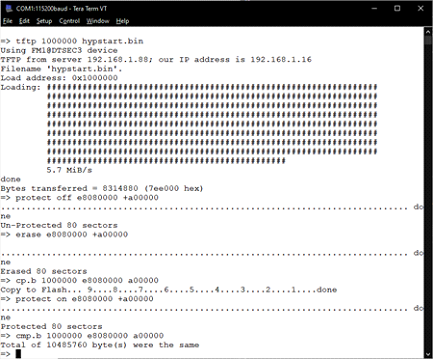
-
To update the debug mode hyperstart image (hypstart2.bin), enter the following commands into the U-Boot prompt
tftp 1000000 hypstart2.bin protect off eb000000 +1000000 erase eb000000 +1000000 cp.b 1000000 eb000000 1000000 protect on eb000000 +1000000 cmp.b 1000000 eb000000 1000000 -
To update the deosBoot image, enter the following commands into the U-Boot prompt:
tftp 1000000 deosBoot.bin protect off E8060000 +20000 erase E8060000 +20000 cp.b 1000000 E8060000 20000 protect on E8060000 +20000 cmp.b 1000000 E8060000 20000 -
To update the deos dtb image, enter the following commands into the U-Boot prompt:
tftp 1000000 6xppc2.dtb
protect off E8040000 +20000
erase E8040000 +20000
cp.b 1000000 E8040000 20000
protect on E8040000 +20000
cmp.b 1000000 E8040000 20000
Updating Deos Hyperstart Images Via Ethernet
-
To update Deos images via ethernet, the U-Boot tool netconsole can be used which will redirect the serial terminal to a listener client on the network. This IP address can be the same as the one being used for the tftp server described earlier. The following commands should be entered into the U-Boot prompt, replace ncip with the ip address of the listener:
setenv ncip 192.168.1.88 saveenv -
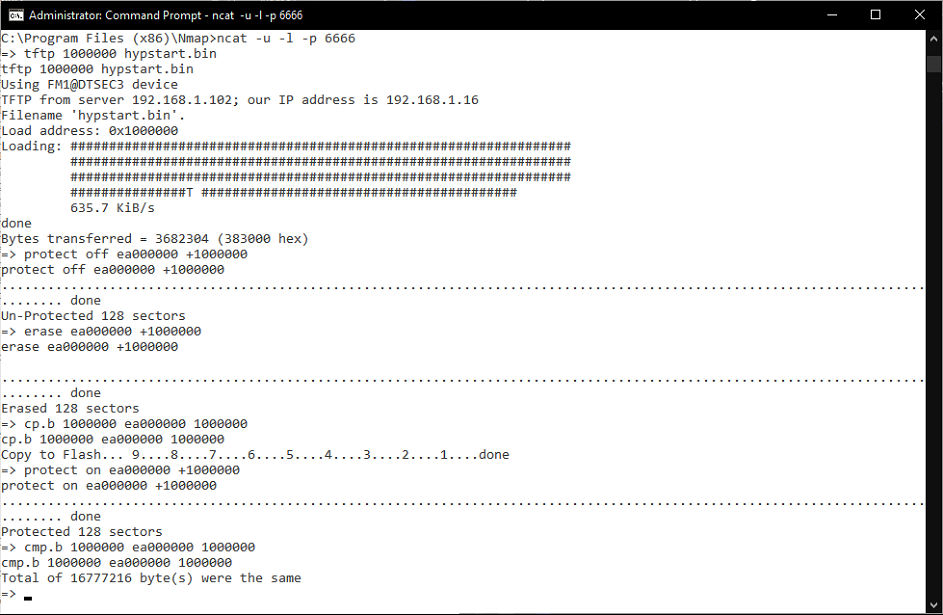
After configuring the netconsole ip address on the 6XPPC2, open a windows command prompt with admin rights and navigate to the ncat.exe executable. Start ncat up and listen on port 6666 to wait for the console redirect with the following command:
ncat -u -l -p 6666 -
The ncat listener on the client side should be started first before powering on the 6XPPC2 which will attempt to redirect the serial terminal on power on if configured to use netconsole. If the connection is successful then the U-Boot terminal will become accessible via the ncat command prompt on the client side. From there downloading can be achieved via the same commands described in the section for updating images via uart.
Configure U-Boot Environment to Boot From NOR Flash
Enter the following commands in the U-Boot prompt which will change the default boot behavior to select an image to load from NOR flash based on the GPI signal scheme described earlier
setenv bootcmd "setexpr downloadflag *0xffdf000c \& 0x40000; setexpr debugflag *0xffdf000c \& 0x20000; if itest 40000 -eq '$downloadflag'; then ; elif test 20000; then run dboot_nor_2; else run dboot_nor; fi"
setenv dboot_nor "run dboot_dtb_nor; cp.b e8060000 19000 20000; cp.b ea000000 140000 2000000; go 19000 040000"
setenv dboot_nor_2 "run dboot_dtb_nor; cp.b e8060000 19000 20000; cp.b eb000000 140000 2000000; go 19000 040000"
setenv dboot_dtb_nor "cp.b e8040000 040000 20000;fdt addr 040000;fdt boardsetup;fdt resize;run clockfreq;run busfreq;run timebasefreq"
Changing Hyperstart Image Location/Size
-
Partitions for the hyperstart images may be increased in size or moved to a different NOR flash address as necessary. The restrictions to this are that the other partitions listed in NOR Flash Layout besides Hypstart and Hypstart2 cannot be modified and that sizes allocated for a partition must be a multiple of the pages size (128KB).
-
The commands described in Updating Deos Firmware Via UART to flash the hyperstart images must be updated accordingly with the modified U-Boot address and size chosen.
-
The U-Boot boot commands responsible for loading the hyperstart images must be updated with the correct NOR flash location and size. The ubootenv dboot_nor is used for loading the operational hyperstart image and dboot_nor_2 is used for loading the debug hyperstart image.
editenv dboot_nor
editenv dboot_nor_2
saveenv
-
For example, if one were to change the hypstart2 image from its current offset of 0xEB000000 and size of 0x1000000 to a new offset of 0xEC000000 and size of 0x2000000 the U-Boot commands to update the flash image would change to the following:
tftp 1000000 hypstart2.bin protect off ec000000 +2000000 erase ec000000 +2000000 cp.b 1000000 ec000000 2000000 protect on ec000000 +2000000 cmp.b 1000000 ec000000 2000000 -
Following the same example above, dboot_nor_2 would also have to be updated with the following:
editenv dboot_nor_2
edit: run dboot_dtb_nor; cp.b e8060000 19000 20000; cp.b ec000000 140000 2000000; go 19000 040000
saveenv