
Update Procedure from Linux to VxWorks
To update the 75ARM1 to VxWorks, perform the procedures in the following paragraphs.
-
Verify Linux MBExec (5.58.0 or Higher) • If MBExec version is 5.58 or higher proceed to step 3
-
Update Linux build to MBExec 5.58 or higher • Enter the command enables a listener to run on the Target for receiving download files: • ‘runConfigModeTCP1Onbrd’
-
Linux to VxWorks
-
Installing VX Works • Plug the mini-HDMI and breakout-board into the front of the card. The serial port should be plugged into the breakout-board. The Ethernet will depend whether the board is front or rear Ethernet! (Front Ethernet → Breakout-board && Rear Ethernet → Debug-board) • Power the card and enter U-boot by holding the ESC key in Tera Term • In Tera Term, go to Setup → Serial Port → Enter 200 msec/line under delay • Copy/Paste the following commands into Tera Term (IP addresses may change): setenv ipaddr 10.0.8.135 setenv serverip 10.111.0.62 setenv netmask 255.0.0.0 setenv gatewayip 10.0.0.2 setenv ethaddr 10.0.8.135 saveenv
• Enter the following commands one at a time. tftpboot $loadaddr bootrom.bin; protect off 0xeff00000 +$filesize; erase 0xeff00000 +$filesize; cp.b $loadaddr 0xeff00000 $filesize; protect on 0xeff00000 +$filesize; cmp.b $loadaddr 0xeff00000 $filesize
If you are getting an error message like this:
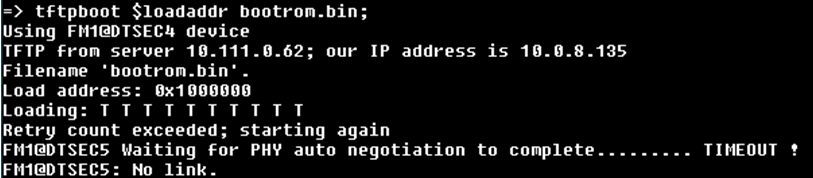
You are on the wrong network! You must use the 10 network.
• Cycle power to the card and proceed to the “Configure BOOTROM parameters” section Stop in auto boot- enter command ‘c’. • Set FTP Server boot configuration as follows; boot device : gem0 processor number : 0 host name : apexlab136 file name : c:/tftp32/NAI75ARM1/vxWorks inet on ethernet (e) : 10.0.8.135:ff000000 (or 172.16.0.55:fffff800) inet on backplane (b) : host inet (h) : 10.0.110.20 gateway inet (g) : 10.0.0.2 (or 172.16.0.1) user (u) : winner ftp password (pw) : winner flags (f) : 0x0 startup script (s) : other (o) : gem0
Then cycle power, don’t halt Auto Boot. .
• Set MAC Address using command naiMacAddrSet 1 & naiMacAddrSet 2 (use actual mac address) 00 16 C6 AA BB CC
• Find SATA drive name with command devs • If WP jumper (JP9 on debug board) not installed then naiSetSSataWriteProtect 0 • Format the SATA Drive using command dosFsVolFormat “/ata0:1” • Copy files to the SATA drive using 3 commands: cp “vxWorks_75ARM1”,“/ata0:1/vxWorks” cp “NAIBoard_Working_75ARM1_noOffboard.out”,“/ata0:1/NAIBoard_Working.out” cp ” powerScript_forATA0_1.txt”,“/ata0:1/powerScript.txt” • Then enter command bootChange • SATA boot Configuration Delete host inet, and gateway during SATA boot configuration
boot device : fs processor number : 0 host name : apexlab136 file name : /ata0:1/vxWorks inet on ethernet (e) : 192.168.1.16:ffffff00 inet on backplane (b) : host inet (h) : gateway inet (g) : user (u) : winner ftp password (pw) : winner flags (f) : 0x08 target name (tn) : 75PPC1 startup script (s) : /ata0:1/powerScript.txt other (o) : gem0
• Power cycle, board should boot into VxWorks without a network cable.